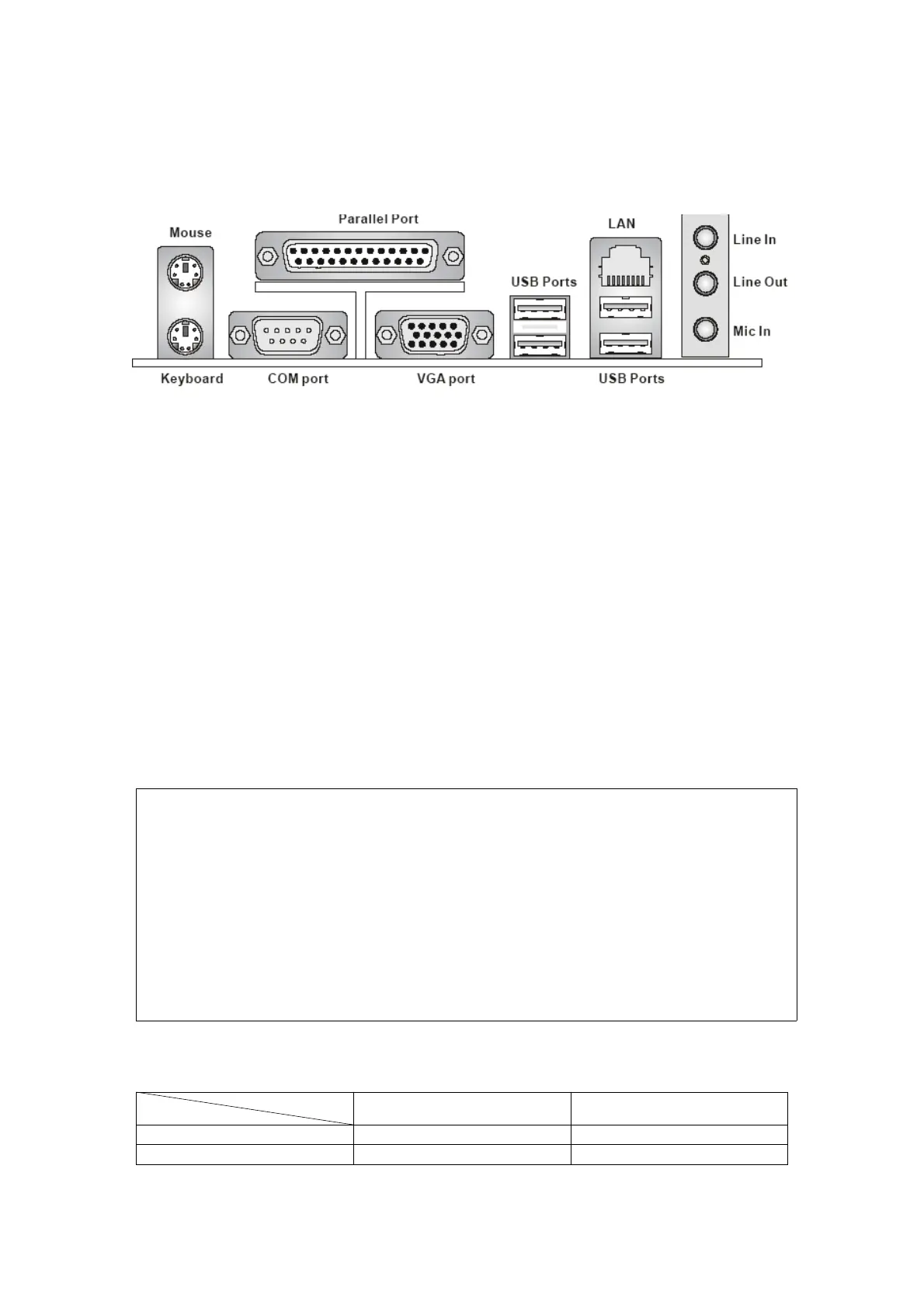
Rear Panel
The rear panel provides the following connectors:
Hardware Setup
This chapter tells you how to install the CPU, memory modules, and expansion
cards,aswellashowtosetupthejumpers on the mainboard. It also provides the
instructions on connecting the peripheral devices, such as the mouse, keyboard, etc.
While doing the installation, be careful in holding the components and follow the
installation procedures.
Central Processing Unit: CPU
The mainboard supports Intel® Pentium 4 processor. The mainboard uses a CPU
socket called LGA775. When you are installing the CPU, make sure to install the
cooler to prevent overheating.
If you do not have the CPU cooler, contact your dealer to purchase and install
them before turning on the computer.
Memory Speed/CPU FSB Support Matrix
Overheating
Overheating will seriously damage the CPU and the system, always make sure the
cooling fan can work properly to protect the CPU from overheating.
Overclocking
This mainboard is designed to support overclocking. However, please make sure
your components are able to tolerate such abnormal setting, while doing
overclocking. Any attempt to operate beyond product specifications is not
recommended. We do not guarantee the damages or risks caused by inadequate
operation or beyond product specifications.
Memory
FSB
DDR 333 DDR 400
533MHz OK OK
800MHz OK OK



 To Next Page
 Loading...