1. First adjust resolution of the PC. (640 X 480, 800 X 600, 1024 X 768)
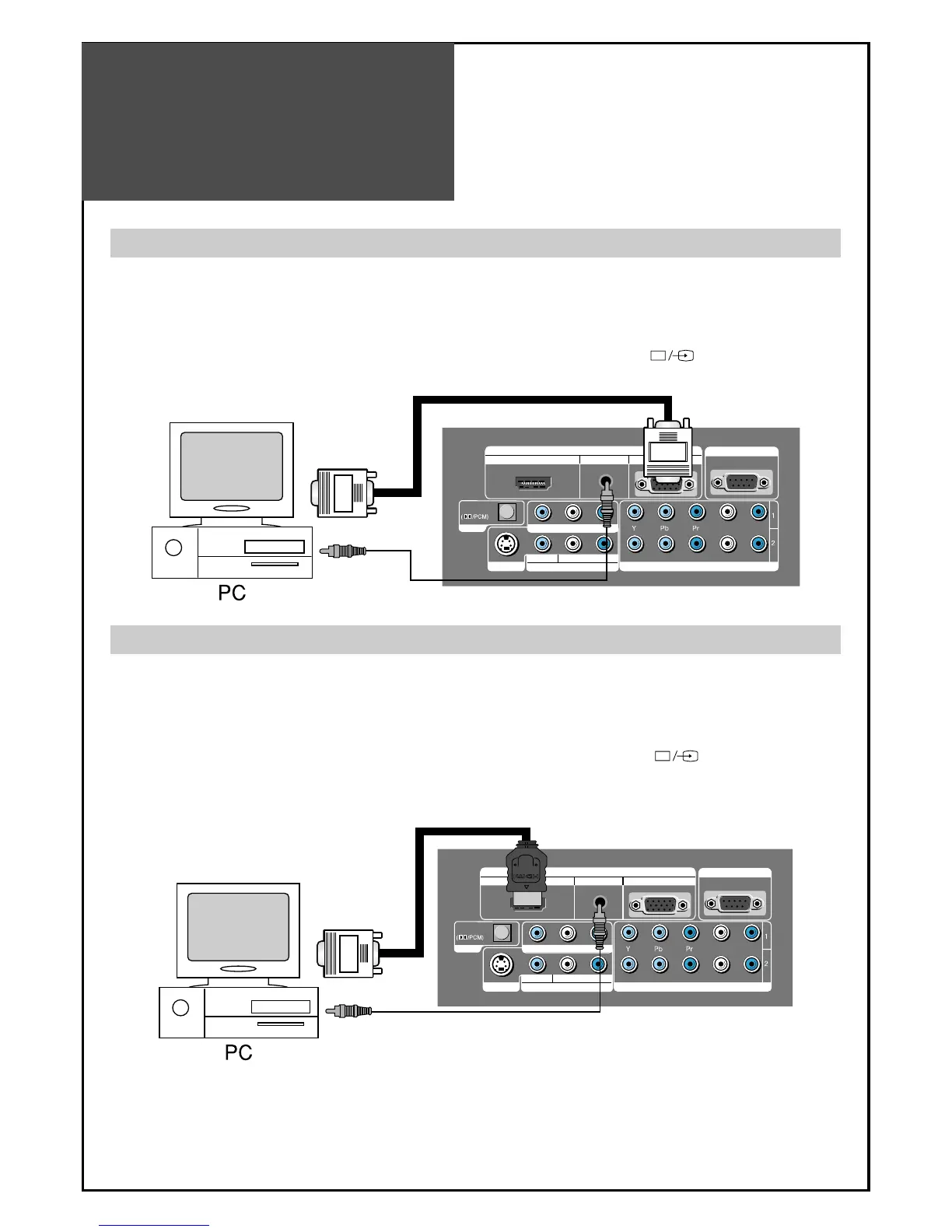
2. Connect between PC and TV set using the D-sub and Audio cable as shown in the picture below.
3. Turn on the PC and TV set.
4. select PC mode by pressing “MULTIMEDIA” button on the remote control or
” ” button of the TV
set.
1. First adjust resolution of the PC. (640 X 480, 800 X 600, 1024 X 768)
2. Connect between PC and TV set using the HDMI and Audio cable as shown in the picture below.
3. Turn on the PC and TV set.
4.
select HDMI mode by pressing “MULTIMEDIA” button on the remote control or
””
button of the TV
set.
BACK OF THE TV SET
BACK OF THE TV SET
When connecting with PC(D-Sub) cable.
When connecting with a HDMI cable.
Note : If the graphic card of the PC only supports a DVI signal, you must connect the Audio cable as shown in the
picture upper.



 To Next Page