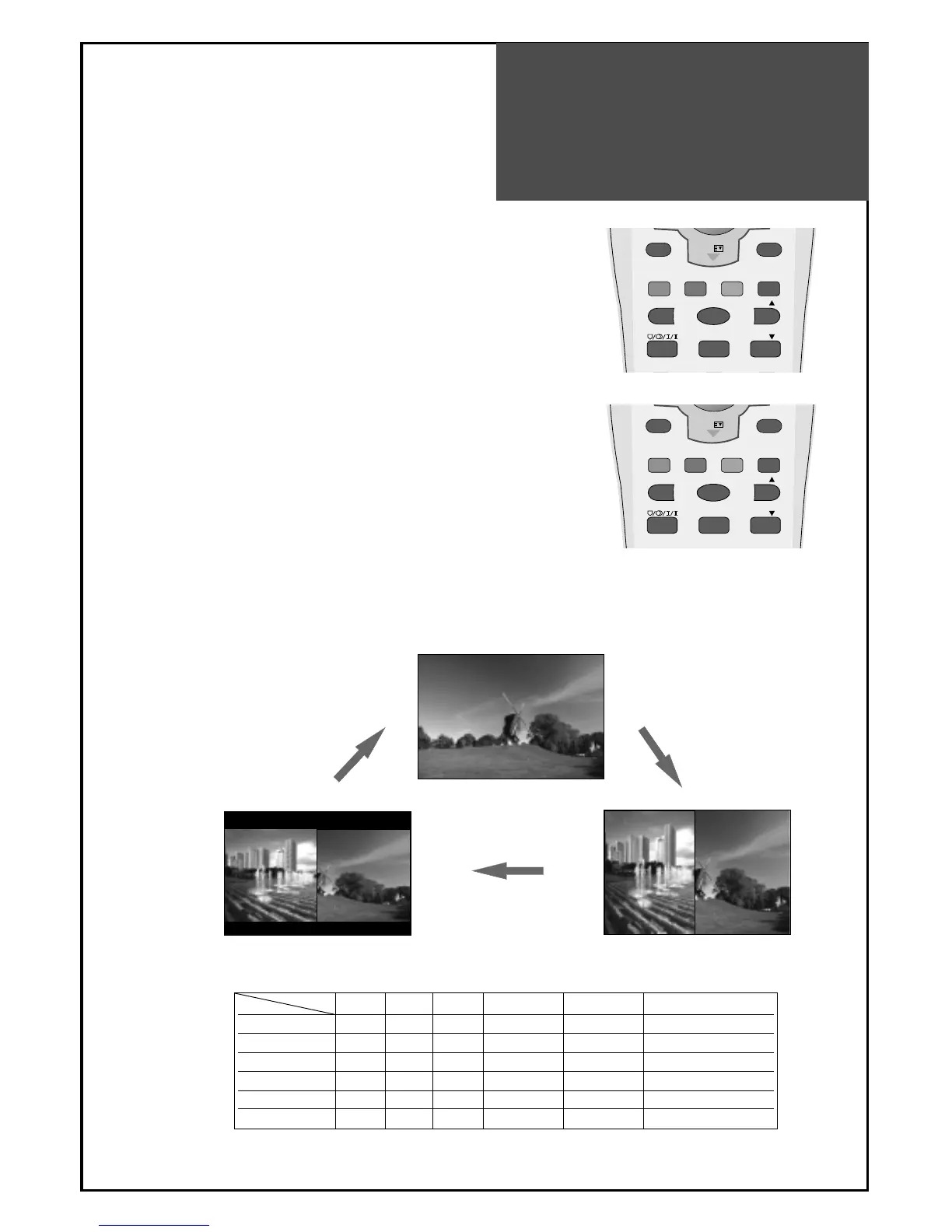
POP Mode
37
Note.
• If you change main source in POP mode, the POP mode is canceled.
• If you press the “
▼PR▲
“ buttons in POP mode, POP is canceled.
• POP does not work with S-video input.
POP mode table.
TV AV1 AV2 PC HDMI COMPONENT
TV X X X O O O
AV1 X X X O O O
AV2 X X X O O O
PC O O O X X X
HDMI O O O X X X
COMPONENT O O O X X X
Main
Sub
1. POP mode when main picture is TV and AV.
•
Press the "P.MODE" button, then POP mode will function.
• Press the "P.STILL" button, then Sub screen will freeze.
• If you want to swap main for the Sub, press the "P.SWAP" button.
• I
f you want to change the sub screen input, press the "P.INPUT"
button.
Sub screen changes as follows:
PC => HDMI => Component 1 => Component 2
2. POP mode when main picture is Multimedia.
•
Press the "P.MODE" button, then POP mode will function.
• Press the "P.STILL" button, then Sub screen will freeze.
• If you want to swap main for sub, press the "P.SWAP" button.
•
If you want to change sub screen input, press the "P.INPUT" button.
• Sub screen changes as follows : TV => AV1/S-Video1 => AV2/S-
Video2 => TV
* POP mode change as followed.



 To Next Page