EN
25
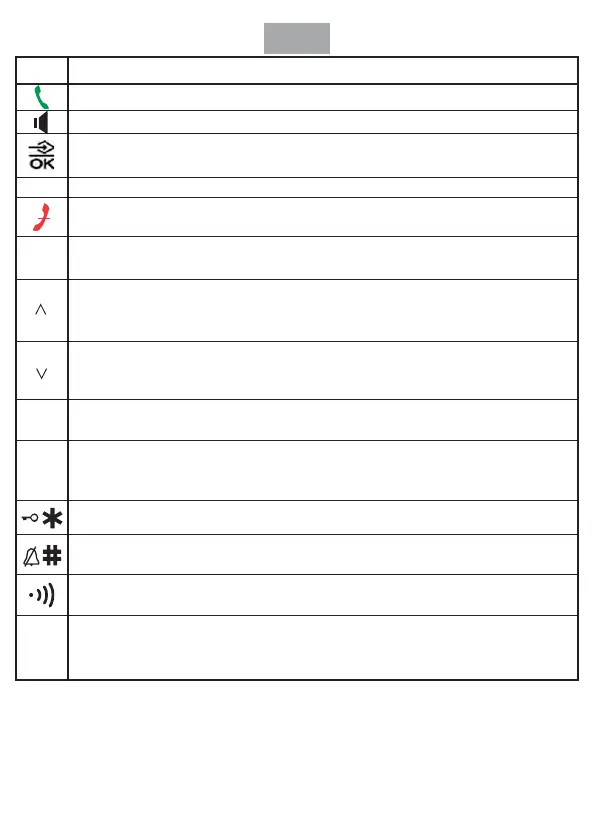
ICON FUNCTION DEFINITION
When there is new call coming, press this key to receive the call;
During conversation, press this key to transfer handset and hands-free mode.
Entry to the menu functions from idle mode;
Con rming selections & actions.
In talk mode press the key to perform mute function.
In talk mode, press once to hang up the call;
In standby mode, hold for 3 seconds to power down the handset.
This key is used to enter the phonebook both in standby mode and in talk mode;
Exiting from a function during menu operation;
Scrolling up through lists and menu options;
Increasing the volume;
Review incoming number, outgoing number and phone number.
Scrolling down through lists and menu options;
Decreasing the volume.
Review incoming number, outgoing number and phone number.
The key is used to delete memory.
Delete the current input by a short pressing during menu edit.
In talk mode once pressing to redial the last dialed number;
Press it to insert a pause time between two digits.
Redial the last dialed number
A long press (3s) to activate key lock;
To set up a conference call.
In addition to its use for text and number entry,
To activate silence function by long press for 3s.
Page the handset,
Register the handset to a speci ed base.
To set up an internal call to another handset;
To transfer an incoming call to another handset;
To set up a conference call with an external line and an internal handset.
MUTE
R/CLR
INT
RD/P
INSTALLATION
1) Plug the main power lead into the bottom of the base unit.
2) Plug the main adapter into mains socket with the switch on the socket set to o .
3) Switch on main power at the socket.
4) Fit the batteries in the handset.


 To Next Page
 Loading...



