IO-DAPPS www.daikinac.com 15
Set Up Communicaons
Seng BACnet™ communicaons properes is required only if the
BACnet Thermostat is integrated into a network with other BACnet
controllers. Entering the communicaons properes requires
entering Password 2.
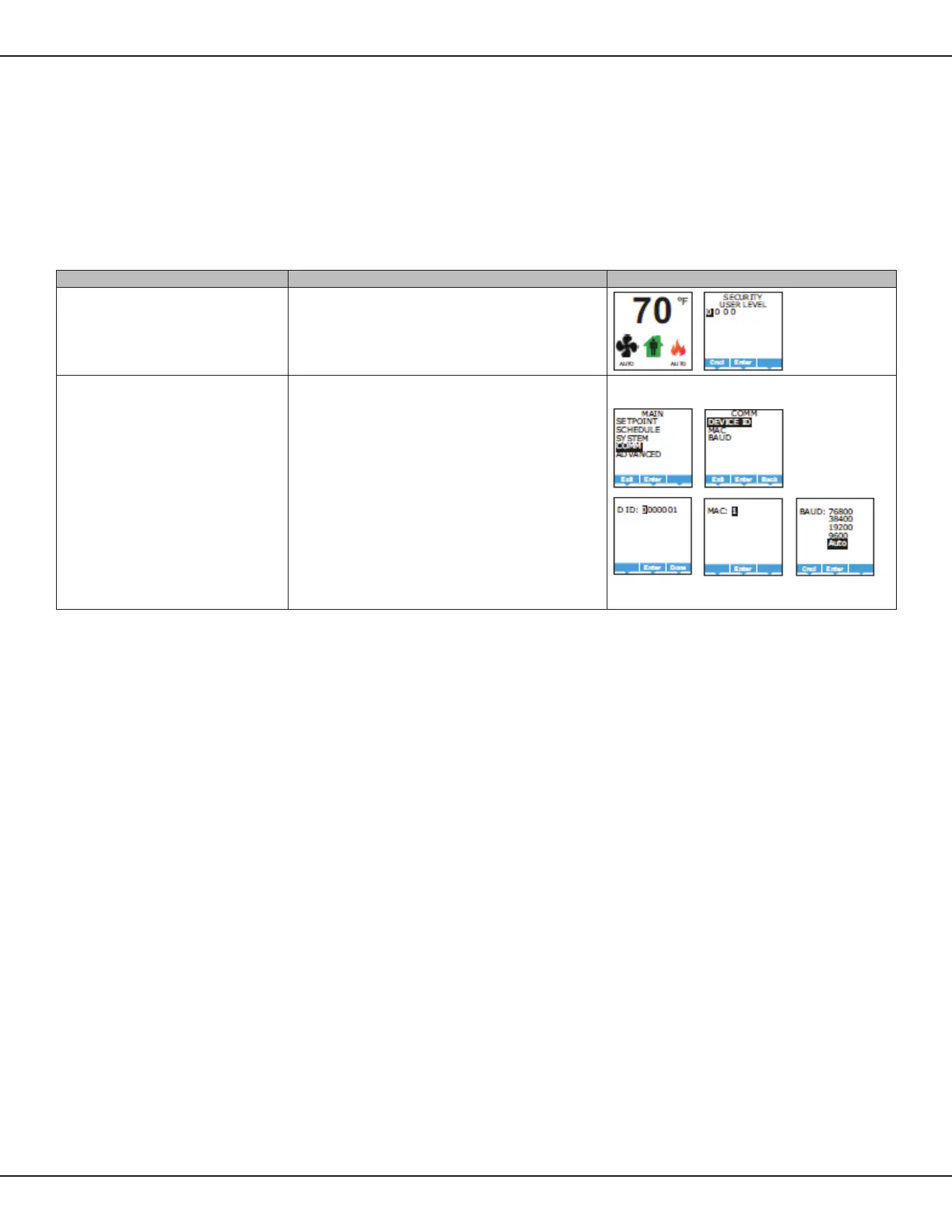
Table 8: Set Up Communicaons
Procedure Steps Display
Starng display
1. Start at the temperature display.
2. Enter Password 2. The display changes to the MAIN menu display.
Change the network communicaon properes
1. From the MAIN menu, press either the ▲ or ▼ buon to
select COMM.
2. Press Enter. The COMM menu opens up.
3. Choose and set the following properes.
• DEVICE ID – This is the BACnet device instance. The device
instance must be within the range of 1 to 4,194,302.
• MAC – The MAC address must be in the range of 1 – 127.
• BAUD – Set to match other devices on the BACnet MS/TP
network. The choices are Auto, 9600, 19200, 38400, or 76800.
NOTE: Aer changing a communicaon property the BACnet
Thermostat will reset.
NOTE: If seng up with the MicroTech Integrated System contact a
Daikin representave for the appropriate values.
Program Set-Up



 To Next Page
 Loading...










