5 | Operation
User reference guide
17
EHSH/X(B)04+08P30+50EF
Daikin Altherma 3 R ECH₂O
4P678719-1 – 2021.11
Dials and buttons
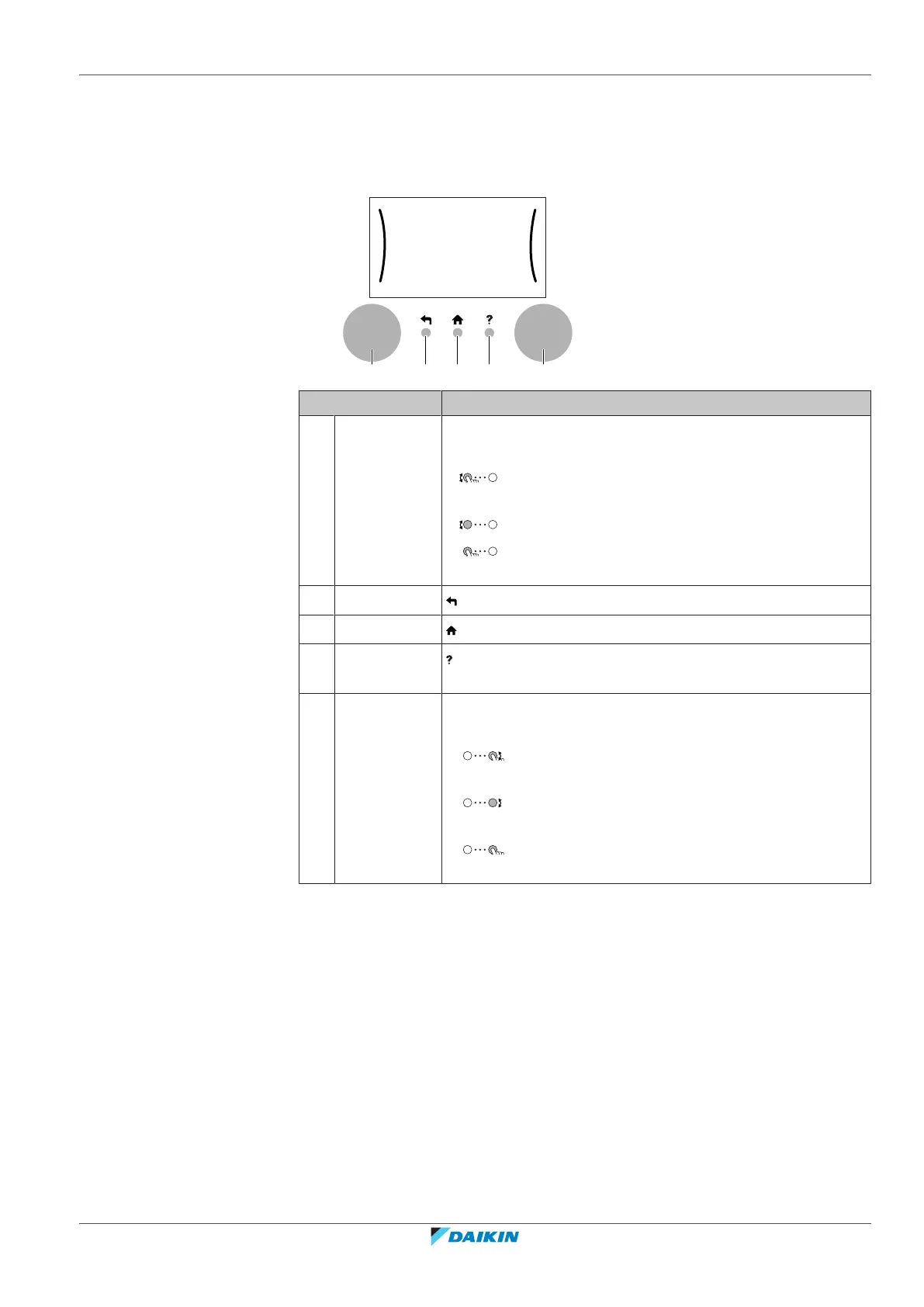
You use the dials and buttons:
▪ To navigate through the screens, menus and settings of the LCD screen
▪ To set values
Item Description
a Left dial The LCD shows an arc on the left side of the display when
you can use the left dial.
▪ : Turn, then press the left dial. Navigate through the
menu structure.
▪ : Turn the left dial. Choose a menu item.
▪ : Press the left dial. Confirm your choice or go to a
submenu.
b Back button : Press to go back 1 step in the menu structure.
c Home button : Press to go back to the home screen.
d Help button : Press to show a help text related to the current page (if
available).
e Right dial The LCD shows an arc on the right side of the display when
you can use the right dial.
▪ : Turn, then press the right dial. Change a value or
setting, shown at the right side of the screen.
▪ : Turn the right dial. Navigate through the possible
values and settings.
▪ : Press the right dial. Confirm your choice and go to
the next menu item.




 To Next Page