5 | Operation
User reference guide
51
EHSH/X(B)04+08P30+50EF
Daikin Altherma 3 R ECH₂O
4P678719-1 – 2021.11
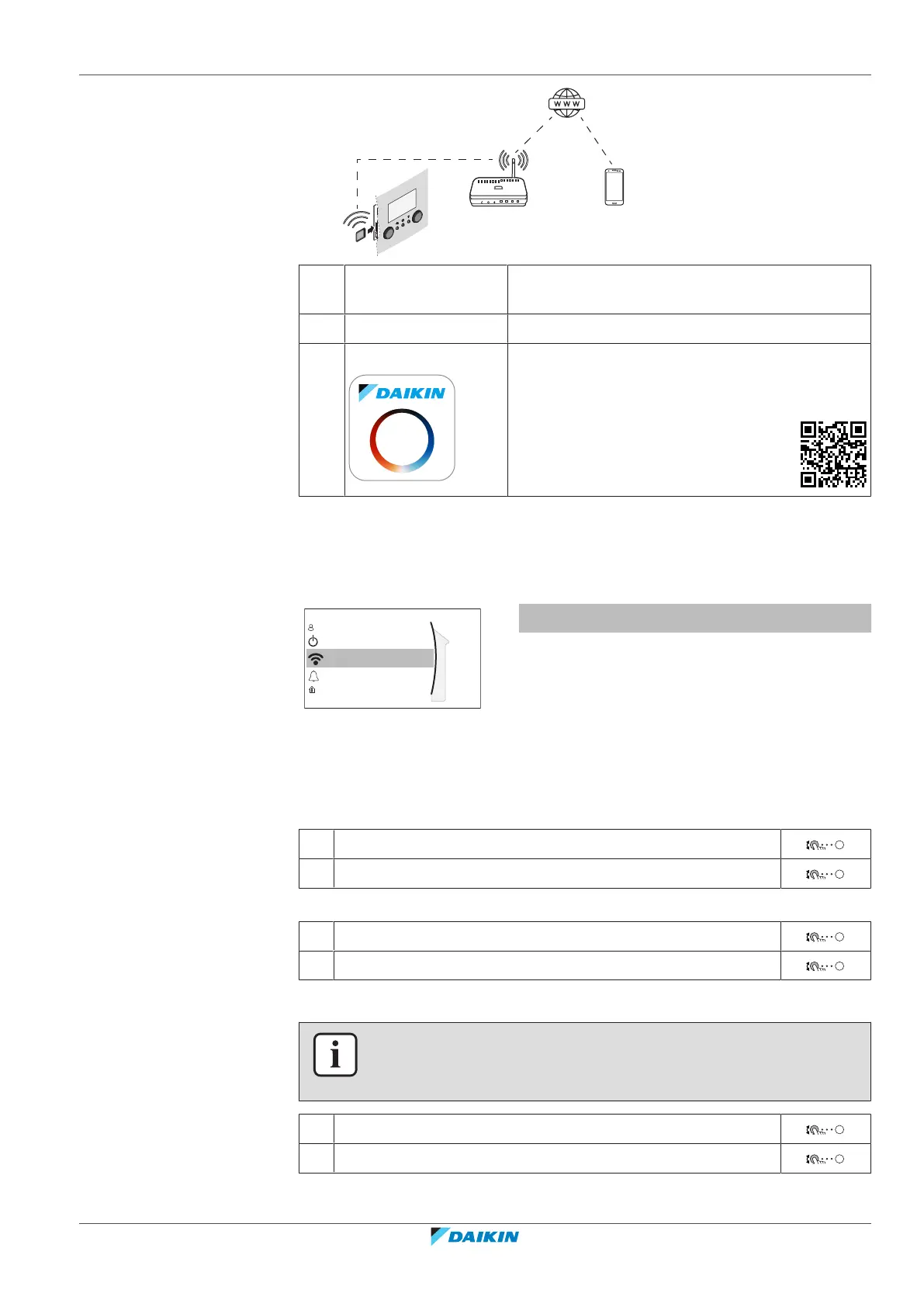
a WLAN cartridge The WLAN cartridge needs to be inserted in the
user interface.
b Router Field supply.
c Smartphone + app The Daikin Residential Controller app needs to be
installed on the user's smartphone. See:
http://www.onlinecontroller.daikineurope.com/
Configuration
To configure the Daikin Residential Controller app, follow the in-app instructions.
While doing this, the following actions and information are needed on the user
interface:
Wireless gateway
Malfunctioning
Operation
User profile
Room
[D] Wireless gateway
[D.1] Mode
[D.2] Reboot
[D.3] WPS
[D.4] Remove from cloud
[D.5] Home network connection
[D.6] Cloud connection
[D.1] Mode: Turn AP mode ON (=WLAN cartridge active as access point):
1 Go to [D.1]: Wireless gateway > Mode.
2 In the Enable AP mode screen, select Yes.
[D.2] Reboot: Reboot the WLAN cartridge:
1 Go to [D.2]: Wireless gateway > Reboot.
2 In the Reboot the gateway screen, select OK.
[D.3] WPS: Connect the WLAN cartridge to the router:
INFORMATION
You can only use this function if it is supported by the software version of the WLAN,
and the software version of the Daikin Residential Controller app.
1 Go to [D.3]: Wireless gateway > WPS.
2 In the WPS screen, select Yes.
[D.4] Remove from cloud: Remove the WLAN cartridge from the cloud:




 To Next Page