SMART GEN Operation
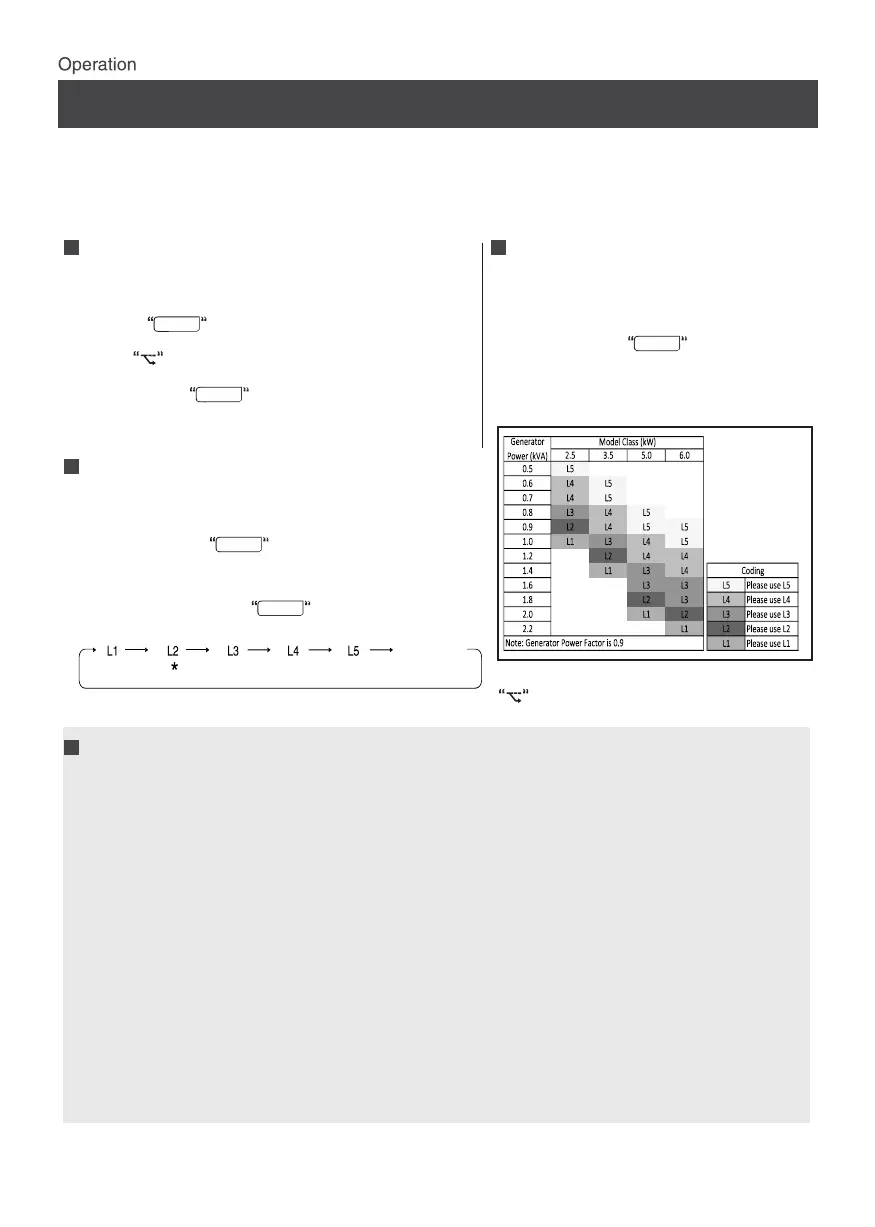
- Smart Gen operation provides user with manual control to select the power consumption of
(85%) , L3 (70%) , L4 (55%) , L5 (40%) .
air conditioner based on Generator power.
- User can adjust the air conditioner input power requirement by selecting L1 (100%) , L2
To start the Smart Gen Operation
- Using the remote,turn on the air conditioner.
displayed on the remote LCD.
- Press the button on the remote controller.
time, the symbol along with the L1 step will be
- If the user turns on smart gen operation for the first
- By pressing the button on the remote controller,
the user can select different power input.
- If Smart Gen operation is already turned ON, and the user
wants to turn OFF the Smart Gen operation, then the user
- The remote LCD will display the last selected power input
- User needs to press the button in the following
manner until normal operation.
step; for example, "L2" will be shown on the remote LCD.
needs to press the button on the remote controller.
To cancel the Smart Gen Operation
SMART GEN
SMART GEN
SMART GEN
SMART GEN
To check the Smart Gen
operation power input step:
- If the user wants to check which power
need to press the button on the
- The last power input step will be displayed
input step is currently in operation, they
on the remote LCD.
remote controller.
SMART GEN
* Last Memorised Step
symbol will be removed from the remote
LCD.
Notes on the Smart Gen Operation
the desired power input step again.
this function will notify the user to change the power input step, as defined below:
Ø If the event of power failure during the above judgement, the timing will restart from zero once power is
restored
3. Power Chill, Power Full, Dew Clean, and Fan mode operations cannot be used together with the
1. In the event of power failure, the selected power input step will be memorized and retained
4.If the user removes the battery and reinserts it while using smart gen function, the smart gen
Ø After 30 minutes of the machine working, the Operation Lamp (Green) and Timer Lamp(Orange) will blink for
32 seconds to indicate to the user that they should change the power input step.
when power is restored.
outdoor ambient conditions.
feature is turned off on the remote. The user will need to restart the smart gen operation and select
Ø If the user does not change the power input step, the next judgment will be taken after the next 15 minutes of
machine working. Until the user changes the power input step, the Operation Lamp(Green) and Timer Lamp
(Orange) will blink for 32 seconds to remind the user to change the power Input change.
5.For the safety and reliability of the AC, the smart gen function may not work in lower and higher
the Brightness control function). Otherwise the user will not be notified in case they select the
2. This function operates only in Dry, Cool, Heat, and Auto modes.
smart gen function. Priority will be given to the last selected function.
6.It is recommended that the user does not turn off the operation lamp and timer lamp LEDs (using
wrong step in accordance with the heat load condition.
7.If the user selects a power input step that is not in accordance with the room heat load conditions,
8
Normal Operation
Mode or TURN OFF
SMART GEN operation


 To Next Page
 Loading...