30
Care Care
Titanium apatite deodorizing lter (included with the air conditioner) /
dust collection lter (PM2.5) (sold separately)
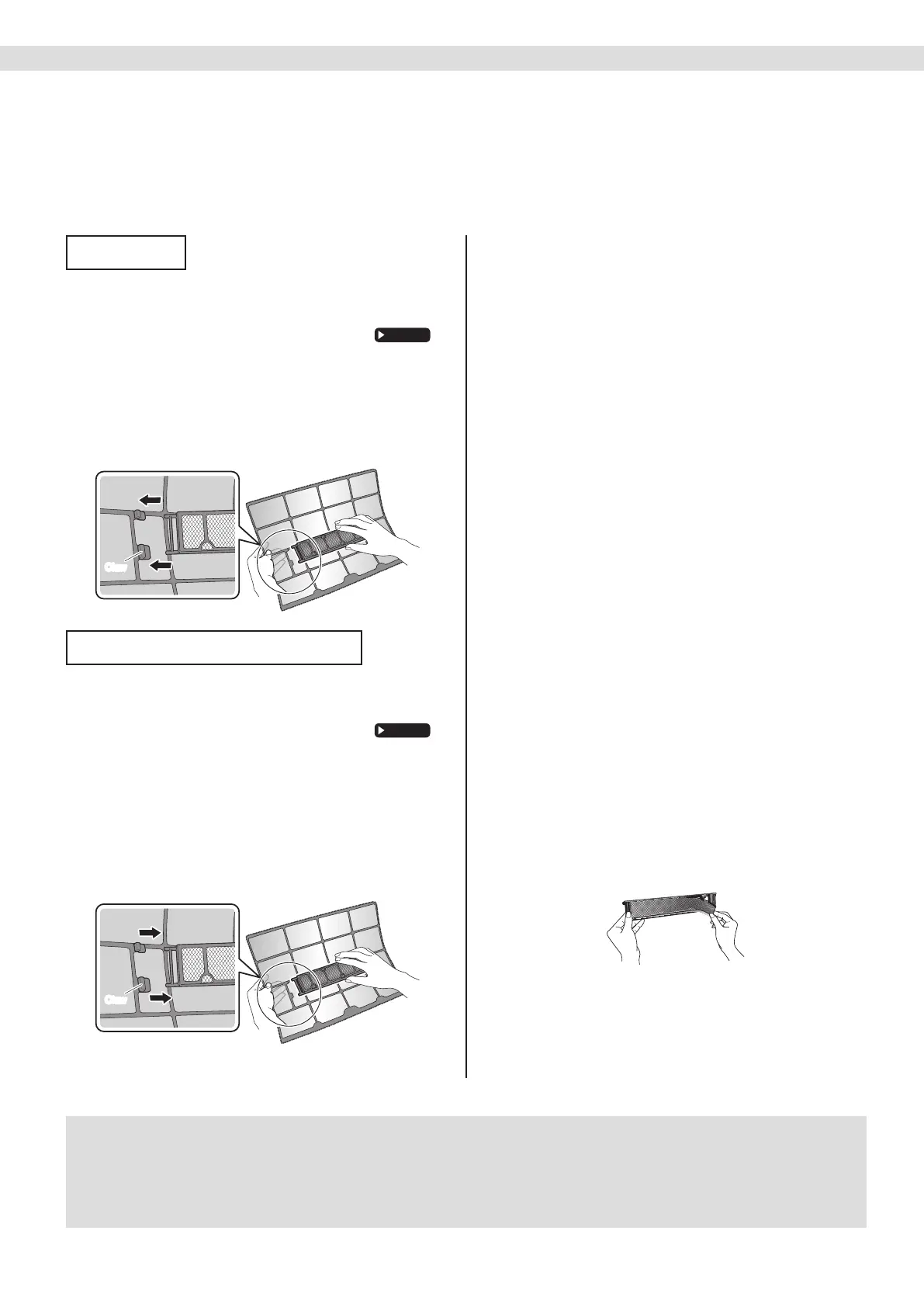
Attaching
1. Open the front panel and
pull out the air lters.
2. Insert the titanium apatite
deodorizing lters or dust
collection lters (PM2.5).
•
Checkthattheltersareinsertedsecurelyunderthetabs.
ClawClaw
Cleaning and Replacement
1. Open the front panel and
pull out the air lters.
2. Take off the titanium apatite
deodorizing lters or dust
collection lters (PM2.5).
•Holdtherecessedpartsoftheframeandunhook
the4claws.
•Removetheltersfromthetabs.
ClawClaw
3.
Clean or replace the titanium
apatite deodorizing lters or
dust collection lters (PM2.5).
[Cleaning for titanium apatite
deodorizing lter (Blue-Black)]
3-1 Vacuum dust, and soak in lukewarm
water or water for about 10 to
15minutes if very dirty.
3-2 After washing, shake off remaining
water and let them dry in the shade.
•Thisltercanberenewedbywashingitwithwater
onceevery 6 monthsandwerecommend
replacingitonceevery 3 years.
•
Donotwiringoutthelterwhenremovingwaterfromit.
[Cleaning for dust collection lter
(PM2.5) (White)]
•
Donotwashtheltersasthiswillreducetheirefciency.
•
Itisrecommendedtoreplaceitonceevery 6 months.
[Replacement]
Remove the lter from the lter
frame and prepare a new one.
•Donotthrowawaythelterframe.Reusethelter
framewhenreplacingtitaniumapatitedeodorizing
lterordustcollectionlter(PM2.5).
•Whenattachingthelter,checkthatthelteris
properlysetinthetabs.
4.
Set the lters as they were
and close the front panel.
•Pressthefrontpanelatbothsidesandthecenter.
NOTE
• Operationwithdirtylters:
−cannotdeodorisetheair,
−cannotcleantheair,
−resultsinpoorcooling,
−maycauseodour.
• Disposeofoldltersasnon-ammablewaste.
01_EN_3P552666-9C.indd 30 29-Apr-19 8:44:13 AM



 To Next Page