Wired Controller XK46
44
6.7 QUIET SETTING
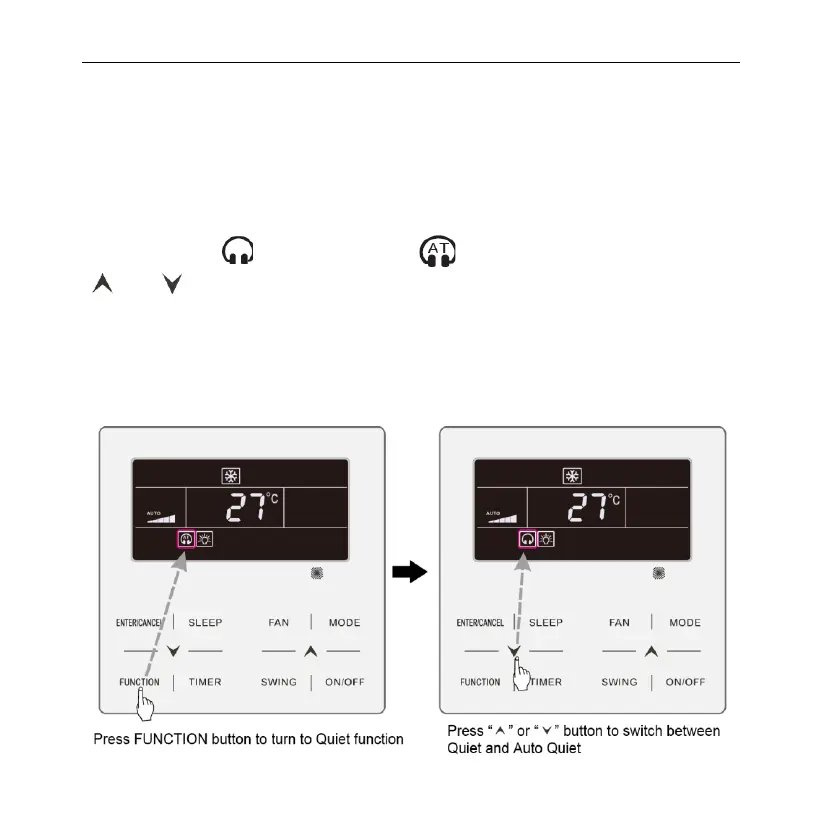
Quiet Function: decrease the noise of indoor unit and achieve the quiet effect.
Quiet function has two modes: Quiet mode and Auto Quiet mode. It is available
only in Auto, Cooling, Dry, Fan, Heating, 3D heating, Space heating mode.
Turn on Quiet Function: press FUNCTION button to turn to Quiet function and
then Quiet icon “ ” or auto quiet icon “ ” is blinking. At this moment, press
“ ” or “ ” button to switch between quiet and auto quiet, and then press
ENTER/CANCEL button to
activate.
Turn off Quiet Function: press FUNCTION button to turn to Quiet function and
then press ENTER/CANCEL button to cancel Quiet function.
The setting of Quiet function is as shown in fig. 6.9 or 6.10:


 To Next Page