EasyManua.ls Logo

Daiwa RF-660 - Rear View and Wiring; Operation and Testing

Daiwa RF-660
4 pages
Print Icon
To Next Page IconTo Next Page
To Previous Page IconTo Previous Page
Loading...
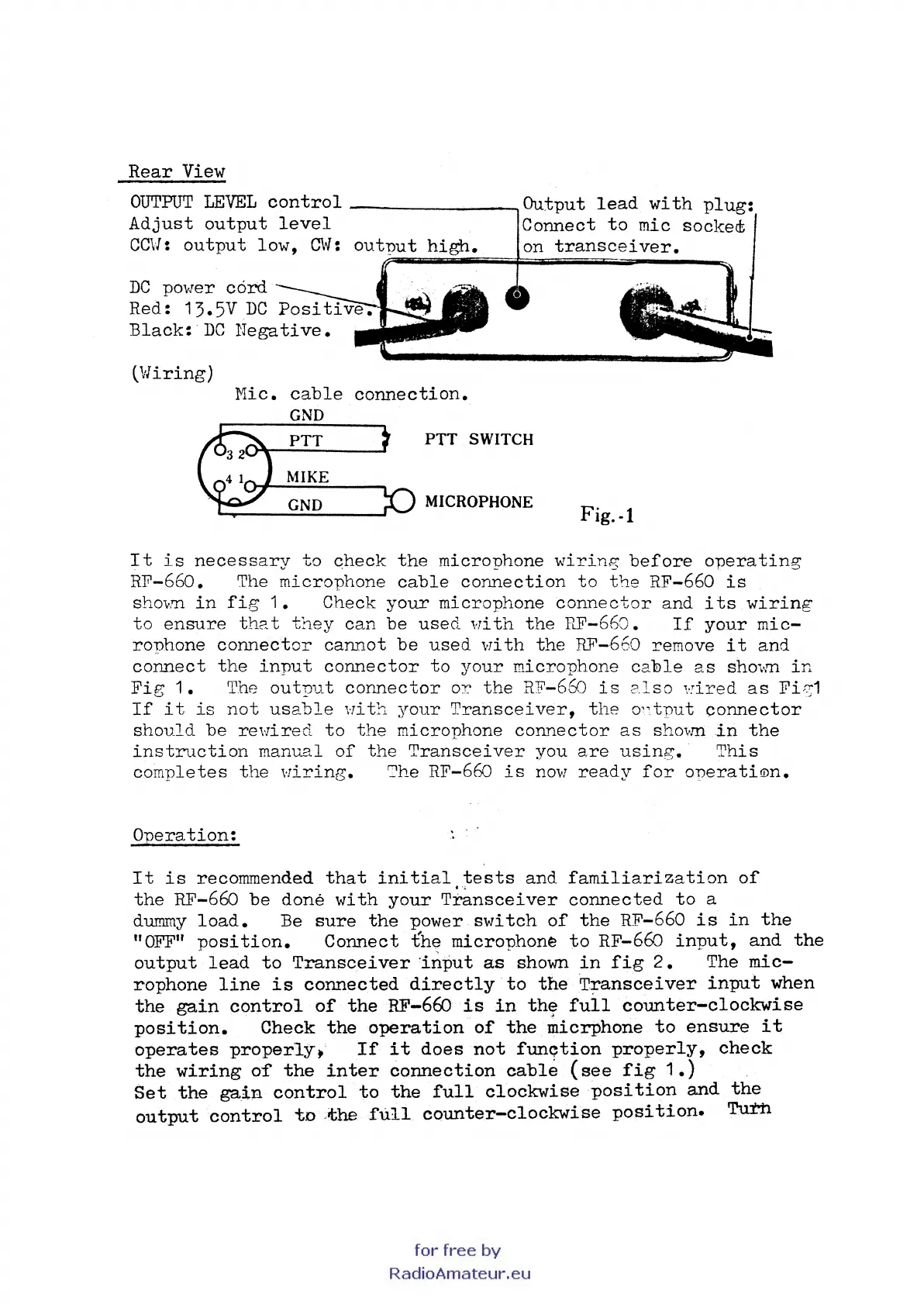
Rear
View
OUTPUT
LEVEL
control
--------.Output
lead
with
plug:
Adjust
output
level
Connect
to
mic socked;
CC\1:
output
low,
C\if:
output
high.
on
transceiver.
DC
povJer
cord
Red: 13.5V
DC
Positi
Black:·
DC
Negative.
(vliring)
Mic.
cable
connection.
GND
PTT
PTT
SWITCH
MIKE
GND
MICROPHONE
Fig.
-1
It
is
necessary
to
check
the
microphone
wiring
before
o~erating
RF-660. The
microphone
cable
connection
to
the
RF-660
is
sh01m
in
fig
1.
Check
your
microphone
connector
and
its
wiring
to
ensure
the. t
they
can
be
used
1:ri
th
the
HF-660.
If
your
rnic-
ronhone
connector
cannot
be
used
vri
th
the
RF-660 remove
it
and
connect
the
input
connector
to
your
microphone
cable
as
sho'>·m
in
Fig
1.
The
output
connector
or
the
RF-66o
is
2.lso
'::ired
as
FiS'1
If
it
is
not
usable
i·rit':l
your
Transceiver,
the
O''tnut
connector
should
be
reHired
to
the
microphone
connector
as
shovm
in
the
instruction
manual
of
the
Transceiver
you
are
using.
This
completes
the
Hiring.
The RF-66o
is
novr
ready
for
operatiam.
Operation:
It
is
recommended
that
initial
tests
and
familiarization
of
the
RF-66o
be
done
with
your
T~nsceiver
connected
to
a
dummy
load.
Be
sure
the
power
switch
of
the
RF-660
is
in
the
"OFFn
position.
Connect
the
microphone
to
RF-66o
input,
and
the
output
lead
to
Transceiver
·in:rmt
as
shown
in
fig
2.
The
mic-
rophone
line
is
connected
directly
to
the
Transceiver
input
when
the
gain
control
of
the
RF-660
is
in
th~
full
counter-clockwise
position.
Check
the
operation
of
the
micrphone
to
ensure
it
operates
properlyJt
If
it
does
not
function
properly,
check
the
wiring
the
inter
connection
cable
(see
fig
1.)
Set
the
gain
control
to
the
full
clockwise
position
and
the
output
control
tn
>the
:full
counter-clockwise
position.
Turn