EasyManua.ls Logo

Dakota Digital BIM-01-2-HLLY - User Manual

Dakota Digital BIM-01-2-HLLY
12 pages
Print Icon
To Next Page IconTo Next Page
Loading...
[1] MAN #650588D
BIM-01-2-HLLY
Bus Interface Module for Holley EFI
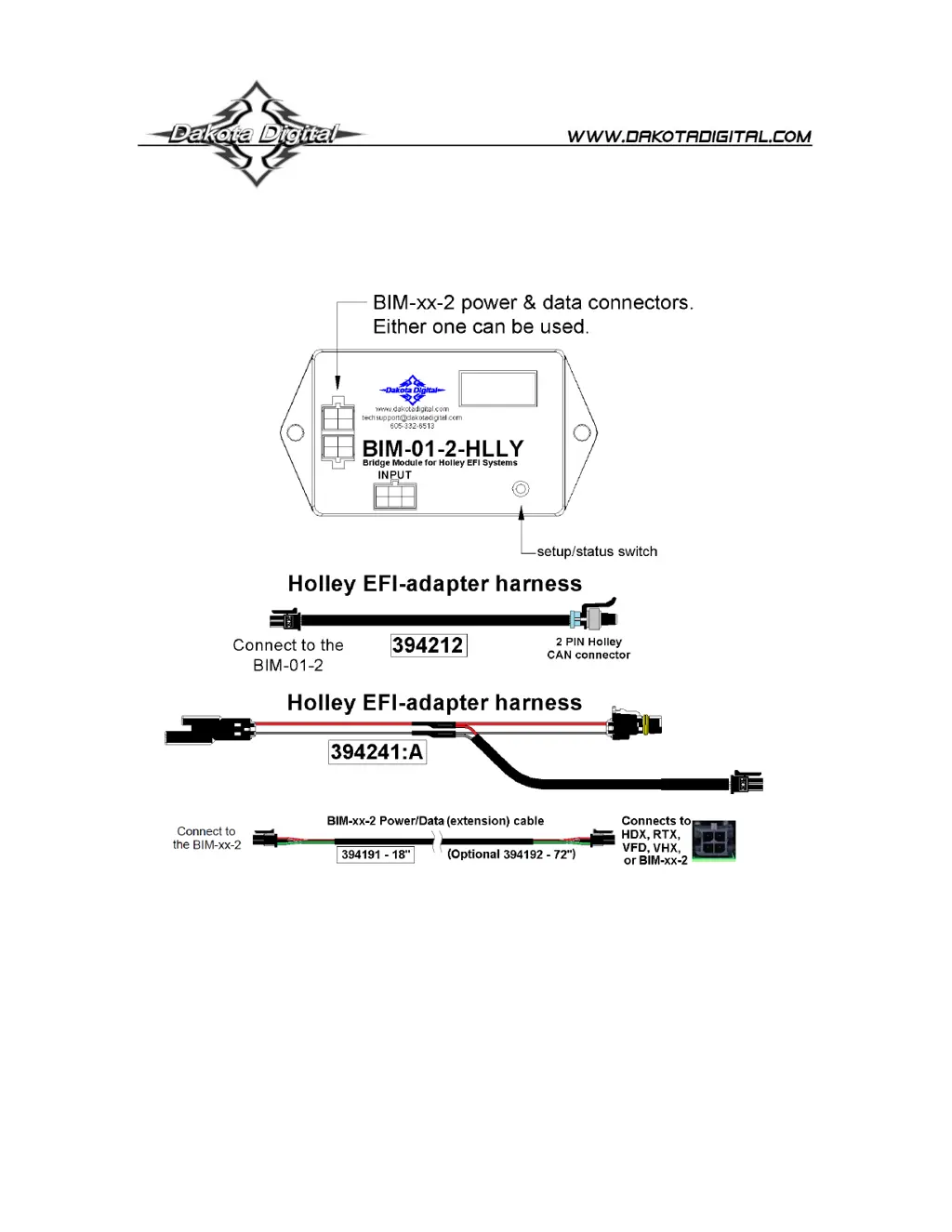
This Bus Interface Module is designed to read engine information from specific Holley EFI kits. The Holley Terminator,
HP, Sniper, Dominator and Terminator X and X Max. The module is connected to the Holley EFI through the CAN-bus
plug on the EFI harness. Depending on your EFI module you may have a 2-pin or 4-pin CAN connector. We supply EFI
adapter harnesses that will allow you to connect with your particular kit.
There are two interface (I/O) ports on the BIM-01-2-HLLYmodule. Either one can be connected to the instrument system
or to another module, allowing several units to be daisy chained together.
Cannot daisy chain with GPS-50-2.
Do not connect the I/O port to anything other than a Dakota Digital control box or BIM.
Do not mount the module in the engine compartment; as it should be mounted in the vehicle’s cabin.
The engine and transmission information that is available from the unit depends on the EFI kit and module programming
and add-ons. For specific data readings: see individual setups below for each version of Holley EFI system below.

Questions and Answers

  • M
    mathewsamandaAug 3, 2025
    Why Dakota Digital Recording Equipment BIM won't light up?
    • N
      nrogersAug 3, 2025
      If the Dakota Digital Recording Equipment BIM doesn't light up, it could be due to several reasons: * The PWR wire may not have power. Ensure it's connected to a location with +12V key-on power. * There might be a grounding issue. Try connecting to a different ground location. * The power/data harness could be damaged. Inspect the harness and repair or replace it if necessary. * The module itself might be damaged, in which case it should be returned for service.
  • C
    Christine KaiserAug 7, 2025
    What to do if Dakota Digital Recording Equipment BIM display is scanning “???”?
    • J
      Jonathan HunterAug 8, 2025
      If your Dakota Digital Recording Equipment BIM display is scanning “???”, it could be due to the following reasons: * The EFI adapter harness is not connected. Connect the appropriate harness to the EFI CAN. * The EFI system is not compatible. Verify compatibility. * The EFI is not powered on. Verify the EFI system is powered on. * The EFI CAN is not configured to “Racepak”. Verify CAN settings within the EFI software.
  • J
    Jessica TaylorAug 13, 2025
    How to fix a Dakota Digital Recording Equipment BIM with a steady dot lit?
    • V
      vhallAug 13, 2025
      If the Dakota Digital Recording Equipment BIM has a steady dot lit, consider the following: * The interface cable might not be connected. Ensure the supplied data cable is connected between the BIM unit and the instrument system control box. * The interface cable could be loose. Make sure both ends of the cable are properly seated. * On VHX systems, the BIM display for this might be disabled. Follow the instructions in the VHX manual to enable the BIM display screen.
  • E
    emilywheelerAug 18, 2025
    What to do if Dakota Digital BIM-01-2-HLLY Recording Equipment BIM display shows “??:?”?
    • B
      Brenda BallAug 18, 2025
      If the Dakota Digital Recording Equipment BIM display shows “??:?”, it could be caused by: * A damaged data cable. Inspect and replace the data cable if necessary. * Another module on the bus being damaged or improperly connected. Inspect other modules on the bus.
  • T
    Tammy Mason MDAug 22, 2025
    What to do if Dakota Digital Recording Equipment BIM display is scanning “???“?
    • A
      Andrew WagnerAug 23, 2025
      If your Dakota Digital Recording Equipment BIM display is scanning “???“, it could be due to several reasons. First, ensure the appropriate harness is correctly connected to the EFI CAN. Verify that your EFI system is compatible and powered on. Also, check the CAN settings within the EFI software to confirm they are configured to “Racepak“.
  • L
    Lori KleinAug 28, 2025
    Why Dakota Digital BIM-01-2-HLLY Recording Equipment BIM will not light up?
    • D
      Daniel StoneAug 28, 2025
      If your Dakota Digital Recording Equipment BIM won't light up, the issue might stem from a lack of power to the PWR wire. Ensure it's connected to a location providing +12V key-on power. Try connecting to a different ground location. Inspect the power/data harness for any damage, and repair or replace it if necessary. If problems persist, consider that the module itself may be damaged and require professional service.

Summary

Holley EFI System Integration and Setup

Terminator, HP, Dominator EFI Setup

Configure Holley EFI CAN settings to "Racepak" for module compatibility.

Sniper EFI System Setup

No specific configuration needed for Sniper EFI system.

Terminator X, X Max EFI System Setup

Configure BIM for Terminator X and X Max systems.

Display System Configuration and Data Acquisition

VFD3;VFD3 X Display Setup

Add extra readings to VFD3/VFD3X displays via BIM module.

VHX Display Setup

Configure VHX system to read data from BIM module.

HDX;RTX Display Setup

Configure HDX/RTX systems to display data from BIM module.

BIM Module Configuration and Features

BIM Setup Menu and System Selection

Configure BIM system type, speed input, and other menu options.

Enabling Boost and Managing ID

Enable boost readings and resolve ID conflicts for multiple BIM units.

Operational Support and Warranty

Quick Tips and Troubleshooting Guide

Operational tips and solutions for common BIM issues.

Service and Repair Information

Procedures for unit return, repair, and warranty claims.

Dakota Digital BIM-01-2-HLLY Specifications

General IconGeneral
BrandDakota Digital
ModelBIM-01-2-HLLY
CategoryRecording Equipment
LanguageEnglish