EasyManua.ls Logo

DANOPLUS DP-101 - User Manual

DANOPLUS DP-101
2 pages
Print Icon
To Next Page IconTo Next Page
Loading...
- 1 -
- 3 -- 2 -
SOUND LEVEL METER
(with bluetooth communication)
User Manual
INTENDED USE
Features:
1
2
3
4
5
6
7
8
9
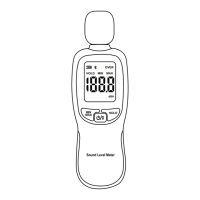
PRODUCT DESCRIPTION
1. Microphone
2. LCD Display
3. MAX/MIN key
4. POWER/BACKLIGHT key
5. HOLD key
6. Windscreen
7. Calibration potentiometer
8. Battery cover
9. Tripod mounting thread
1. Battery capacity indicator
2. Bluetooth symbol
3. Over range indicator
4. Data hold indicator
5. MIN value indicator
6. MAX value indicator
7. Measured dB value
8. Frequency weighting
8
LCD DISPLAY
This sound level meter is a portable and handheld digital meter to measure
sound level. Its wide application includes but not limits to construction site,
working and engineering sound level measurement. It is supported by an
app, dB-Tester, which makes the usage more user-friendly and transforms
the data set into an easier way to read.
• High accuracy
• Data hold and Max/Min hold functions
• With data export function via bluetooth function
• Compatible with Apple IOS (IOS 9.0 or above version) and
Android smartphones (Android 5.0 or above version)
OPERATING INSTRUCTION
BLUETOOTH COMMUNICATION, DATA RECORDING & EXPORTING
• Bluetooth communication
1. Download the IOS or Android “dB-Tester” APP on your smartphone.
2. Turn on your smartphone's Bluetooth and then launch the “dB-Tester” app.
3. Press and hold the “ ” key on the meter to activate or deactivate the
Bluetooth. will appear on the LCD when the Bluetooth is activated.
4. Click “ ” on the APP and choose “SoundMeter” from the device list
that now appears.
Note:
For Android version, it is necessary to allow the dB-Tester app to access
your phone's location, photos, media, and the files on your phone to
search the device and to save the data when installing the app.
If the Bluetooth connection does not work, close the app and reopen it to
try the above steps from 2.~4. again.
IOS version
Scan the QR
code to download
the dB-Tester App
To diminish other factor affecting the accuracy of the measurement, please
use the windscreen when making outdoor measurement in windy weather
or when measuring air conditioning equipment or similar.
• Turning the meter ON/OFF
a. Remove the battery cover and insert 3 AAA batteries.
b. Short press “ ” to turn on the meter.
c. Press and hold “ ” to turn off the meter.
Note: The meter is equipped with an Auto Power Off feature that shuts the
meter off after approximately 10 minutes of inactivity. The meter defaults to
Auto Power Off each time it is turned on. To disable the auto power off
function, press and hold “ ” key to turn on the meter while it is off.
“UOF” will appear on the display indicates that the auto power off function
now is disabled. The meter will now remain on until the user turns it off or
until the battery run out.
• Turning the backlight ON/OFF
Press the “ ” key to turn the backlight on or off.
• Setting alarm level if needed
a. With the meter on, press the “ ” key to display “HOLD” and then
press and hold “ ” key to enter setting mode.
b. Press the “ ” key or “ ” key to increase or decrease the alarm level
to your desired value.
c. Press the “ ” key to save the value.
Note: Alarming level can also set through APP as below,
Menu --> Settings --> Parameter Settings --> Interval and Alarm -->
Alarming level (dB).
(Please refer to Page 4 - Data recording & exporting - 1.a.)
• Taking measurements
Hold the instrument comfortably in one hand (away from your body) or
position it on a tripod for long-term monitoring. Point the microphone in the
direction of the noise to take a measurement.
• Selecting the MAX/MIN value measurement
a. Press the “ ” button once to display “MIN” and the minimum recorded
dB level. The display will be updated only when reaching the lower dB
reading.
Android version
Scan the QR
code to download
the dB-Tester App
b. Press the “ ” button again to display “MAX” and the maximum
recorded dB level. The display will be updated only when the max dB
reading is exceeded.
c. Press the “ ” button again to exit MIN/MAX mode. The current
reading will now display and continually updating.
• Using the Hold function
With the meter on, press the “ ” key to display “HOLD” and the last dB
reading. Press “ ” again to exit the function.
IOS version
Android version
Scan the QR code to download
the dB-Tester App
SCAN THE QR CODE
to download USER MANUAL
in different languages
www.danoplus.com/dp-101
Need more help?
CONTACT US.
TUTORIAL VIDEO ON HOW TO USE
SoundMeter

Question and Answer IconNeed help?

Do you have a question about the DANOPLUS DP-101 and is the answer not in the manual?

Overview

This document describes the Sound Level Meter (with Bluetooth Communication), a portable and handheld digital device designed for measuring sound levels. It is suitable for various applications, including construction sites, and for measuring sound levels in working and engineering environments. The meter integrates with a smartphone app called "dB-Tester" to enhance user-friendliness and facilitate data analysis.

Function Description

The Sound Level Meter is primarily used to measure sound levels with high accuracy. It features data hold and Max/Min hold functions, allowing users to capture and review minimum and maximum sound readings. A key feature is its Bluetooth communication capability, which enables data export to compatible smartphones. The device is compatible with Apple iOS (version 9.0 or above) and Android smartphones (version 5.0 or above).

The meter's LCD display provides essential information, including:

  • Battery capacity indicator
  • Bluetooth symbol
  • Over-range indicator
  • Data hold indicator
  • MIN value indicator
  • MAX value indicator
  • Measured dB value
  • Frequency weighting

Important Technical Specifications

  • Measuring Range: 30 ~ 130 dBA
  • Accuracy: ±1.5 dB
  • Frequency Response: 31.5 Hz ~ 8 KHz
  • Frequency Weighting: A Weighting
  • Resolution: 0.1 dB
  • Working Temperature and Humidity: 0 ~ 40°C, 10 ~ 80% RH
  • Storage Temperature and Humidity: -10 ~ 60°C, 0 ~ 90% RH
  • Power Source: 3 * 1.5V AAA Batteries
  • Weight: 96.38 g (Excluding Battery)
  • External Dimension: 56.1 x 177 x 36.03 mm
  • Data Storage: 20,000 groups (on meter)
  • Auto Power Off: 10 minutes without operation

Usage Features

Turning the Meter ON/OFF:

  • To turn on, short press the power button.
  • To turn off, press and hold the power button.
  • The meter has an Auto Power Off feature that activates after approximately 10 minutes of inactivity. This can be disabled by pressing and holding the power button while turning on; "UOF" will appear on the display to confirm.

Backlight ON/OFF:

  • Press the power button to toggle the backlight on or off.

Setting Alarm Level:

  • With the meter on, press the "HOLD" key to display "HOLD," then press and hold the power button to enter setting mode.
  • Use the "MAX/MIN" keys to adjust the alarm level.
  • Press the power button to save the value.
  • Alarm levels can also be set via the dB-Tester app (Menu -> Settings -> Parameter Settings -> Interval and Alarm -> Alarming level (dB)).

Taking Measurements:

  • Hold the instrument comfortably, away from your body, or position it on a tripod for long-term monitoring.
  • Point the microphone in the direction of the noise source.
  • Use the windscreen for outdoor measurements or when measuring air conditioning equipment to minimize external factors affecting accuracy.

MAX/MIN Value Measurement:

  • Press the "MAX/MIN" button once to display "MIN" and the minimum recorded dB level. The display updates only when a lower reading is reached.
  • Press the "MAX/MIN" button again to display "MAX" and the maximum recorded dB level. The display updates only when a higher reading is exceeded.
  • Press the "MAX/MIN" button again to exit MIN/MAX mode.

Hold Function:

  • With the meter on, press the "HOLD" key to display "HOLD" and freeze the last dB reading.
  • Press the "HOLD" key again to exit the function.

Bluetooth Communication, Data Recording & Exporting:

  • App Download: Download the "dB-Tester" app from the App Store (iOS) or Google Play (Android) using the provided QR codes.
  • Connecting to App: Turn on your smartphone's Bluetooth and launch the "dB-Tester" app. Press and hold the "HOLD" key on the meter to activate Bluetooth; the Bluetooth symbol will appear on the LCD. Click the Bluetooth icon in the app and select "SoundMeter" from the device list.
  • Data Recording (via App):
    • In the app's "Setting" menu, configure reading mode, recording intervals, and alarm values.
    • Click "Record on Phone" (iOS) or "Start" (Android) to begin recording. Real-time data and a data graph will be displayed.
    • Click "Stop" to end recording, then "Save" in the menu to name and save the file.
    • Data recorded on the app can be cleared via the "Clear" option in the menu.
    • Note: Data must be saved before closing the app, otherwise it will be cleared.
  • Data Recording (on Meter):
    • In the app's "Setting" menu, set recording intervals and the total number of records (up to 20,000 groups).
    • Click "Start" in the app or press and hold the "MAX/MIN" key on the meter until the dBA symbol flashes to start recording.
    • Click "Stop" in the app or press and hold the "MAX/MIN" key until the dBA symbol stops flashing to stop recording.
    • Export stored data from the meter to the app by clicking "Export."
    • Clear meter memory by clicking "Clear" in the app.
  • Viewing & Sharing Saved Data:
    • iOS: Click "data file" in the top right corner, then select the file name.
    • Android: Click "data file" in the top right corner, then select the file name. Data can be viewed as curve or list data.
    • Sharing: Swipe the file to the left on the "Data file" page to reveal Share and Delete icons.
  • Exporting Data:
    • On the "record file" page, select "Export" from the dropdown.
    • Choose to export as PDF or Excel file.
    • Click "Confirm" to download the file, which will be stored in the /storage/emulated/0/dB_Tester/ folder.

Calibration Method:

  • An external sound level calibrator (94.0dB at 1kHz) and a flat screwdriver are required.
  • Turn on the meter and plug the microphone into the calibrator's 1/2 inch hole.
  • Turn on the calibrator and set it to output 94dB@1KHz.
  • Use a flat screwdriver to adjust the calibration potentiometer (located at the back) until the LCD displays 94.0.
  • Turn off the calibrator and remove the microphone.
  • The recommended calibration interval is 1 year.

Battery Replacement:

  • The meter is powered by 3 AAA 1.5V batteries.
  • Replace batteries when the low battery icon appears or the meter cannot be powered on.
  • To replace: Turn off the meter, remove the battery cover, replace old batteries with new ones, and replace the cover.

Maintenance Features

  • Long-term Storage: Remove batteries if the device will not be used for a long period to prevent damage from battery leakage.
  • Device Integrity: Do not open the device or modify its circuitry to prevent damage or severe deterioration.
  • Environmental Conditions: Avoid placing the device in humid, dusty, acidic, alkaline, or corrosive environments.
  • Cleaning: Use a clean, soft cloth to wipe the meter if it becomes dirty.

DANOPLUS DP-101 Specifications

General IconGeneral
BrandDANOPLUS
ModelDP-101
CategoryMeasuring Instruments
LanguageEnglish