Button Definition
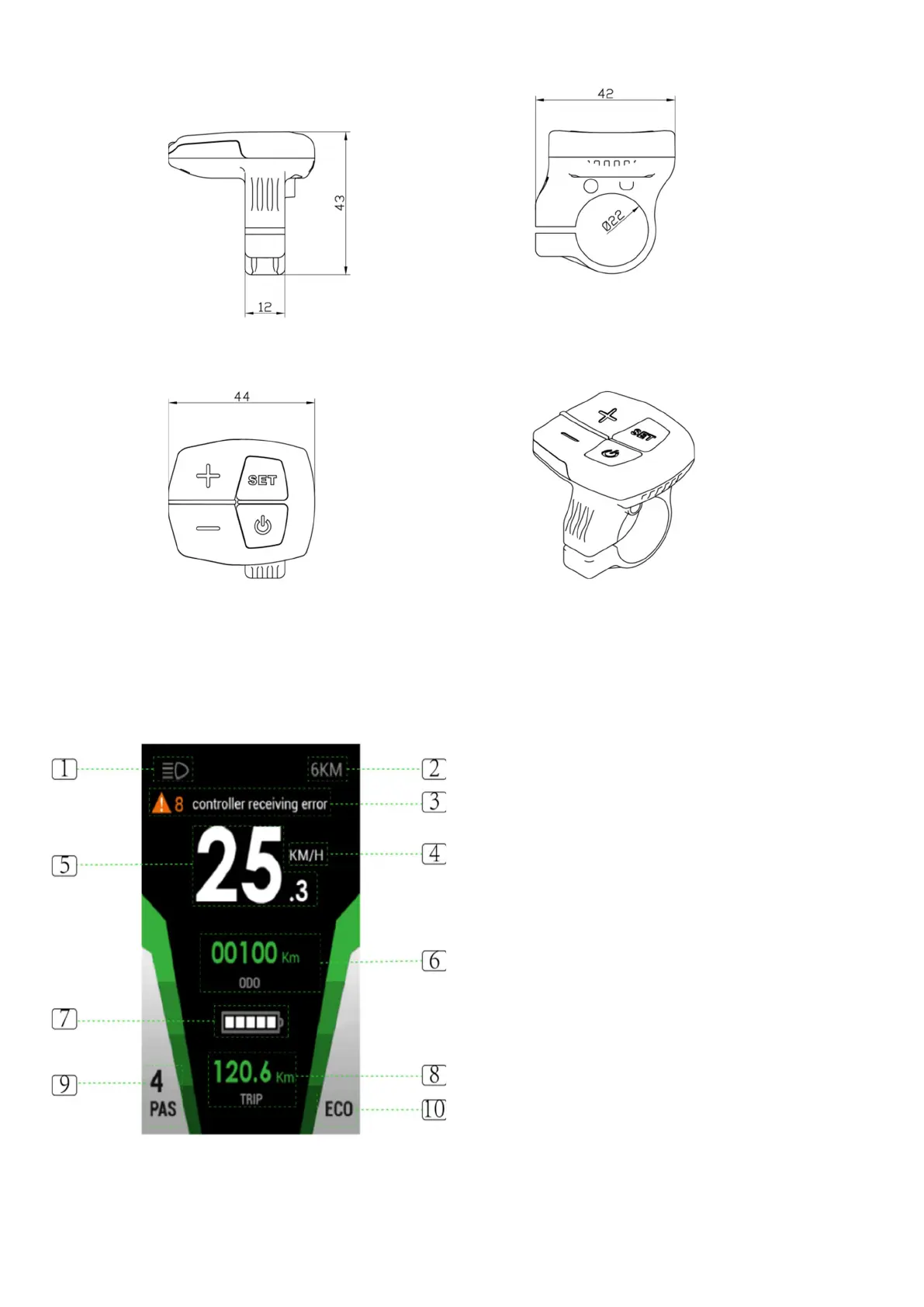
C800 has four buttons, including ON/OFF, SET, PAS UP and PAS DOWN
Function Summary
C800 provides a wide range of functions and indicators to fit the users’ needs. The indicated contents are as
below.
1. Backlight indicator - With the power on, click
the ON/OFF and turn on the backlight.
2. 6KM/H work - Hold the + DOWN for 2 seconds
to enter 6km PAS walk mode.
3. Error - Displays the current error code.
4. KM/H&MPH - Select KM/H or MPH for the
speed and mileage to display desired mode.
5. Speed display is in MPH or KMH.
6. ODO - The ODO (Odometer) records total
distanced travelled whilst POWER is ON.
Accumulated distance cannot be cleared.
7. Battery status indicator – indicates amount of
charge in battery.
8. Trip Meter - Displays single trip distance.
9. PAS - Displays ‘Pedal Activation’ level selected..
10. Riding mode selection - There are three modes
for riding with arrow selection, including
POWER,NORMAL and ECO. The default option
is NORMAL.


 To Next Page
 Loading...