1. Operating System
• Windows® 7, 8, 10, 11
• Mac® OS X 10.7 or higher
• Software: None required
2. Features
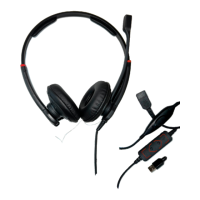
• USB cable
• Quick Disconnect (QD) cable for easy mobility
• In-line control board equipped PTT switch, RX volume
and call ON/OFF switch
• Complete digital sound card
• Clear live voice transmission with VoIP
• Supports Teams, Skype, Avaya One-x agent, Cisco
Jabber, Bria(X-Lite) and 3CX softphones with SoftLink
3. Installation
Connect the AlphaTalk Push-To-Talk QD to a USB
port on your computer. No installation is required,
simply plug & play. Your AlphaTalk Push-To-Talk is fully
functional once connected. (You might need to adjust
your computer’s input/output settings to select the
AlphaTalk as the primary audio device)
For additional help
If you have additional questions, please visit support.datalocker.com
For warranty information, datalocker.com/warranty


 To Previous Page
 Loading...