ENG
7
Reading an EID
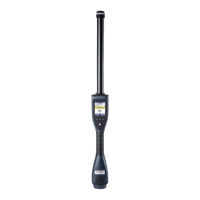
Press the read button on the back of the reader to start
reading. When the AirSck detects an EID, reading data
is displayed on the screen and recorded in the reading
session. The counter on the screen shows the number
of EIDs stored in the current session. At the rst usage,
a reading session is already available when you turn the
AirStick on, without the needing of creating a new one.
The AirStick indicates that a successful reading has been
made with a vibration, an audio notication and a green
light on the antenna (the light ashes red during reading).
In continuous mode, press the read button to stop reading.
If duplicates are not allowed, a duplicate message will be
displayed on the AirStick’s screen when an EID is read
twice.
While connected to an external device, each EID read is
sent on the y. Scroll down to select the shortcut to print
the session content.
Read
buon


 To Next Page