EasyManua.ls Logo

Datron 1062 - Page 20

Default Icon
202 pages
Print Icon
To Next Page IconTo Next Page
To Previous Page IconTo Previous Page
Loading...
11
1.8
'AUTOCAL'
OVER
THE
BUS
All the
calibration
procedures
covered
in
this
manual
can be
carried
out
remotely
using
Option
50,
the
IEEE
Bus.
Effectively,
the
five
calibration
keys are
replaced
by
five Bus
instructions
and these
are
used
instead
of the
'CALIBRATE'
keys
listed
in
the
Calibration
tables
on
previous
pages.
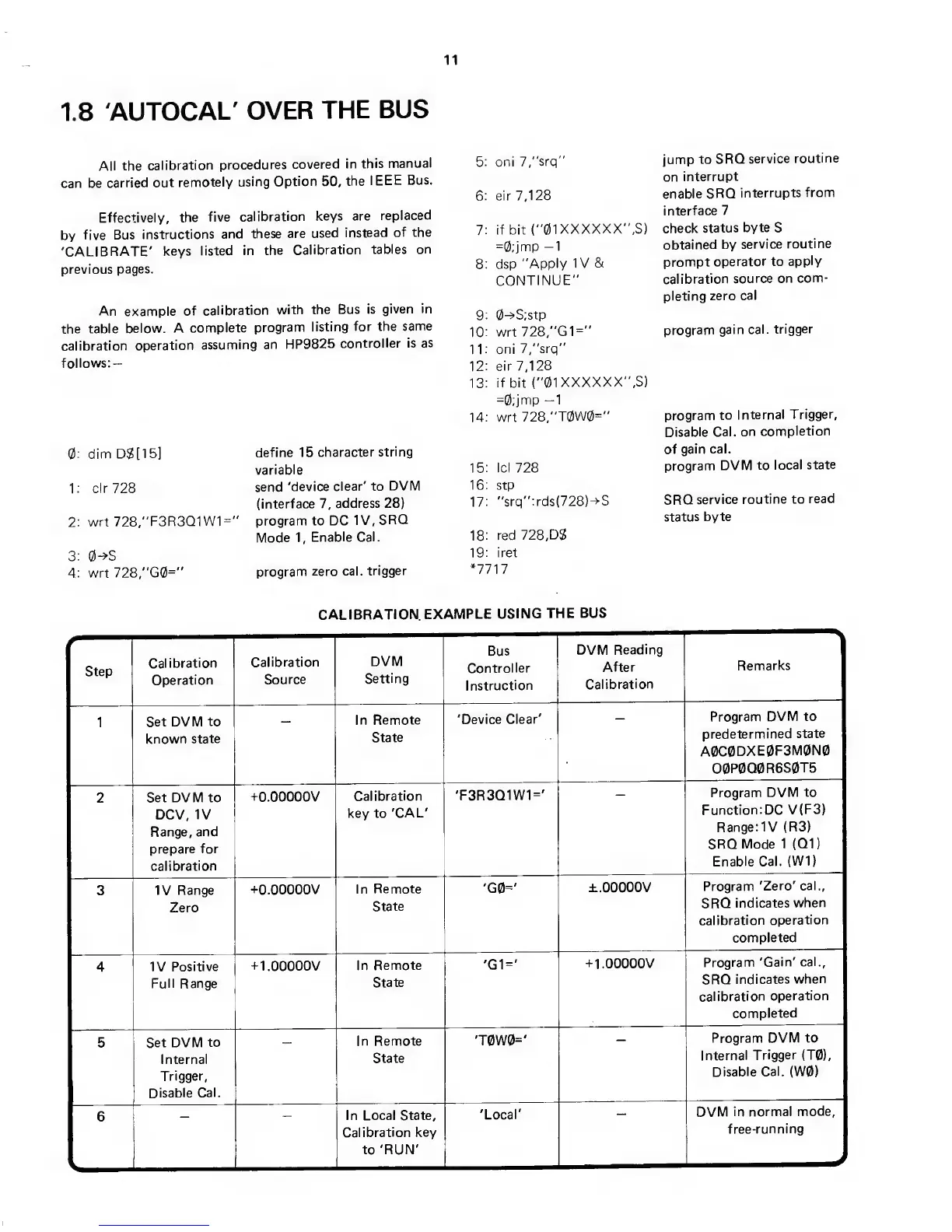
An
example
of
calibration
with
the Bus
is
given
in
the table
below.
A
complete
program
listing
for the
same
calibration
operation
assuming an
HP9825
controller
is as
follows:
-
0; dim DS[15]
1: clr728
2: wrt
728,"F3R3Q1W1="
3:
O-^'S
4: wrt
728,"G0="
define 15
character
string
variable
send
'device
clear' to
DVM
(interface
7,
address
28)
program to DC
IV,
SRQ
Mode
1,
Enable Cal.
program
zero cal.
trigger
5: oni
7,"srq"
6: eir 7,128
7: if bit
("01XXXXXX' ,S)
=0;jmp
—1
8: dsp
"Apply IV
&
CONTINUE"
9:
0-^S;stp
10: wrt
728,
"G1="
11: oni
7,"srq”
12: eir 7,128
13:
if
bit
("01XXXXXX' ,S)
=0:jmp
—1
14;
wrt
728,"T0W0="
15: Id 728
16:
stp
17:
"srq":rds(728)->S
18: red
728,
DS
19: iret
*7717
jump
to
SRQ
service
routine
on
interrupt
enable SRQ
interrupts
from
interface
7
check
status
byte
S
obtained
by
service
routine
prompt
operator
to
apply
calibration
source
on com-
pleting
zero
cal
program
gain
cal.
trigger
program
to
Internal
Trigger,
Disable
Cal.
on
completion
of
gain cal.
program
DVM
to
local
state
SRQ
service
routine to
read
status
byte
CALIBRATION
EXAMPLE
USING
THE
BUS
Step
Calibration
Operation
Calibration
Source
DVM
Setting
Bus
Controller
Instruction
DVM
Reading
After
Calibration
Remarks
1
Set DVM
to
known
state
In
Remote
State
'Device
Clear'
Program
DVM to
predetermined
state
A0C0DXE0F3M0N0
O0P0Q0R6S0T5
2
Set DVM to
DCV,
IV
Range, and
prepare for
calibration
-(-O.OOOOOV
Calibration
key to
'CAL'
'F3R3Q1W1='
Program
DVM
to
Function:DC
V(F3)
Range:1V
(R3)
SRQ
Mode
1
(Q1)
Enable Cal.
(W1)
3
IV Range
Zero
-^O.OOOOOV
In
Remote
State
'G0='
±.ooooov
Program
'Zero'
cal.,
SRQ
indicates
when
calibration
operation
completed
4
IV
Positive
Full Range
-1-
1.00000V
In
Remote
State
'G1='
-(-1.00000V
Program
'Gain'
cal.,
SRQ
indicates
when
calibration
operation
completed
5
Set DVM
to
Internal
Trigger,
Disable
Cal.
In Remote
State
'T0W0='
Program
DVM to
Internal
Trigger (T0),
Disable
Cal. (W0)
6
In Local State,
Calibration
key
to 'RUN'
'Local'
DVM
in normal
mode,
free-running