

EasyManua.ls Logo

Dawn CLOCKS - User Manual

Dawn CLOCKS
4 pages
Print Icon
To Next Page IconTo Next Page
Loading...
User Manual
8” Digital Calendar & Reminder Clock
Helping people manage better at home.
The Dawn Clock aims to assist people connect time to their
daily routine, enable peoples independence and helps to ease
the workload of families and caregivers.
Once your Dawn Clock has been setup, think about where the
best location for it is. Many people choose the main living area
like the kitchen, or some choose a bedroom depending on
their needs.
Some people may benefit from placing the Dawn Clock next
to a calendar or diary to help with keeping appointments
and planning activities.
For carers - try talking to your loved one about where they
think is the best place to put their Dawn Clock and where they
think they would get the most benefit from it.
1.
Question and Answer IconNeed help?

Do you have a question about the Dawn CLOCKS and is the answer not in the manual?

Summary

Product Diagram

Dimensions

Provides the physical dimensions for the clock screen and frame.

Calendar Screen (UI-1 Mode)

Describes the screen display that shows the day, time, and date.

Now its Screen (UI-2 Mode)

Describes the screen display showing the current time of day.

Getting Started

How to set

Instructions on how to access and navigate the settings menu for configuration.

Configuration Settings

Time and Date Settings

Options to set time mode (12/24 HR) and date mode format.

Language and UI Options

Settings for display language and toggling UI elements like day/time.

Time of Day Segments

Setting specific times for Predawn, Morning, Afternoon, Evening, and Night.

Display and Alarm Settings

Configuration for auto-dimming, brightness, and alarm frequency.

Alarm Settings and Troubleshooting

Setting Up Reminders

Guide to configuring up to 14 reminders with custom messages and sounds.

Troubleshooting Common Errors

Solutions for 'TIME SET ERROR' and switching between display modes.

Overview

The Dawn Clock is an 8" digital calendar and reminder clock designed to help individuals, particularly those needing assistance, manage their daily routines, promote independence, and ease the workload of caregivers. It aims to connect time to daily activities and provide visual reminders.

Function Description:

The primary function of the Dawn Clock is to display the time, day, and date in an easy-to-read format. It offers two main display modes:

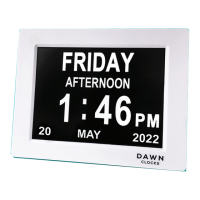
  • "Calendar" Screen (UI-1 Mode): This mode displays the day of the week, the time (including AM/PM and a descriptive time of day like "MORNING," "AFTERNOON," "EVENING," "NIGHT," or "PREDAWN"), the date (day, month, year), and the year. For example, "FRIDAY AFTERNOON 1:46 PM MAY 2022."
  • "Now It's" Screen (UI-2 Mode): This mode simplifies the display to show "NOW IT'S" followed by the day of the week and the descriptive time of day, such as "NOW IT'S THURSDAY MORNING."

Beyond time display, the clock incorporates a comprehensive alarm and reminder system. Users can set up to 14 reminders for different times, each with customizable messages and sounds. These reminders are categorized for various needs:

  • Medication Alarm Times (1-5): Pre-set messages include "TIME FOR YOUR MEDICATION," "MORNING MEDICATION TIME," "AFTERNOON MEDICATION TIME," "EVENING MEDICATION TIME," and "NIGHT MEDICATION TIME." There is also an option for "NO MESSAGE" (just sound).
  • Daily Tasks Alarm Times (6-13): Messages cover common daily activities like "TIME FOR BREAKFAST," "TIME FOR LUNCH," "TIME FOR DINNER," "TIME TO GET DRESSED," "TIME TO SHOWER," "CHECK YOUR DIARY," "TIME TO GO TO BED," and "DRINK SOME WATER."
  • Appointment Alarm Time (14): This specific alarm includes a DATE function and the message "TIME FOR YOUR APPOINTMENT."

Alarms ring for 50 seconds at the designated time and can be manually shut off by pressing any button on the back of the clock.
Important Technical Specifications:

  • Screen Size: 160mm (width) x 120mm (height).
  • Clock Frame Dimensions: 215mm (width) x 170mm (height).
  • Power: The device is powered by an included AC adapter, compatible with standard 100-240V AC electrical outlets. It automatically powers on when plugged in.
  • Mounting: The clock features a wall mount hole for flexible placement.
  • Controls: Buttons on the back include ON/OFF, UP, LEFT, RIGHT, OK, DOWN, and MENU.

Usage Features:

  • Setup and Navigation:
    • The device powers on automatically when plugged in.
    • The "OK" button toggles between the "Calendar" and "Now It's" display modes.
    • The "MENU" button is used to access and exit the settings menu.
    • Settings can only be amended when the corresponding line is highlighted and underlined.
    • "LEFT," "RIGHT," and "OK" buttons are used to highlight lines and underline text for changes. "UP" and "DOWN" buttons adjust values when text is underlined.
  • Time and Date Settings:
    • SET TIME: Adjust hour and minutes using "LEFT," "RIGHT," "UP," and "DOWN" buttons.
    • SET DATE: Adjust day, month, and year using "LEFT," "RIGHT," "UP," and "DOWN" buttons.
    • TIME MODE: Choose between 12 HR or 24 HR display.
    • DATE MODE: Select preferred date format: < Day - Month - Year > or < Month - Day- Year >.
  • Language: Users can select their preferred display language.
  • UI 1 TIME OR DAY ON/OFF: This setting allows users to turn off the descriptive time of day words (e.g., 'Before Dawn, Morning, Afternoon, Evening, Night') if they prefer a simpler display in UI-1 mode.
  • PREDAWN/ MORNING/ AFTERNOON/ EVENING/ NIGHT TIME SET: These settings define the 24-hour time boundaries for each descriptive period (e.g., "00" for Predawn, "04" for Morning, "12" for Afternoon, "17" for Evening, "21" for Night). These times must be sequential and non-overlapping to avoid a "TIME SET ERROR."
  • Alarm Settings:
    • Users scroll to set the number of alarms and their ring times.
    • Messages for each alarm are chosen by navigating to "PS" (MESSAGE settings) and selecting from a list.
    • Reminders can be set "On" or "Off."
    • Alarm sounds can be selected from 5 options: Trill, Bell, Music, Beat, or Chime.
  • Display Customization:
    • AUTO DIMMING: When enabled, the clock dims from 7pm until 7am.
    • BRIGHTNESS: Overall day brightness can be adjusted from 1-5.
  • Placement: The manual suggests placing the clock in a main living area like the kitchen or a bedroom, and potentially next to a calendar or diary to aid with appointments and planning. Carers are encouraged to discuss placement with the user for maximum benefit.

Maintenance Features:

  • Troubleshooting: The manual addresses common errors:
    • "TIME SET ERROR": This occurs if the Predawn, Morning, Afternoon, Evening, and Night time settings are not sequential or overlap. The solution involves accessing the MENU, scrolling to these settings, and adjusting them to a correct 24-hour sequence (e.g., 00, 04, 12, 17, 21).
    • Main screen changed from "Calendar mode" to "Now It's mode": This is resolved by pressing the "OK" button once to toggle back to the desired main screen.
  • Protective Film: Users are instructed to remove the protective film from the LCD upon initial setup.
  • Support: For further assistance, users can email info@dawn-clocks.com or visit www.dawn-clocks.com/pages/troubleshooting.

Dawn CLOCKS Specifications

General IconGeneral
BrandDawn
ModelCLOCKS
CategoryClock
LanguageEnglish