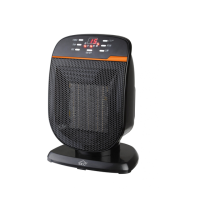
Instruction Manual PTC180 CERAMIC HEATER
dcg16.it
13
6. Oscillation
Press the OSC button to allow the unit to rotate back and forth. The
oscillation indicator will light on when in use. To stop the oscillation,
press the oscillation button again.
SAFETY
1, TIP OVER SWITCH: This heater is equipped with a safety tip-over
switch, which is located on the bottom of the heater. This feature cuts
the main power to the heater if it gets knocked over. If the heater
does tip over, simply stand it upright in order to resume operation.
2.THERMAL PROTECTION/RESETTING THE APPLIANCE: This
heater includes an Overheat Protection System that shuts the unit
off when a potential overheat temperature is reached. If this occurs,
the heater can only resume its normal operation after resetting it. To
reset the heater: Unplug the heater and wait about 30 minutes for
the unit to cool down. After the 30 minutes, plug the unit in again
and operate normally.
Trouble shooting
If the heater fails to operate:
1,Pleaseconrmtheredpowerswitchonthetopofthebackcover
is turned ON (I).
2, Make sure the electric outlet or circuit breaker is working.
3, Turn the heater OFF and Unplug it.
4,Checkforobstructions.Ifyoundanobstacle,turntheheateroff
and unplug it. Then carefully remove the obstruction.
5, The unit is overheated and power off automatically. Please try to
reset the heater: Unplug the heater and wait about 1 hour for the unit
to cool down. After the 1 hour, plug the unit in again and operate
normally.
6, The temperature may be set too low, low than the room temperature.
Please set the temperature high than the room temperature to check.
7,Itmaythetip-overswitchworks,pleaseplacetheunitonaatand
hardoortocheck.


 To Next Page
 Loading...