325.6610.17 - 22 -
3.2.2.5 Operating Modes
The following four modes of operation may be selected:
• RUN - displays concentration data
• SETUP - setup menu
• ALARMS - active alarm/events queue
• DATA - historical alarm/events queue
When the power is first applied, the unit activates in the RUN mode. In this mode, the
display shows active gas concentration information. SETUP, ALARM, and DATA modes
can be selected by pressing the appropriate key on the front panel keypad. These keys
are used to “toggle” between the respective modes and RUN. Since the RUN mode has
no key associated with it, PRESSING THE RESPECTIVE MODE KEY AGAIN RETURNS
THE UNIT TO THE RUN MODE. For example, in order to return to RUN mode from any of
these operating modes, the user must press the current mode key again (i.e., if in SETUP
mode and the SETUP key is pressed, the operating mode returns to the RUN mode).
CAUTION
In SETUP, ALARMS, and DATA modes, gas-monitoring
continues to take place even though concentration values are
not shown on the display. However, when in SETUP, initiation
of CALIBRATION, SELF-TEST, or SENSOR CHECK functions
will temporarily suspend normal gas-monitoring.
3.2.2.6 Password
When the receiver initializes to the default parameters, password-protection is disabled
and the operator must automatically enter the SETUP menu by pressing the SETUP ke y.
Password-protection may be enabled, if desired, by entering the SETUP mode and
selecting the CONFIGURE-INSTRUMENT-CHANGE PASSWORD menu item (Refer to
section 4.4). The user may then enter a numerical or alphanumerical password.
If password-protection is enabled, the user will be required to enter his password whenever
attempting to enter the SETUP mode.
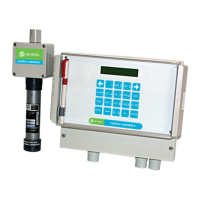
Figure 3-1 Chloralert™ Plus Keypad
DEF
1 32
ABC
6
MNOJKL
5
GHI
4
WXY
9
TUV
87
PRS
QZ
0
SETUP
DATA
ALARM
ENTER
LETTER
ACK


 To Next Page
 Loading...