325.6610.17 - 38 -
The operator interface consists of the following activities:
• Awareness of the level of gases being monitored.
• The operator must know how to enter, navigate and exit the menus.
Entering information consists primarily of selecting an entry but numerical data
must be entered for certain menu parameters. Many of the setup parameters
have default values, based on those most commonly used in the industry, which
are entered at the factory. The setup time can be minimized if these values are
suit able for the application.
• Running receiver routines for CALIBRATION, SENSOR-CHECK and SELF-TEST.
Each of these routine maintenance procedures suspends normal RUN-mode
operation until the routines are completed. Calibration mode and the specific
channel(s) to be calibrated are selected at time of calibration after the calibration
information has been entered.
• Retrieval of operating, calibration and set up data either on the display or via digital
communication.
• The operator needs to be familiar with the error messages that appear on the
display both during set up and during normal operation and messages that
appear on the display during and after the calibration procedure.
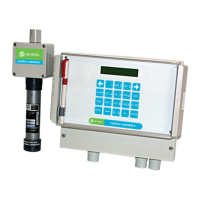
Programming information is entered using the receiver’s alpha-numerical keypad shown in
Figure 4-4.
Figure 4-4 Receiver Data-Entry Keypad
4.3.2 Configuration
The top menu consists of four main operating modes:
• RUN - Displays operational information such as gas concentration and alarm
messages
• SETUP - Used to enter configuration data
• ALARM - Used to verify or poll status of any alarms and events
• DATA - Used to access the operational information. Data is also available via serial
digital communication.
SETUP, ALARM, and DATA modes can be selected by pressing the appropriate key on the
front panel keypad. These keys are used to “toggle” between the respective modes and RUN.
Since the RUN mode has no key associated with it, PRESSING THE RESPECTIVE KEY AGAIN
RETURNS THE UNIT TO THE RUN MODE. For example, in order to return to RUN mode
from any of these operating modes, the user must press the current mode key again (i.e., if in
SETUP mode and the SETUP key is pressed, the operating mode returns to the RUN mode.)
Configuring the unit is done by entering the SETUP mode. This allows access to the
following menus:
• CONFIGURE - Used to enter operating parameter
• RUN CALIBRATION - begins calibration of the sensor(s)
• STOP CALIBRATION - terminates sensor calibration
DEF
1 32
ABC
6
MNOJKL
5
GHI
4
WXY
9
TUV
87
PRS
QZ
0
SETUP
DATA
ALARM
ENTER
LETTER
ACK


 To Next Page
 Loading...