- 39 - 325.6610.17
When power is first applied to the Chloralert™ Plus, it will activate in the RUN mode. The
front panel LCD display will indicate OFF on all four channel indicators. To make the unit
operational, a sensor channel must be activated by entering appropriate parameters. This is
done using the SETUP mode.
4.3.3 Setup
NO OPTIONS:
To activate a sensor channel and make the unit operational, the following entries
must be made to allow proper operation of the gas monitor:
• Configure Instrument
• Configure Channels
• Configure Digital Outputs
WITH OPTIONS:
If analog output, additional digital outputs and communications options have been
specified, the following additional entries must be made to allow proper operation of
the gas monitor:
• Configure Analog Outputs (in the CHANNELS menu)
• Configure additional digital outputs (in DIGITAL OUTPUTS menu)
• Configure comm port (in COMM PORT menu)
4.3.3.1 Menu Navigation & Defaults
For a summary overview of the 17CA3000 menu structure, refer to section
4.4.
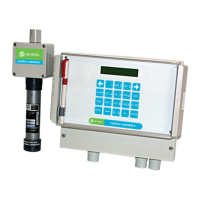
The main menu navigation buttons on the keypad are the right and left
ARROW buttons and the ENTER button. Their function is explained below:
• LEFT ARROW BUTTON - Returns display to the previous level
in the menu (sometimes provides a “backspace” function)
• RIGHT ARROW BUTTON - Scrolls through selections within a menu
• ENTER BUTTON - Used to enter a sub-menu or accept a menu
parameter entry
In menu locations where numerical entries are required, press the
appropriate number button to select that number.
Some menu areas allow the entry of alpha-numerical information. For
example, the NAME menu in the INSTRUMENT submenu. If the entry letter
is desired, a combination of alphanumeric and the LETTER buttons is used.
The unit automatically reverts to the numeric mode after each letter entry.
The entry sequence for entering a letter is as follows:
• Press the LETTER button to indicate an alpha-entry is being
selected
• Press the button that contains the letter-group containing the
desired letter.
• Press either the 1, 2, or 3 button depending on the position
of the desired letter entry in the letter group on the button.


 To Next Page
 Loading...