/
13 / 44
EN
Preparation
Pause/Cancel key and turn the Programme Selection knob clockwise by one level within 5
seconds. Once this time has elapsed, the product will enter the regeneration setting mode.
2. Regeneration level in the memory will be illuminated for 5 seconds when the regenerator
adjustment mode is activated.
3.To adjust the new Water Hardness Level, move the Programme Selection knob to the
position that is suitable for your supply water. (see, Water Hardness Level Adjustment Table)
**Programme Selection knob rotates in 5 steps regardless of the number of the programmes
contained on the machine.
4. To store, set the Programme Selection knob to “Off” position.
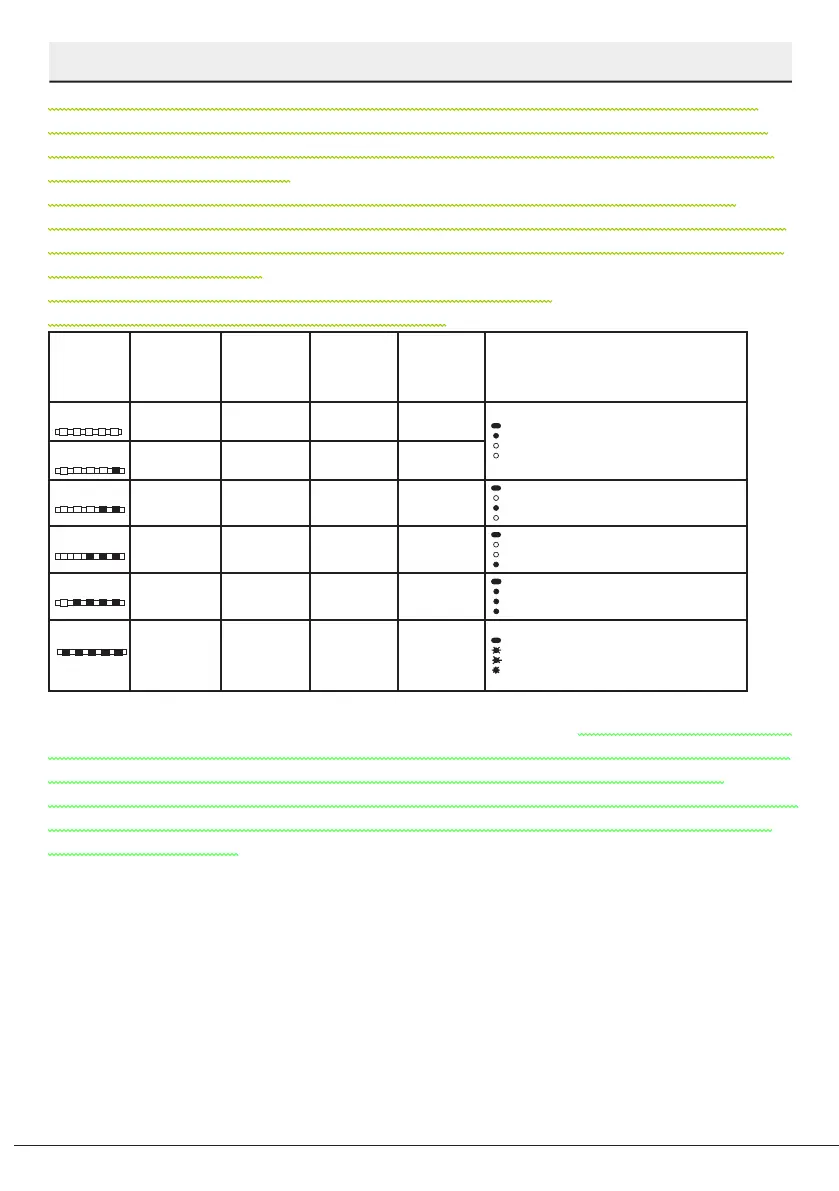
Water hardness level adjustment table
Hardness
Level
English Water
Hardness °dE
German Water
Hardness °dH
French* Water
Hardness °dF
Position of
programme
selection
knob*
Water Hardness Level Indicator
Level 0
0-5 0-4 0-8 1
Washing lamp on the panel will
illuminate.
Level 1
6-9 5-7 9-13 1
Level 2
10-15 8-12 14-22 2
Drying lamp on the panel will
illuminate.
Level 3
16-19 13-15 23-27 3 End lamp on the panel will illuminate.
Level 4
20-24 16-19 28-34 4
Washing, Drying and End lamps on
the panel will illuminate.
Level 5
25-62 20-50 35-90 5
Washing, Drying and End lamps
on the panel will ash at 1-second
intervals.
If the hardness level of the water that you use is above 50°dH or if you are using well water,
than it is recommended to use filter and water purification devices.If the hardness level of the
water that you use is below 7°dH, there is no need to use salt in your dishwasher. In this case,
the Salt Indicator light on the control panel of your dishwasher will light continuously.
If the water hardness is set to level 1, the Salt Indicator will light continuously although it is not
necessary to use salt. If you use salt under this condition, salt will not be consumed and the
lamp will not illuminate.



 To Next Page