This document describes a wireless smart-kinetic wall switch control unit, designed to enhance smart home systems. It offers convenient control via a smartphone app or an optional Kinetic wireless wall switch, providing flexibility and modern technology integration for various electrical circuits.
Function Description
The control unit allows users to manage electrical appliances and lighting remotely, enhancing comfort and energy efficiency in a smart home environment. It addresses common concerns like forgetting to turn off lights or devices, enabling remote control of irrigation pumps or LED strips, and creating the illusion of occupancy when away from home. The device is compatible with Delight product family Kinetic switches (55352, 55353) but can also function as a standalone smart device. Its application is broad, limited only by imagination, and it can be connected to any electrical circuit within its specifications. Users can monitor device status quickly and easily from anywhere with internet access via a free downloadable app.
Important Technical Specifications
- Input voltage: 100 - 240 V AC, (50-60 Hz)
- Max. current: 15 A
- Max. power: 600 W
- Network connection: Wifi 2.4 GHz - 802.11b/g/n + Kinetic 433 MHz
- Application: TuyaSmart
- Smart home integration: Amazon Alexa, Google Home, Apple HomeKit (Siri)
- Compatible phone software: IOS 6.0+ / Android 2.3+
- Timer: Yes
- Control by event: Yes
- Operating environment: 10 – 50 °C
- Protection: IP20
- Size: 70 x 45 x 28 mm
- Color: White
- Indicator LED: Blue
- Material: Plastic
- Weight: ~80 g
Usage Features
The control unit supports any consumer with a power rating not exceeding 600 W (at 100 V-240 V AC (50/60 Hz) operating voltage). Devices connected to this unit can be switched on and off using a button on the top of the unit. Additionally, one or more optional wireless KINETIC switches can be paired with the control unit, allowing control from multiple points in an apartment. This enables easy connection and synchronization of multiple devices without modifying the existing power grid. The product utilizes both WiFi and 433 MHz technology, eliminating the need for a separate Gateway network device; a home internet connection with wireless access (router and WiFi available) is sufficient.
Installation of the Control Unit:
Before installation, ensure the circuit is de-energized. Connect the main lead to the "INPUT" sockets: "Lin" for the phase (live) wire and "Nin" for the neutral (zero) wire. Connect the consumer wires to the "OUTPUT" sockets: "Lout" for the phase (live) wire and "Nout" for the neutral (zero) wire. Always seek professional help if unsure about connections.
Application Usage:
- Connect the device to your local WiFi network.
- Download and install the "Tuya Smart" application from the Play Store or AppStore.
- Log in to your profile or register a new account if you don't have one.
- When the switch is powered on, the application will automatically detect devices waiting to be paired. Follow the on-screen instructions to add the device to your profile, name it, and assign it to a room if desired (useful for multiple identical devices). After successful pairing, the switch can be controlled remotely via the smartphone.
Pairing of Optional Kinetic Switches:
- Provide power to the control unit.
- Press and hold the button on the top for 5-6 seconds until a blue light illuminates at the bottom, indicating pairing mode.
- Briefly press the wall switch you wish to pair.
- Upon successful pairing, the device can be controlled with the wall switch. Multiple wall switches can be paired with one control unit by repeating these steps.
Resetting the Device:
Hold the button at the top for 10 seconds to restore factory settings.
Maintenance Features
Cleaning:
If the switch is accessible and dirt is present on the outer casing, de-energize the device and wipe off any dirt with a soft, dry, microfiber cloth. Do not use a damp cloth.
Warnings:
- Danger of Suffocation: Keep packaging out of reach of children. The appliance is for adult use only, and storage should prevent accidental access by children. Children should be supervised to ensure they do not play with the appliance.
- General Safety: Use the device only for its intended purpose. Only individuals who have read, understood, and are capable of operating the device should use it. People with reduced mental, physical, or sensory capabilities, and children, should not use the device. It is designed for residential use.
- Damage: Do not use the device if it has been dropped, struck, or is visibly damaged. It is strictly forbidden to use, modify, or disable safety devices.
- Danger of Electric Shock: If unfamiliar with connecting electrical equipment to the mains, seek professional assistance from an electrician. Always de-energize the circuit before connecting the device and use a phase tester to ensure no voltage in the wires.
- Operation Environment: DO NOT operate the control unit with a free cable end. Only switch on the appliance when all cables are correctly connected. Do not use the device in humid environments; it is for indoor use in dry areas only to avoid short circuits and electric shock.
- Voltage and Handling: Operate the device only with the specified voltage (100 – 240 V AC). Do not touch the device or its cable with wet hands.
- Wiring: Before applying power, check for correct connection and intact insulation. Improper wiring can lead to accidents and property damage. Choose cables with a cross-section of at least 2 x 1 mm² for connection, depending on the consumer's power. Ensure the mains cable is intact during use, avoiding edges or objects that could damage its surface.
- Overload: Do not operate a device with a higher power rating than specified, as this may damage the unit. In case of damage, do not use the device and contact a specialist workshop.
- Installation: Secure the device safely using self-adhesive or screws. Install it away from direct sunlight or heat sources. Do not cover the device with any material. Do not disassemble the device or change its parameters.
- Liability: The manufacturer and distributor are not liable for damage resulting from improper use.
Disposal:
The crossed-out wheeled bin symbol indicates that this electrical and electronic product must not be disposed of with household waste. For proper disposal and reuse, return the product to a designated collection point. Correct disposal helps prevent potential negative consequences for the environment and human health. Contact local authorities or the nearest collection point for more details.

 Need help?
 General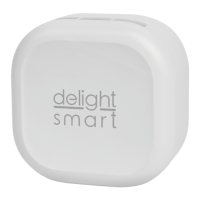

 To Next Page