WIRELESS KINETIC WALL SWITCH CONTROL UNIT
EN
• Do not operate a device with a higher power rating than specied in the specication, as this may damage
the device! In the event of damage, do not use the device, contact a specialist workshop!
• Secure the device to install the device safely. Use self-adhesive or a screw that can be applied to the
mounting surface.
• Install the device in such a way that it is not exposed to direct sunlight or heat sources!
• Do not cover the device with any material! Do not disassemble the device! It is forbidden to change the
parameters of the device!
• The manufacturer and the distributor are not liable for any damage resulting from improper use!
INSTALLATION OF THE CONTROL UNIT:
Lin
Output
Input
Nin
Lout
Nout
FUSE
INPUT
N
L
OUTPUT
N
L
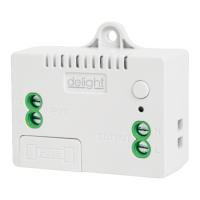
Connect the disconnected mains lead to the sockets marked “INPUT”.
• Socket marked “L” = “phase or live” cable.
• Socket marked “N” = “zero” wire
Connect the wires to the consumer to the sockets marked “OUTPUT”.
• Socket marked “L” = “phase or live” cable.
• Socket marked “N” = “zero” wire
PAIRING OF SWITCHES:
Turn on the power to the control unit, then press and hold the button on the top for 3 seconds. A steady
blue LED indicates that the device has switched to pairing mode. Then press the wall switch you want to pair
briey. After successful pairing of devices, the device can be controlled with the wall switch. Multiple wall
switches can be paired with one control unit. Repeat the steps to add more switches.
FUSE REPLACEMENT, INSPECTION:
If the control unit does not work properly, we recommend that you check the power supply and the condition
of the fuse. Disconnect the device from the power supply, then pull the fuse holder upwards by moving the
door, marked “FUSE” on the top of the device and check the condition of the fuse.
CLEANING:
If the switch is accessible and there is dirt on the outer case, de-energize the device and wipe o any dirt with
a soft, dry, microber cloth. Do not use a damp cloth! The cleaning operation is especially recommended if a
layer of dust blocks the ventilation opening of the device
DISPOSAL:
This symbol on the product or on its packaging indicates that this electrical and electronic product must not
be disposed of with your other household waste. For proper disposal and reuse, please return this product
to a designated collection point. By ensuring this product is disposed of correctly, you will help prevent
potential negative consequences for the environment and human health, which could otherwise be caused
by inappropriate waste handling of this product. Contact your local authorities or the nearest collection point
for more details on disposal.


 To Next Page
 Loading...