This document describes a Smart Wi-Fi Garage/Gate Opener.
Function Description
The Smart Wi-Fi Garage/Gate Opener is an innovative device designed to provide convenient and remote control over garage doors and motorized gates using a smartphone. It eliminates the need for traditional remote controls, allowing users to open and close their doors from anywhere at any time, as long as they have internet access. The device enhances home comfort by enabling easy and quick status checks of the garage door through a free downloadable application. It can be connected to any motor control with a wall connection option. The system also allows granting access to others without needing to order or copy additional remotes.
Important Technical Specifications
- Voltage: AC 100 - 240 V, 50-60 Hz
- Max. input amperage: 0.2 A
- Output USB spec.: 5 V, 1 A
- Max. power: 5 W
- Network connection: Wifi 2.4 GHz - 802.11b/g/n
- Application: TuyaSmart
- Protection class: IP20
- Size: 90 x 45 x 20 mm
- Color: Black
- Cable color: Black
- Operation ambient temperature: 10 - 50 °C
- Indicator LED: Red
- Material: Plastic
- USB cable length: 150 cm
- Opening sensor cable length: 5 m
- Control unit cable length: 45 cm
- Opening detection distance: ~2 cm
Usage Features
The device offers a wide range of features for enhanced control and automation:
- Comfortable Control: Easily control your garage door and motorized gate.
- Wi-Fi Technology: Operates using Wi-Fi, eliminating the need for a separate Gateway network device. Requires an internet connection and wireless access (router and Wi-Fi available).
- USB Port Network Adapter: Comes with a USB port network adapter for power.
- Magnetic Opening Sensor: Includes a magnetic sensor to detect the opening and closing status of the door.
- Timer Function: Set timers for days, weeks, or months in advance for when the door should open or close.
- Automatic Closing: Configure the door to close automatically after a specified amount of time.
- Device Management: Control up to 250 devices within the application, and assign a unique name to each device.
- Device Interconnection: Connect devices to create automated scenarios, e.g., opening the gate automatically when the garage opens (requires individual settings and programming).
- Smart Home Integration: Compatible with Amazon Alexa, Google Home, and Apple HomeKit (Siri only).
- Voice Commands: Control the device using voice commands with a properly configured personal assistant (Alexa, Google Home).
- IFTTT Integration: Set up IFTTT rules, for example, to automatically close the gate when leaving home and open it when arriving home (uses mobile phone's GPS position).
- Access Sharing: Grant access to manage individual devices to others within the application.
- Flexible Combinations: All these options can be combined in any way, limited only by imagination.
Installation Instructions
- Safety First: Before installation, ensure the circuit is powered off. Pay attention to correct connections; if unsure, seek help from a specialist.
- Connect to WiFi: Connect the device to your local WiFi network.
- App Installation: Download and install the "Tuya Smart" application from the Play Store or AppStore.
- Account Login/Registration: Log in to your existing user account or register a new one by entering your details.
- Device Recognition: Once the garage door controller is connected to a power source, the application should automatically recognize it. Follow on-screen instructions to add the device to your profile, name it, and set its room location (useful for multiple identical devices).
- Factory Reset (if needed): If the application doesn't automatically recognize the controller, press the button on the side of the device for 5-6 seconds to factory reset it. The device will then enter pairing mode, and you can try to find it again using the application.
- Controller Connection: Connect the controller to the appropriate port of the garage opener motor, ensuring proper insulation. Refer to the technical description of your garage opener motor for correct wiring. Identify and use the connection ports for the wall switch that controls opening/closing.
- Controller Mounting: Attach the controller to the top and side of the motor using the self-adhesive tape. Ensure that moving parts of the gate do not come into contact with the controller or its cables.
- Sensor Cable Routing: Guide the opening sensor cable in the middle, past the rack to the door. Use the included cable guide, cable fasteners, and cable ties for fastening. Ensure the cable is placed to prevent accidental mechanical damage.
- Sensor Placement: Place the opening sensor in the upper middle part of the garage door. Before sticking the sensor, test that the device detects opening and closing (check status in the application). The ideal distance between the two units is 3-15 mm.
- Sensor Attachment: When the door is closed, stick the cabled sensor part to the console/wall and the cableless magnetic unit to the garage door. Fasten with a screw, using included angle irons if necessary.
Maintenance Features
- Factory Reset: Press the RESET button on the side of the device for 5-6 seconds to restore factory settings.
- Cleaning: Wipe off any dirt with a soft, dry microfiber cloth. Do not use a wet cloth.
Warnings
- DANGER OF SUFFOCATION! Keep packaging away from children.
- Adult Use Only: The device should only be used by adults who have read and understood the manual. Children must not play with the device.
- Intended Purpose: Use the device only for its intended purpose.
- Restricted Use: Persons with reduced mental, physical, or sensory abilities should not use the device.
- Residential Use: The device is designed for residential use.
- Damage: Do not use the device if it has been dropped, bumped, or is visibly damaged. Safety equipment must be used as intended; modification or removal is strictly forbidden.
- Environment: Do not operate in damp or wet environments; use indoors in a dry place to avoid short circuits.
- Power Source: Operate only from an energy source that complies with specifications (including USB ports of network adapters or other devices).
- Placement: Install away from direct sunlight or heat sources.
- Obstruction: Do not cover the device with any material. Do not disassemble or modify its parameters.
- Responsibility: The manufacturer and distributor are not responsible for damages resulting from improper use or installation.
Disposal
The crossed-out wheeled bin symbol on the product or packaging indicates that this electrical and electronic product must not be disposed of with household waste. For proper disposal and reuse, return the product to a designated collection point. Correct disposal helps prevent potential negative consequences for the environment and human health. Contact local authorities or the nearest collection point for more details.

 Need help?
 General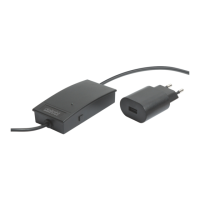

 To Next Page