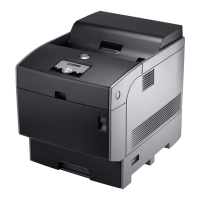
(standard 500-sheet tray, optional 500-sheet tray
module, and optional 1000-sheet tray module).
3
Standard 500-sheet tray
4
Multipurpose feeder
5
Front latch
6
Printer
7
Side button
8
Front cover
NOTE: The front cover opens by pushing the front
latch up.
9
Outer Front Cover
NOTE: The outer front cover opens by pushing the
side button.
To order replacement toner cartridges or supplies from Dell:
1. Double-click the icon on your desktop.
2. Visit Dell's website, or order Dell printer supplies by phone.
www.dell.com/supplies
For best service, have your Dell printer Service Tag available.
For help locating your Service Tag number, see "
Express Service Code and Service Tag number."
Notes, Notices, and Cautions
NOTE: A NOTE indicates important information that helps you make better use of your printer.
NOTICE: A NOTICE indicates either potential damage to hardware or loss of data and tells you how to avoid the
problem.
CAUTION: A CAUTION indicates a potential for property damage, personal injury, or death.
Information in this document is subject to change without notice.
© 2005 Dell Inc. All rights reserved.



 To Next Page
 Loading...