46 | Operating the monitor
Icon Menu and
Submenus
Description
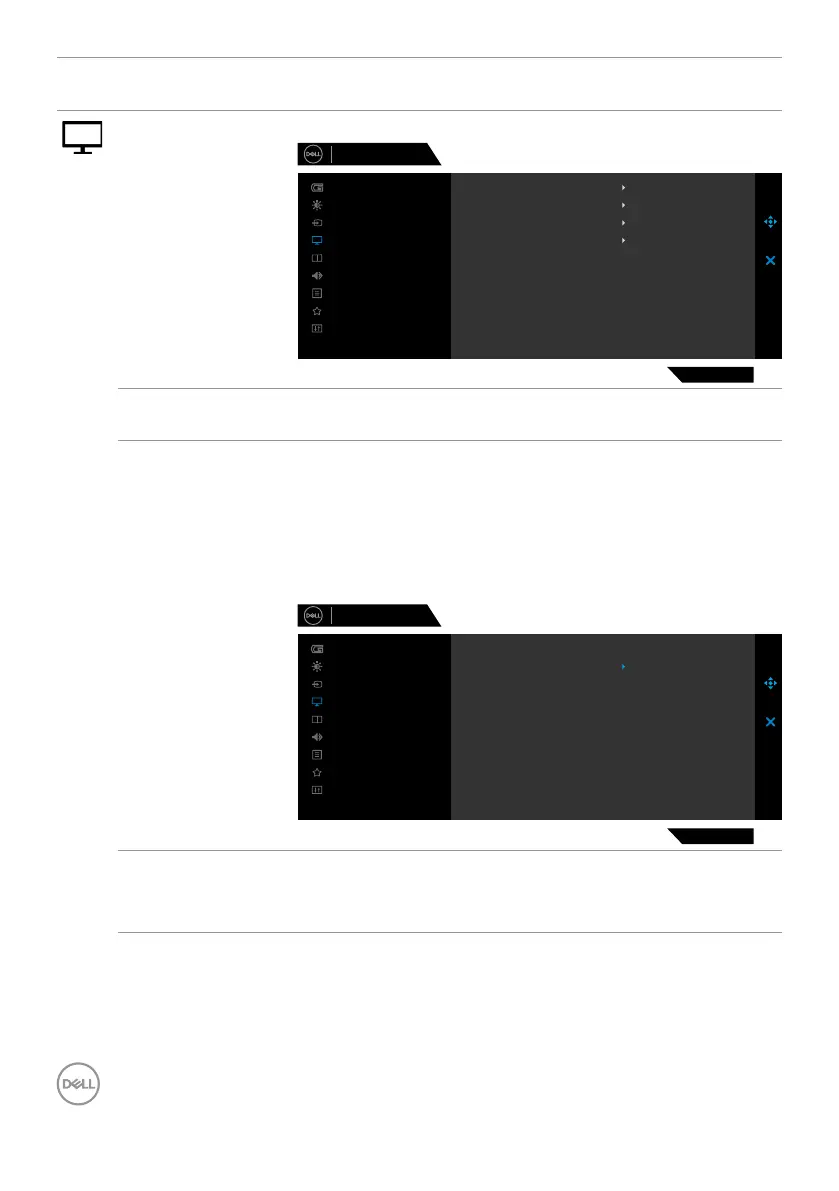
Display Use the Display menu to adjust image.
Input Color Format
Aspect Ratio
Smart HDR
Sharpness
Reset Display
Desktop
50
RGB
16:9
Dell 32 Gaming Monitor
G3223Q
Menu
Personalize
Others
Brightness/Contrast
Game
Display
Input Source
Audio
PIP/PBP
Aspect Ratio Adjust the ratio of width to height of an image to 16:9,
Auto Resize or 4:3.
Input Color
Format
Allows you to set the video input mode to:
• RGB: Select this option if your monitor is connected to
a computer or a media player that supports RGB output
using a DisplayPort or HDMI cable.
• YCbCr: Select this option if your media player supports
only YCbCr output.
Input Color Format
Aspect Ratio
Smart HDR
Sharpness
Reset Display
YCbCr
RGB
Dell 32 Gaming Monitor
G3223Q
Menu
Personalize
Others
Brightness/Contrast
Game
Display
Input Source
Audio
PIP/PBP
Sharpness This feature can make the image look sharper or softer.
Move the joystick up and down to adjust the sharpness
from ‘0’ to ‘100’.


 To Next Page