4 Upgrading Your System Board and Riser Board
www.dell.com | support.dell.com
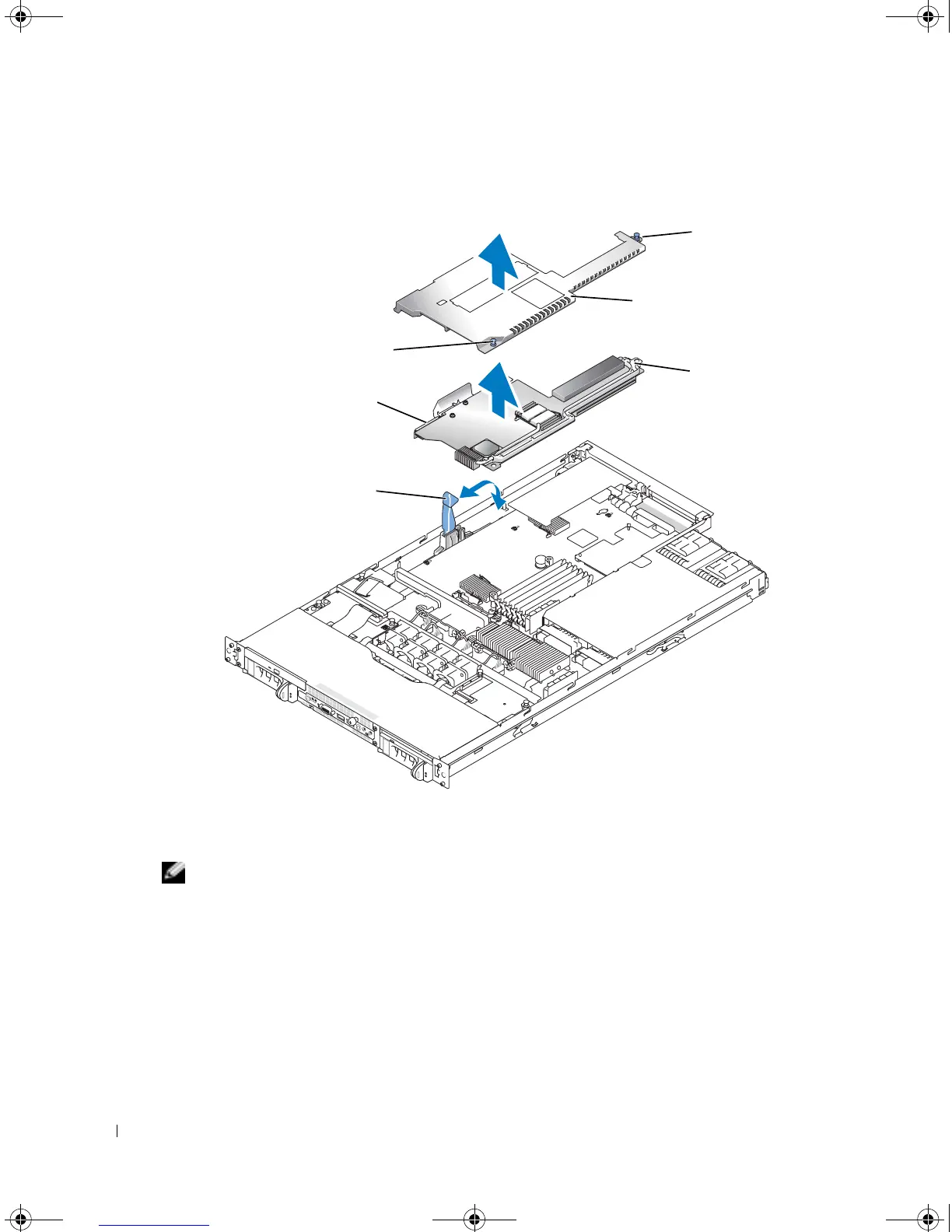
Figure 1-1. Installing and Removing the Riser Board
9
Remove the memory modules. See "System Memory" in "Installing System Options" in your
Installation and Troubleshooting Guide
.
NOTE: While removing the memory modules, record the memory module socket locations to ensure
proper installation.
10
If applicable, remove the RAC card. See "Installing a RAC Card" in "Installing System
Options" in your
Installation and Troubleshooting Guide
.
11
If applicable, remove the RAID key.
12
Remove the power supply(s). See "Power Supplies" in "Installing System Options" in your
Installation and Troubleshooting Guide
.
13
Remove the processor(s). See "Processor" in "Installing System Options" in your
Installation
and Troubleshooting Guide
.
plastic rivet
riser board
SCSI data connector
riser board insulator
riser board cam lever
plastic rivet
D8781bk0.book Page 4 Wednesday, October 6, 2004 3:43 PM












 To Next Page