Cet appareil
se recycle
Points de collecte sur www.quefairedemesdechets.fr
Français
Español
Polsku
Italiano
České
Svenska
Română
Magyar
Instrukcje bezpieczeństwa
• Produkt należy zabezpieczyć przed wilgocią
• Podczas instalacji produktu należy unikać elektryczności statycznej
Instalacja sprzętu
Uwaga: Upewnij się, że gniazdo M.2 obsługuje PCIe.
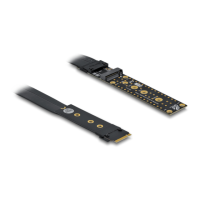
1. Zainstalować adapter M.2 w wolnym gnieździe M.2 key M.
2. Teraz można podłączyć M.2 SSD do slotu M.2.
Bezpečnostní pokyny
• Chraňte produkt před vlhkostí
• Při instalaci produktu se vyvarujte antistatické elektřině
Instalace hardware
Poznámka: Ujistěte se, že váš slot M.2 podporuje PCIe.
1. Nainstalujte M.2 adaptér do volného slotu M.2 key M.
2. Teď můžete připojit SSD M.2 ke slotu M.2.
Instrucciones de seguridad
• Proteja el producto contra el polvo
• Evite la electricidad antiestática al instalar el producto
Hardware Instalación
Nota: Asegúrese de que la ranura M.2 admite PCIe.
1. Instale el adaptador M.2 en una llave M.2 libre M.
2. Ahora puede conectar un SSD M.2 a la ranura M.2.
Instructions de sécurité
• Protéger le produit contre l’humidité
• Evitez l’électricité électrostatique lorsque vous installez le produit
Installation matérielle
Remarque : Assurez-vous que l'emplacement M.2 prend en charge PCIe.
1. Installer l'adaptateur dans une fente disponible M.2 clé M.
2. Maintenant, vous pouvez connecter un SSD M.2 à une prise M.2.
Biztonsági óvintézkedések
• Óvja a terméket a nedvességtől.
• Kerülje az elektrosztatikus kisüléseket a termék üzembe helyezése közben
Hardvertelepítés
Megjegyzés: Győződjön meg arról, hogy az M.2 aljzat támogatja a PCIe
használatát.
1. Szerelje be az M.2 adaptert egy szabad M.2 kulcs M nyílásba.
2. Most már összekötheti az M.2 SSD-t egy M.2 csatlakozóba.
Instrucţiuni de siguranţă
• Protejaţi produsul împotriva umidităţii
• Evitaţi electricitatea antistatică atunci când instalaţi produsului
Instalarea componentelor hardware
Notă: Asiguraţi-vă că fanta M.2 acceptă PCIe.
1. Instalați adaptorul M.2 într-o tastă M.2 liberă M.
2. Acum puteți conecta un M.2 SSD la slotul M.2.
Säkerhetsinstruktioner
• Skydda produkten mot fukt
• Undvik antistatisk elektricitet när du installerar produkten
Hårdvaruinstallation
Obs: Se till att din M.2-kortplats stöder PCIe.
1. Installera M.2-adaptern i en ledig M.2 key M-ingång.
2. Nu kan du ansluta en M.2 SSD-enhet till M.2-kortplatsen.
Istruzioni per la sicurezza
• Proteggere il prodotto dall'umidità
• Evitare l'elettricità antistatica durante l'installazione del prodotto
Installazione dell'hardware
Nota: Assicurarsi che lo slot M.2 supporti PCIe.
1. Installare l'adattatore M.2 in un tasto M.2 libero M slot.
2. Ora si può collegare un SSD M.2 allo slot M.2.


 To Previous Page
 Loading...