14
8.9 Making LONG coee using pre-ground coee
Follow the instructions in points 1, 2, 3 and 4 of the section “8.7
Making coee using pre-ground coee”, then press the
button (B9- g. 19).
The appliance starts making coee and “LONG COFFEE FUNC-
TION” appears on the display (B13), together with a progress bar
which lls gradually as preparation proceeds. Halfway through
preparation, the message “ADD PRE-GROUND COFFEE, Press OK”
appears. Add one level measure of pre-ground coee and press
OK (B12-g. 10).
Preparation resumes and the appliance displays a progress bar
which lls gradually as preparation proceeds.
8.10 Customising the LONG coee quantity
The appliance is set by default to automatically deliver about
6,09 .oz/180ml of LONG coee. To modify these settings, pro-
ceed as follows:
1. Place a suciently large cup or glass under the coee
spouts (A7- g. 13).
2. Press and hold the button (B9-g.19) until “Pro-
gram quantity” is displayed.
3. Release the button. The appliance starts delive-
ring coee;
4. As soon as the coee in the cup reaches the required level,
press the button again.
The quantity of coee in the cup has now been programmed.
Please note!
If the programme uses pre-ground coee, the appliance will
prompt you to add a second level measure of coee (C2).
9. MAKING CAPPUCCINOS AND MILKBASED
COFFEES
Please note!
• To avoid producing milk with poor froth or large bubbles,
always clean the milk container lid (D2) and hot water/
steam connection nozzle (A8) as described in sections “9.5
Cleaning the milk container after every use”, “11.10 Clean-
ing the milk container” and “11.11 Cleaning the hot water/
steam connection nozzle”
9.1 Filling and attaching the milk container
1. Remove the lid (D2- g. 20);
2. Fill the milk container (D3) with a sucient quantity of
milk, not exceeding the MAX level marked on the contain-
er (g. 21). Each mark on the side of the container corre-
sponds to about 3,38 .oz/100 ml of milk.
Please note!
• For a denser more even froth, you must use skimmed or
partially skimmed milk at refrigerator temperature (about
5°C).
• If “Energy Saving” mode is enabled, you may have to wait a
few seconds before the drink is delivered.
3. Make sure the milk intake tube (D4) is correctly inserted in
the bottom of the milk container lid (g. 22).
4. Place the lid back on the milk container.
5. Extract the cappuccino maker/hot water spout (C6) by
pressing the button (C7) on the spout (g. 23A and B).
6. Attach the milk container to the connection nozzle (A8)
and push as far as it will go (g. 24). The machine emits a
beep (if the beep function is enabled).
7. Place a suciently large cup under the coee spouts (A7)
and frothed milk spout (D5). Adjust the length of the milk
spout. To move it nearer the cup, simply pull it downwards
(g. 25).
8. Follow the instructions below for each function.
9.2 Adjusting the amount of froth
Turn the froth adjustment dial (D1) to adjust the amount of froth
on the milk delivered while making cappuccinos and milk-based
coees.
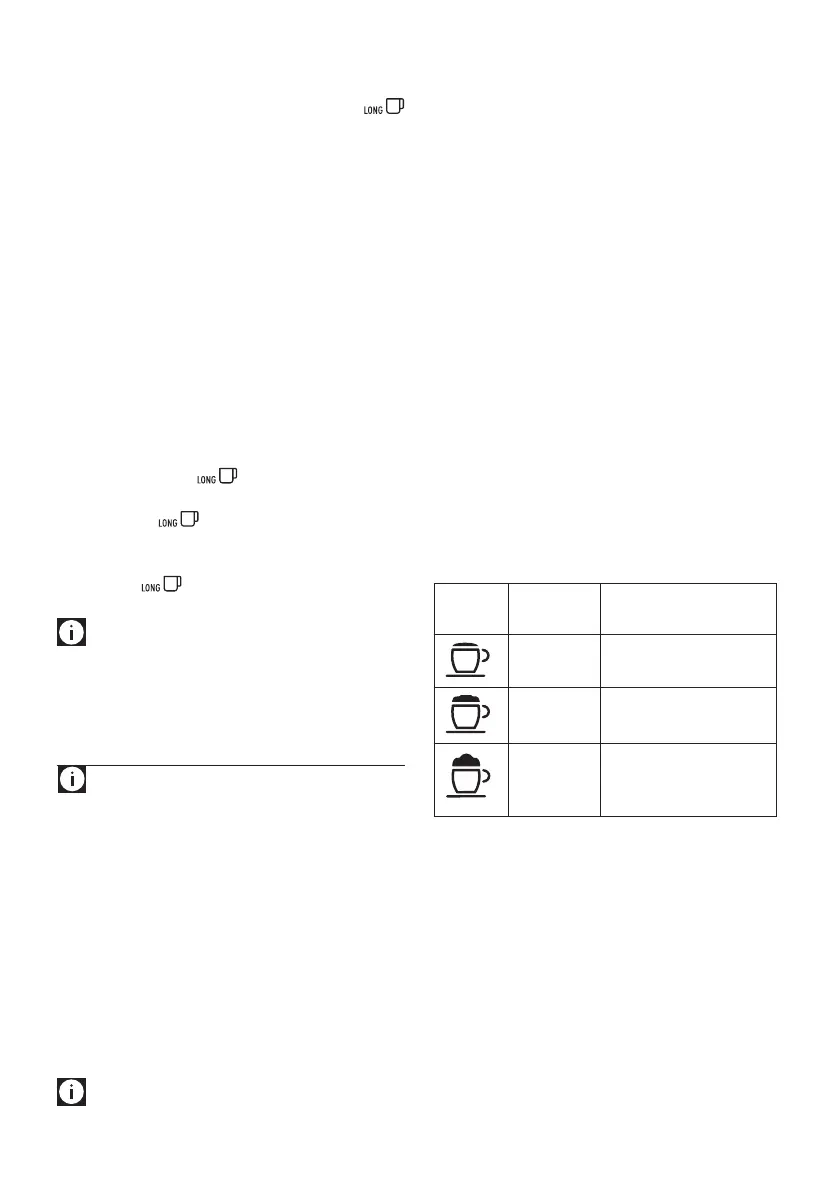
Dial
position
Description Recommended for…
No froth CAFFELATTE /
MILK hot milk)
Min. froth LATTE MACCHIATO/
FLAT WHITE
Max. froth CAPPUCCINO /
MILK (frothed milk)/
E
SPRESSO MACCHIATO
9.3 Making cappuccinos and milk-based coees
automatically
The CAPPUCCINO (B3), CAFFELATTE (B4) and LATTE MACCHIATO
(B5) buttons on the control panel (B) enable these drinks to be
prepared automatically. Proceed as follows:
1. Fill the milk container (D) and attach it as described above
(g. 24).
2. Turn the froth adjustment dial (D1) on the milk container
lid (D2) to the position corresponding to the required froth.
3. Press the button corresponding to the required drink.
The name of the drink selected is displayed together
with a progress bar which gradually lls as preparation
progresses.




 To Next Page