21
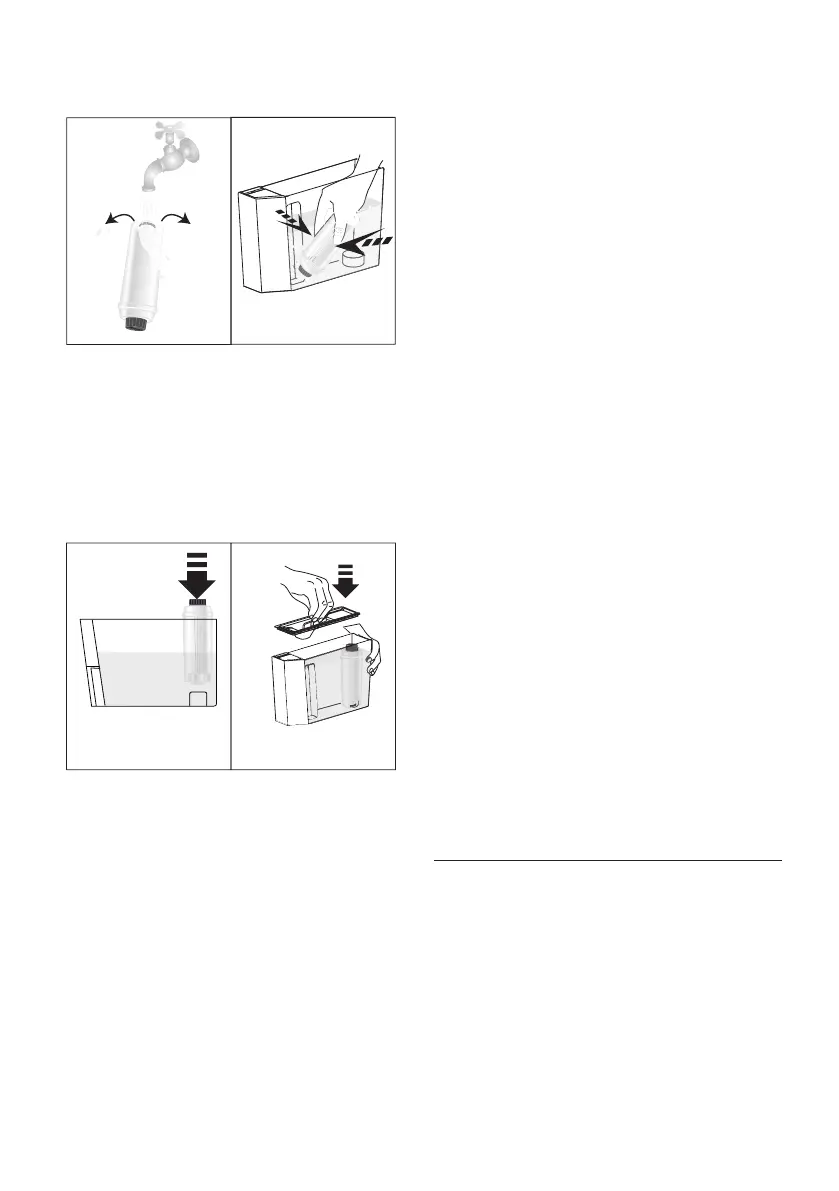
3. To activate the lter, run tap water through the hole in the
lter as shown in the gure until water comes out of the
openings at the side for more than a minute (g. 47).
4847
0,5 L
4. Extract the tank (A16) from the appliance and ll with
water.
5. Insert the lter in the water tank and immerse it complete-
ly for about ten seconds, sloping it and pressing it lightly to
enable the air bubbles to escape (g. 48).
6. Insert the lter in the lter housing (A17- g. 49A) and
press as far as it will go.
7. Close the tank with the lid (A18- g. 49B), then replace the
tank in the machine.
49A 49B
When you install the lter, you must notify the appliance of its
presence.
8. Press the MENU/ESC button (B14) to enter the menu;
9. Press < (B4) or > (B8) (g. 9) until “Install lter” appears
on the display (B13).
10. Press the OK button (B12- g. 10).
11. “Install?” is displayed.
12. Press the OK button to conrm the selection. “HOT WATER
Press OK” is displayed.
13. Position a container under the hot water spout (C6) (min.
capacity: 17 .oz/500 ml).
14. Press the OK button to conrm the selection. The appliance
begins hot water delivery and the message “Please wait” is
displayed.
15. After the ow of hot water stops, the appliance automati-
cally resets to “Ready for coee” status.
The lter is now active and you can use the coee machine.
14.2 Replacing the lter
When “REPLACE FILTER” appears on the display (B13), after two
months (see date indicator) or when the appliance has not been
used for 3 weeks, you should replace the lter (C4):
1. Extract the tank (A16) and exhausted lter;
2. Take the new lter out of its packet and proceed as illus-
trated in points 2, 3, 4, 5, 6 and 7 in the previous section.
3. Position a container with a minimum capacity of 17 .oz/
500ml under the hot water spout (C6).
4. Press the MENU/ESC button (B14) to enter the menu;
5. Press < (B4) or > (B8) (g. 9) until “Replace lter” is
displayed.
6. Press the OK button (B12- g. 10);
7. The message “Conrm?” is now displayed
8. Press the OK button to conrm the selection;
9. “HOT WATER Press OK” is displayed;
10. Press the OK button to conrm the selection. The appliance
begins hot water delivery and the message “Please wait” is
displayed.
11. After the ow of hot water stops, the appliance automati-
cally resets to “Ready for coee” status.
The new lter is now active and you can use the coee machine.
14.3 Removing the lter
If you want to use the appliance without the lter (C4), you must
remove it and notify the appliance of its removal.
Proceed as follows:
1. Extract the tank (A16) and exhausted lter;
2. Press the MENU/ESC button (B14) to enter the menu;
3. Press < (B4) or > (B8-g. 9) until “Install lter, Enabled” is
displayed;
4. Press the OK button (B12- g. 10);
5. “Disable?” appears on the display;
6. Press the OK button to conrm and the MENU/ESC button
to exit the menu.
15. TECHNICAL DATA
Voltage: 120 V~ 60 Hz max. 10 A
Power: 1250 W
Pressure: 1,5 MPa (15 bar)
Water tank capacity: 2 L
Size LxDxH: 260x470x365 mm
Cord length: 1750 mm
Weight: 11 kg
Beans container capacity: 400 g




 To Next Page