-1- -2-
-3- -4-
Pronouncement items 2
Function summarization 2
Get to know the musical player 3
Outward appearance and keystroke 3
Screen display signal 3
Electricity quantity display 3
Basic function operation 3
Keystroke operation definition 4
Keystroke operation definition 4
Keystroke action definition 4
Play music 5
Operation program 5
Sound-effect mode 5
Sound record 5
Record in recording mode 5
Choose recording types 6
Play recording documents 6
Transform ACT recording files into WAV 7
Use FM radio set(optional) 7
System setting 8
How to get in 8
Each parameter item synopsis 9
Detailed applying directions 9
Use USB disk 11
Upgrade the player 11
Other settings 13
Choose different catalogues (stop sub-menu) 13
Delete documents (stop sub-menu) 13
Playing mode (play sub-menu) 14
Playing speed (play sub-menu) 14
Re-reading mode (play sub-menu) 14
Re-reading times (play sub-menu) 15
Re-reading interval (play sub-menu) 15
Key recommendation 16
USB drive install 17
Difficulties 17
Follow accessory 18
Technical criterion 18
Catalogue
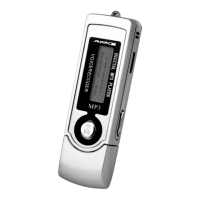
This Mp3 player represents a new generation of MP3 players, supporting MP1, MP2,
MP3, WMA, WMV, ASF, WAV and other music file formats. its excellent sound effect,
high reliability and graceful appearance match well with each other It can be called the
first-class works. We whole-heartedly wish that it could bring you super enjoyment of
the digital time.
Pronouncement items
Thank you for your purchase.
Please read this manual carefully before using your new player.
Contents in this manual may change possibly for better service.
We have the right to make changes to this manual without notice.
Function summarization
Exquisite pronouncement design, fashionable anti-rubbing nanom-eter lens decorations.
Support many kinds of audio frequency patterns, such as MP1, Mp2,MP3,WMA,WMV,
ASF,WAV and other musical formats.
Firmware upgrade function, offer latest upgrade software download in the website,
realize this machine's expansion of the function upgrade.
FM receiving, the function of strong automatic or manual searching radio station,
let you receive the programmed easily.
Without driving U-disk function, no need of managing program, it can pass on data, no
need of install driver in WIN 2000 system or over it.
"Unusual degree space"disk mode, using the subsidiary tools, you can divide the disk
of this machine into two disks and encipher one of them, hide the space ,and prevent this
part from seeing and reading, so as to hide the secret.
Backlight display in blue with time setting.
You can record through the microphone and save them as the voice documents of WAV
and ATC mode.
Section or contrast re-reading, realizing the true digital re-reading function.
Seven timbre balance ware, natural, rock, popular, classical, soft, jazz, and DBB.
Several playing mode, common mode, single -song cycle, catalogue playing, catalogue
cycle, total cycle, stochastic playing and skimming playing.
Fixed time shutting -off you can set the sleeping and electricity-saving mode so as to
use it more conveniently.
With the full and audio visual animation menu with corresponding words, you can use
it with high proficiency.
Electricity quantity display
This mp3 player employs the control of nine-level electricity quantity.
When the electricity quantity is 1.5V, the display shows .
With the time up, the display of the electricity quantity will reduce.When the battery is
almost used up, the battery mode will change into blank . You should change the battery
in time.
Basic function operation
Enter the menu
You can enter all kinds of menus through pressing the MODE key. The menu is divided
into the main menu (long time press the mode key to enter when is stopping), the playing
sub-menu (short time press) and the sub-menu in the stop situation (press the key for a
short time)
Browsing operation
Choose the skimming songs and the menu items.
Fast forward and fast backward while playing.
Entry distinctness features mode
From the main menu you will enter different function mode.
Main menu:
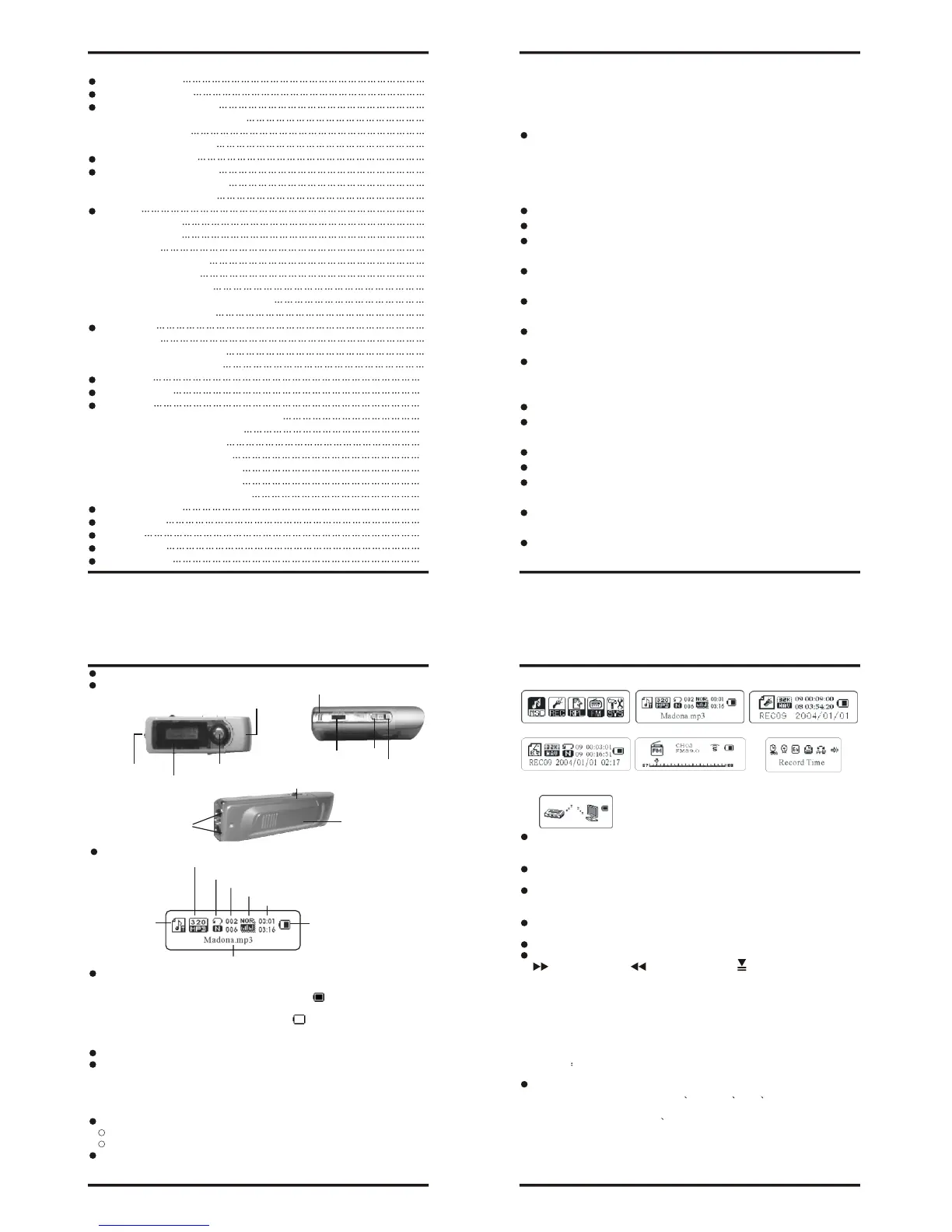
Screen display signal
Get to know the musical player
Outward appearance and keystroke
long control Mode
come into:
Musical mode: Recording mode:
Sound mode: FM mode (Optional): System setting:
Enter the USB mode through
the connection with PC:
Volume adjustment
Press the VOL- key for a short time to turn down the volume and the VOL+ key for a
time to turn up the volume.
Turn on / Turn off
Press the PLAY key for a long time to turn on or turn off the mp3 player
Playing or stopping (record have stay function). From submenu exit.
Music mode. short press Play key. Play music.
Play music. Short press Play key stop play.
Play/Pause
In the Music mode press the "Play/Pause" button to playback the music.
Keystroke operation
Keystroke operation definition
- Express Forward; - Express Backward; - Play/Pause
1."Play/Pause": Power ON/PLAY/STOP/OFF.
2."Mode": General confirmation button.
3."VOL+": Increase volume. Speed up.
4."VOL-": Decrease volume. Speed down.
5."Forward": Next one. Fast Forward. Next
6."Backward": Previous one. Fast Backward. Last
7."USB": USB plug.
8."Earphone jack": Standard earphone connector.
9."HOLD" Press lock key.
10. "REC": Come into recording mode.
Keystroke action definition
Keystroke action comprise short press long press press single press four genus
handle means.
Back expect in particular explain all belong to short press.
Short press: press once Keystroke. At once become effective.
Long press: press once Keystroke. Excess 1.2 second don't leave go of just go into
effect, and that just once.
Single: press once keystroke. As far as leave go of time moment just go into effect.
Press: Press once keystroke unto leave goes of process. Business take definite
Inner Microphone
USB SHELL
Hitching-string hole
LCD
PLAY/STOP
Headphone out
Battery Shell
HOLD
VOL-
VOL+
File mode/bitrate
Circulation mode
Song serial number/song total
Music impact mode
Play time
Electr of orm quantity reveal
Singer appellation/song appellation/Lyric show
Work mode


 To Next Page
 Loading...