Chapter 3 Creating and Editing Programs|DOP-EXIO Series
3-20
Revision March, 2008, Doc. Name: 2007PDD23000014
is replaced by C100, it is then a failure.
Search Instruction
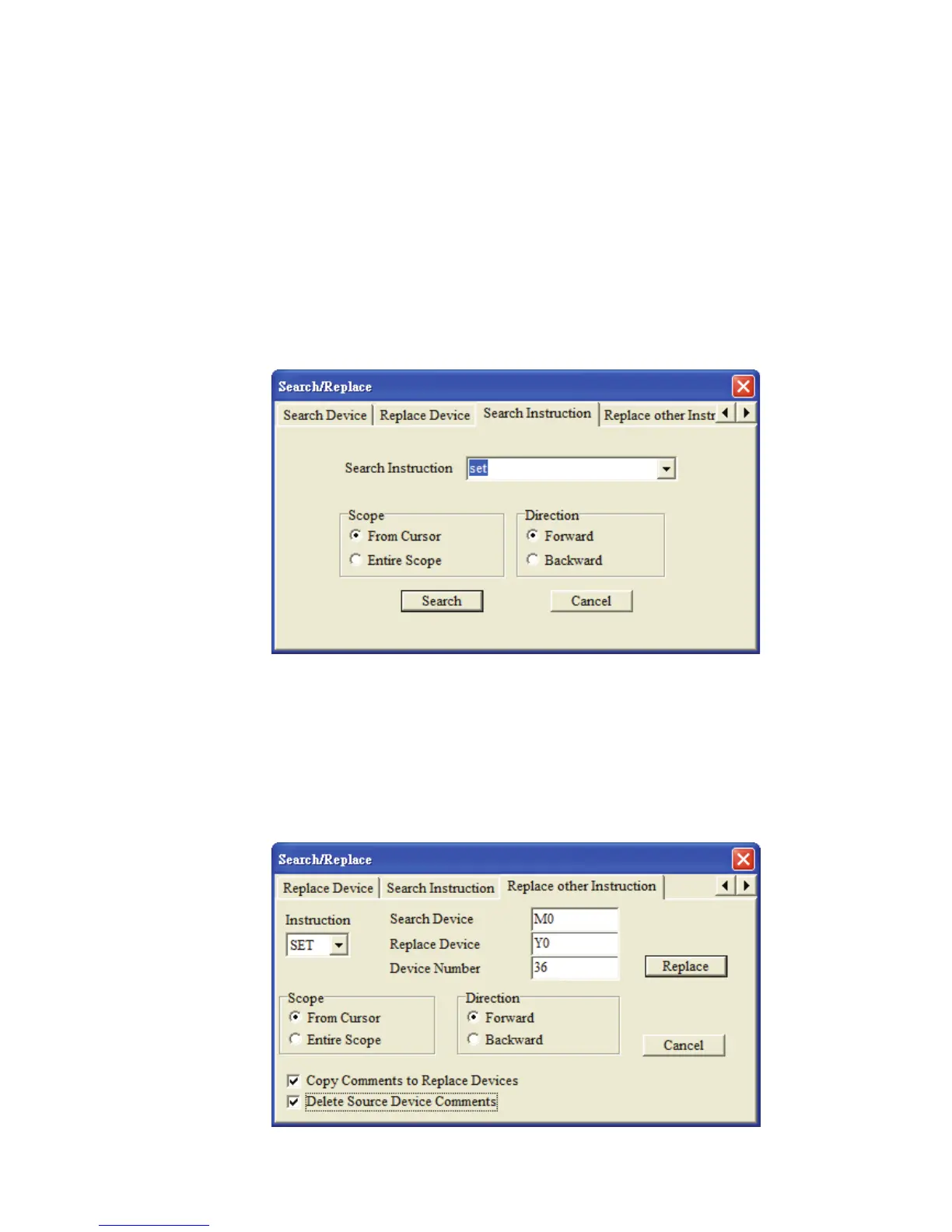
Use this command to search the specified instruction name match the search criteria in
the program. Click “Search Instruction” tab after the “Seach/Replace” function is
activated, and enter the instruction name that the user is looking for in the field of
“Search Instruction”. Then, press the “Search” button to start the search. The system
will memorize and record all the searched instruction names in the “Search Instruction”
drop-down menu. This is a useful function for the user to search more quickly and
conveniently next time.
Replace other Instruction
In “Replace other Instruction” tab, the system provides the replace criteria for SET, RST,
PLS and PLF, these four kinds of instructions and allows the user to replace the devices
match the criteria of these instructions in the program. For example, if the user wants to
replace SET M0 ~ M35 with SET Y0 ~ Y43, in order to complete the replacement, the
user can set the settings as shown as the figure below.



 To Next Page