FEATURES
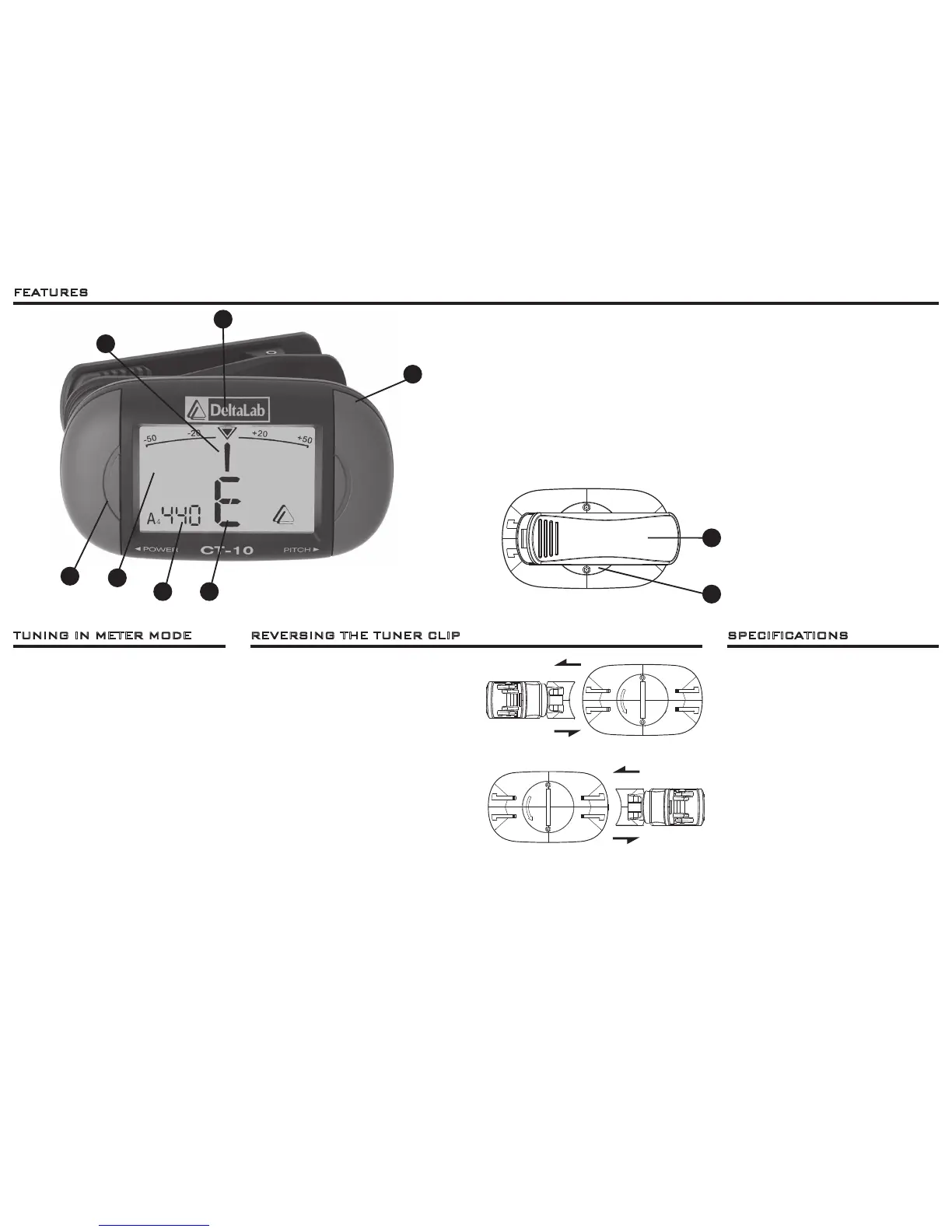
1. Power/Play Button – Turns power on or off.
2. Display – Shows note, calibration adjustments and tuning meter.
3. Calibration Frequency indicator – Displays current “A” note calibration.
4. Note Indicator – Displays current note being played.
5. Calibration Button – Adjusts tuner calibration.
6. Tuning Guide Indicator – Provides visual tuning reference for sharp, flat, and “in tune.”
7. Tuning Needle – Shows precise indication of current pitch .
8. Tuner Clip – Attaches tuner to instrument and picks up vibrations from instrument (for tuning).
9. Battery Cover
The CT-10 has a reversible tuner clip. This
allows the clip to be used on the front of
a guitar headstock or the back of a guitar
headstock on either right or left handed
instruments. Reversing the clip is a quick and
easy procedure.
1. Turn over the CT-10 so that you are looking
at the clip side of the tuner.
2. Hold the tuner body with one hand and
gently slide the clip away from the tuner
body with your other hand.
3. Rotate the tuner body clockwise 180
degrees.
4. Gently slide the clip back into the guides on
the other side of the rear of the CT-10.
TUNING IN METER MODE REVERSING THE TUNER CLIP
1. Clip the CT-10 on to your instrument in a
place where it will pickup the vibrations of
the instrument such as the headstock of
a guitar.
2. Press the power button to turn the CT-10
on. (Pressing the power button again will
turn off the CT-10.)
3. When the power is turned on, the reference
pitch defaults to A = 440 Hz . If you wish
to change the reference pitch (calibration),
press the Calibration button to increase the
reference pitch in 1 Hz steps over a range
of 415Hz -- 466 Hz. Once the pitch reaches
466Hz, it will start over at 415Hz.
4. Play a single note on your instrument. The
name of the nearest note will be displayed.
5. Adjust the tuning of your instrument so that
the meter moves to the 0 position (center)
and the center of the triangle fills in with
black. The tuning needle will be to the left
of center if your instrument is flat, or to the
right of center if your instrument is sharp.
SPECIFICATIONS
7
6
5
8
9
43
2
1
Indicator: LED Display
Tuning Range: A
0
(27.5 Hz) - C
8
(4186 Hz)
Tuning Mode: Vibration
Response Time: <20ms
Precision: +/- 1 cent
Calibration: 415Hz - 466Hz
Power Supply: 3 Volt
(CR2032 Lithium Battery)
Power Consumption: <16mA
Accessories: Owner’s Manual
Dimensions: 2.44”(62mm) Wide
x 1.3”(33mm) Deep x 1.5”(38mm) High
Weight: .91 oz (26g)


 To Previous Page
 Loading...