10
Playing tracks in the desired order
(Program playback)
Up to 25 tracks can be programmed.
1
In the stop mode, press
PROGRAM.
“PGM” is displayed.
2
Use 0 – 9, +10 to select the tracks.
GExampleH To program tracks 3, 12, 7 to
play in that order:
Press PROGRAM, 3, +10, 2, 7.
3
Press 1/3.
Playback starts in the programmed
order.
n Checking the order of the programmed tracks
In the stop mode, press 9.
The track numbers are displayed in the programmed order each
time the button is pressed.
n To clear the last track programmed
In the stop mode, press CLEAR.
The last track programmed is cleared each time the button is
pressed.
n To clear one programmed track at a time
In the stop mode, press 9 to select the track to be cleared, then
press CLEAR.
n Clearing the all programmed track
In the stop mode, press PROGRAM.
•When REPEAT is pressed during program playback, the tracks are
played repeatedly in the programmed order.
•When RANDOM is pressed during program playback, the
programmed tracks are played in random order.
•The program is cleared when the disc tray is opened or the power
is turned off.
Playing CDs
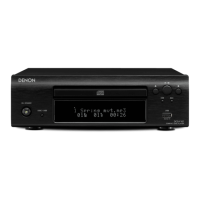
Switching the display
Press INFO.
Elapsed time of
currently playing track
Remaining time of
currently playing track
Remaining time for all
remaining tracks
•The display switches each time the button is pressed.



 To Next Page
 Loading...