EasyManua.ls Logo

Denon DN-961FA - Basic Operation Guide

Denon DN-961FA
92 pages
Print Icon
To Next Page IconTo Next Page
To Previous Page IconTo Previous Page
Loading...
@
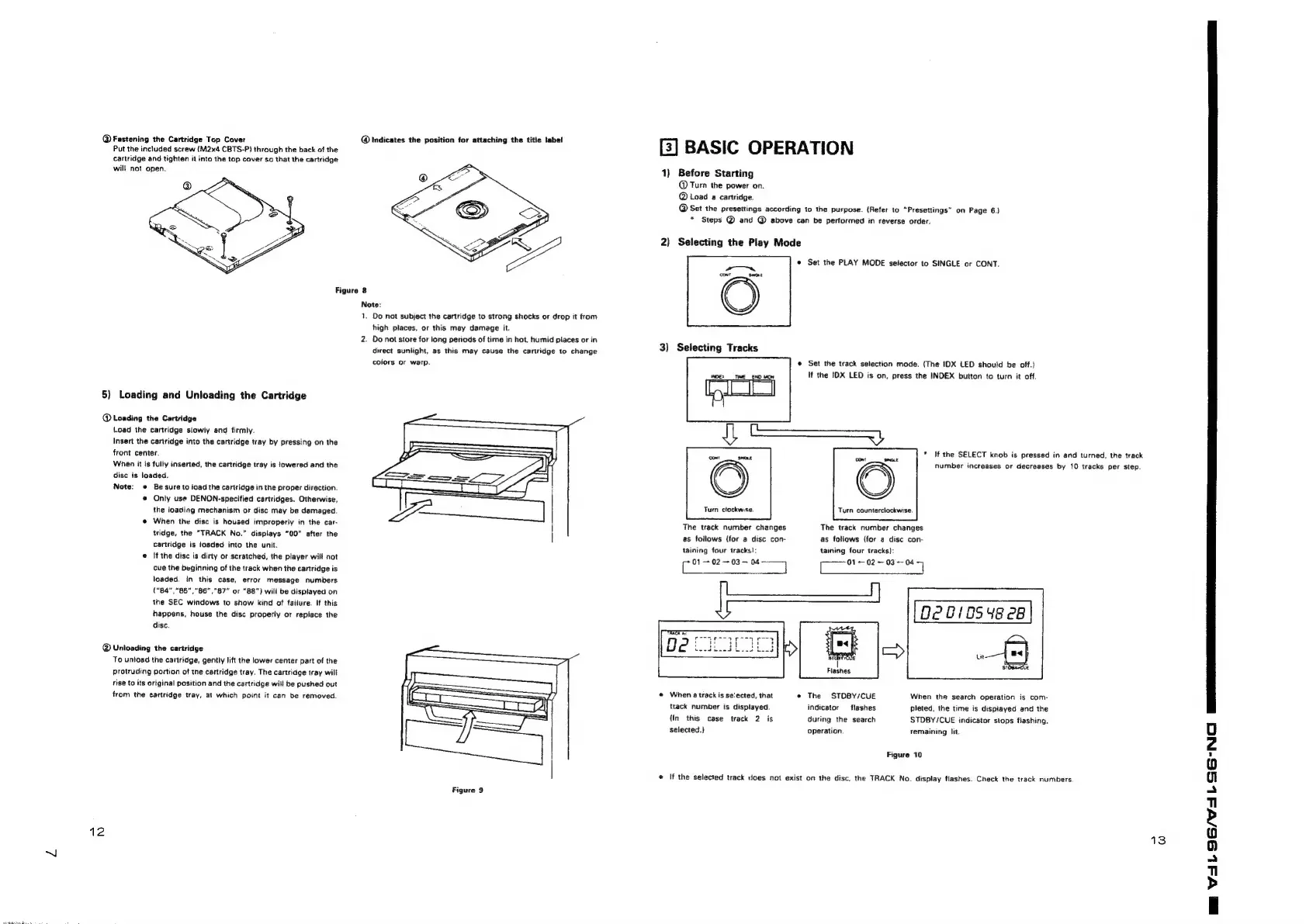
Fastening
the
Cartridge
Top
Cover
Put
the
included
screw
(M2x4
CBTS-P)
through
the
back
of
the
cartridge
and
tighten
it
into
the
top
cover
so
that
the
cartridge
will
not
open.
@
Indicates
the
position
tor
attaching
the
title
label
Figure
8
5)
Loading
and
Unloading
the
Cartridge
@
Loading
the
Cartridge
Load
the
cartridge
slowly
and
firmly.
Insert
the
cartridge
into
the
cartridge
tray
by
pressing
on
the
front
center.
When
it
is
fully
inserted,
the
cartridge
tray
is
lowered
and
the
disc
is
loaded.
Note:
©
Be
sure
to
load
the
cartridge
in
the
proper
direction.
Only
use
DENON-specified
cartridges.
Otherwise,
the
loading
mechanism
or
disc
may
be
damaged
@
When
the
disc
is
housed
improperly
in
the
car-
tridge,
the
“TRACK
No.”
displays
“00”
after
the
cartridge
is
toaded
into
the
unit.
e
If
the
disc
is
dirty
or
scratched,
the
player
will
not
cue
the
beginning
of
the
track
when
the
cartridge
is
loaded.
in
this
case,
error
message
numbers
(°84"|"85","86","87"
or
“88")
will
be
displayed
on
the
SEC
windows
to
show
kind
of
failure.
If
this
happens,
house
the
disc
properly
or
replace
the
disc.
@
Unloading
the
cartridge
To
untoad
the
cartridge,
gently
lift
the
lower
center
part
of
the
protruding
portion
of
tne
cartridge
tray.
The
cartridge
tray
wilt
rise
to
its
original
position
and
the
cartridge
will
be
pushed
out
from
the
cartridge
tray,
at
which
point
it
can
be
removed.
12
Note:
1.
Do
not
subject
the
cartridge
to
strong
shocks
or
drop
it
from
high
places,
or
this
may
damage
it.
2.
Do
not
store
for
long
periods
of
time
in
hot,
humid
places
or
in
direct
sunlight,
as
this
may
cause
the
cartridge
to
change
colors
or
warp.
=|
Figure
9
[3]
BASIC
OPERATION
1}
Before
Starting
@
Turn
the
power
on.
@
Load
a
cartridge.
@
Set
the
presettings
according
to
the
purpose.
(Refer
to
“Presettings”
on
Page
6.)
*
Steps
@
and
@
above
can
be
performed
in
reverse
order.
2)
Selecting
the
Play
Mode
©
Set
the
PLAY
MODE
selector
to
SINGLE
or
CONT.
a~—"
cont
£
|
3)
Selecting
Tracks
©
Set
the
track
selection
mode.
(The
IDX
LED
should
be
off.)
INDEX
TIME
END
MON
If
the
IDX
LED
is
on,
press
the
INDEX
button
to
turn
it
off.
real
*
If
the
SELECT
knob
is
pressed
in
and
turned,
the
track
number
increases
or
decreases
by
10
tracks
per
step.
Turn
clockwise.
Turn
counterclockwise
The
track
number
changes
as
follows
(for
a
disc
con-
taining
four
tracks]:
(eee
esl
The
track
number
changes
as
follows
(for
a
disc
con-
taining
four
tracks):
[ee
ee
0201854828
|
Flashes
@
When
atrack
is
se'ected,
that
e
The
STOBY/CUE
When
the
search
operation
is
com-
track
number
is
displayed.
indicator
flashes
pleted,
the
time
is
displayed
and
the
(In
this
case
track
2
is
during
the
search
STDBY/CUE
indicator
stops
fiashing,
selected.)
operation.
remaining
it.
Figure
70
©
If
the
selected
track
ices
not
exist
on
the
disc,
the
TRACK
No.
display
flashes.
Check
the
track
numbers.
13
me
VAL96/75
LSG-NC)
Saee

Other manuals for Denon DN-961FA

Related product manuals