39
ENGLISH
5. CONTROL FEATURES
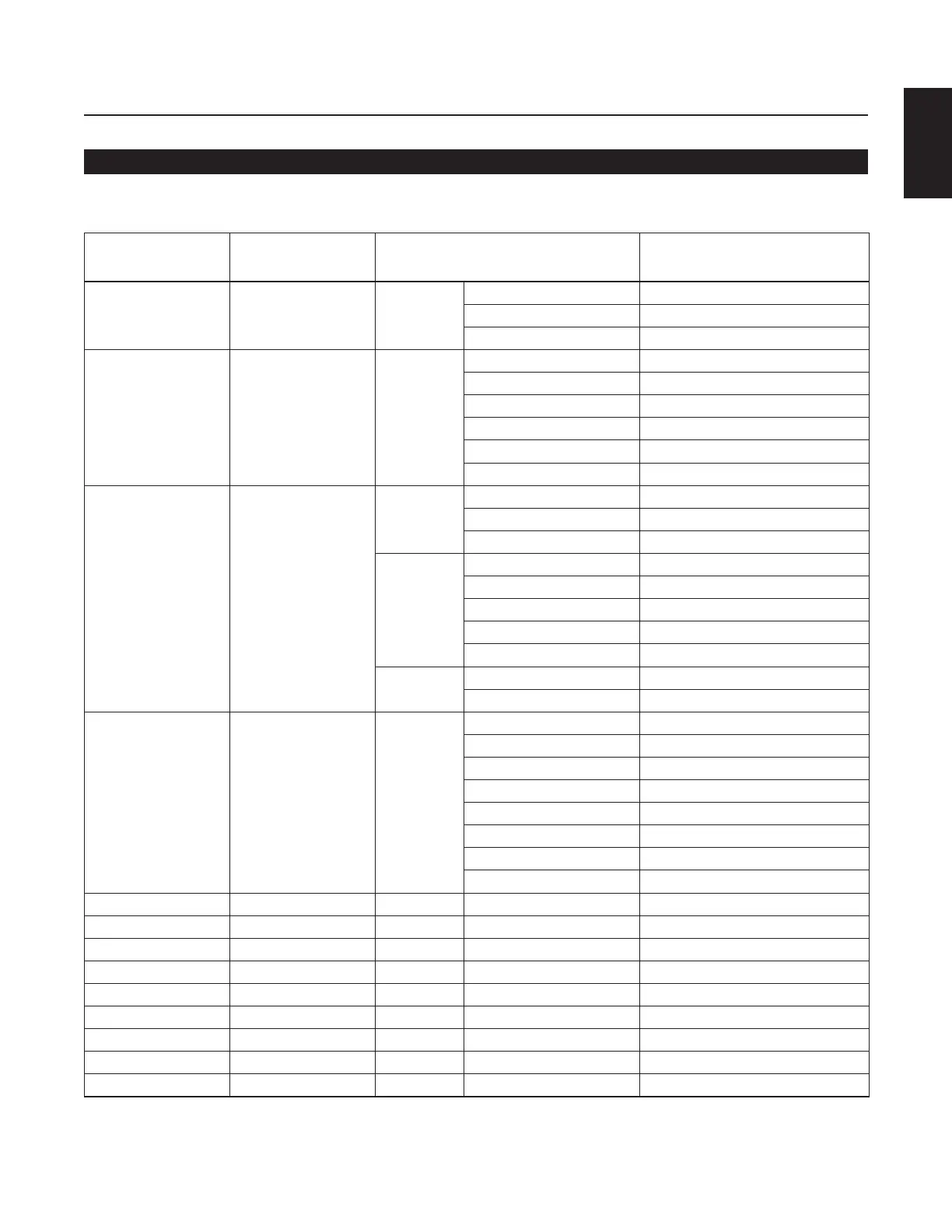
(5) Table of Status Request and Status information codes
When a Status Request Command from the host is received by the DN-C640, the DN-C640 sends the Status Information to the
host. When the DN-C640 changes status, the DN-C640 automatically sends Status Information to the host.
Mode Request Code Status
Power Mode “@0?PW”+CR On “@0PW00”+CR
Standby “@0PW01”+CR
Off –
Disc “@0?CD”+CR No Disc “@0CDNC”+CR
Loading “@0CDRE”+CR
Disc In “@0CDCI”+CR
Network “@0CDNW”+CR
Executing “@0CDEX”+CR
DiscError(Unformat) “@0CDCE”+CR
Status “@0?ST”+CR Stop Stop “@0STST”+CR
Cue “@0STCU”+CR
Sleep “@0STSL”+CR
Play Playback “@0STPL”+CR
Playback Pause “@0STPP”+CR
FF “@0STFF”+CR
RWD “@0STRW”+CR
END MON “@0STEM”+CR
Other Ulitity / Preset “@0STED”+CR
Operation Error “@0STER”+CR
Time Mode “@0?TM”+CR Time Mode TotalDiscTime “@0TMTD”+CR
Track Elapse Time “@0TMTT”+CR
Track Remain Time “@0TMTR”+CR
File Name “@0TMFN”+CR
File Information “@0TMFI”+CR
Recorded Date “@0TMRD”+CR
Recorded Time “@0TMRT”+CR
Recorded Channel “@0TMCH”+CR
Track Number “@0?TR”+CR Track Number “@0TRXXX”+CR
Display Time “@0?TI”+CR Time “@0TIhhhmmssff”+CR
Volume “@0?VM”+CR Volume “@0VMXXX”+CR
Pitch “@0?PT”+CR Pitch “@0PTXXXX”+CR
Text Title “@0?T1”+CR Text Title “@0T1XXX...”+CR
✽1
Text Artist “@0?T2”+CR Text Artist “@0T2XXX...”+CR
✽1
Text Album “@0?T3”+CR Text Album “@0T3XXX...”+CR
✽1
POS Code “@0?C1”+CR POS Code “@C1XXXXXXXXXXXXX”+CR
ISRC Code “@0?C1”+CR ISRC Code “@C2XXXXXXXXXXXX”+CR
✽1: 0 to 255 digits



 To Next Page