35
ENGLISH
Resetting
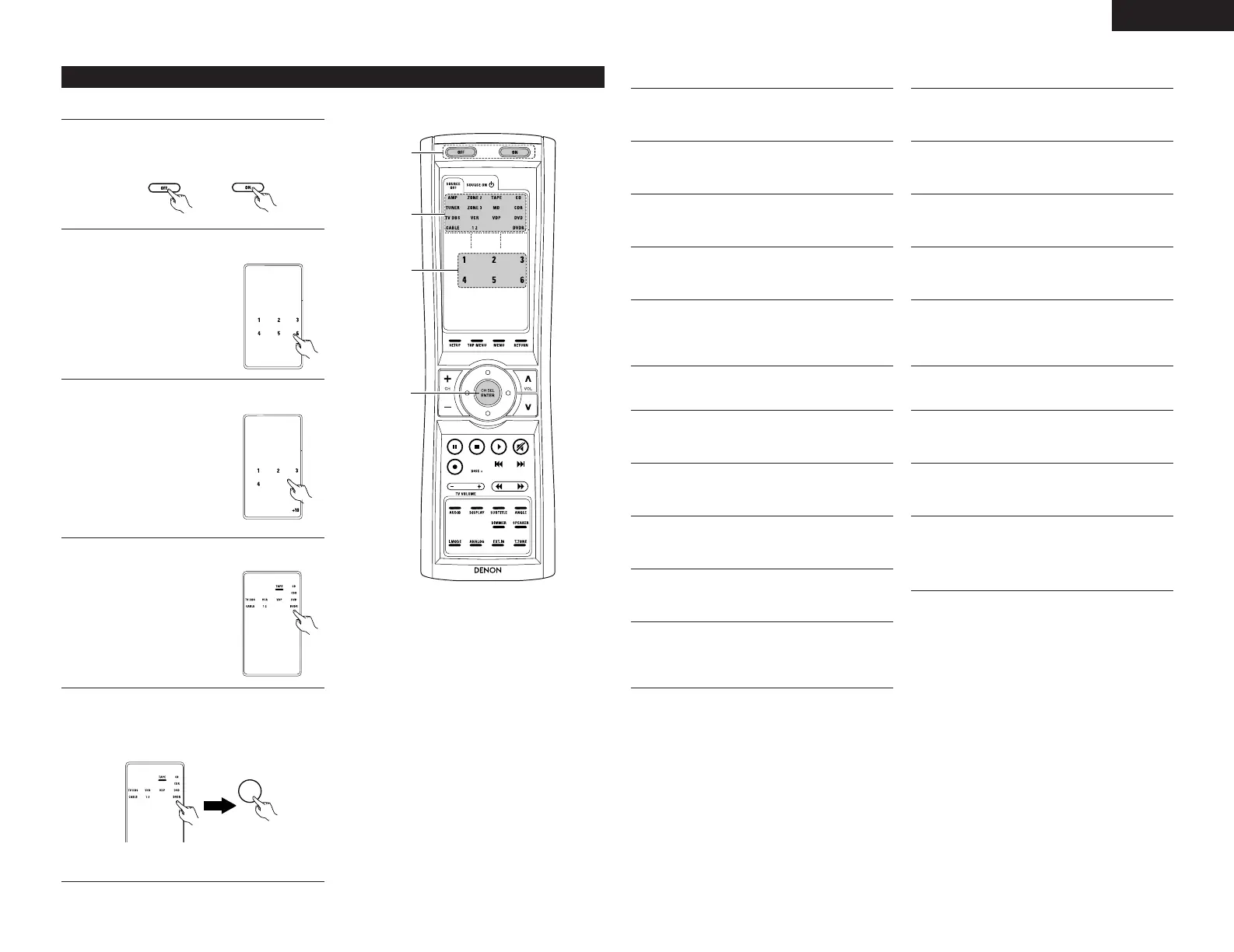
(1) Resetting the preset memory
1
Press the power ON button and the OFF button
at the same time.
2
Press the “6” button to select Resetting.
3
Press the “1” button to resetting the preset
memory.
• Resetting List
1 : Resetting the preset
memory
2 : Resetting the “Learned”
buttons
3 : Resetting the system call
4 : Resetting the punch
through setting
+10 : All reset function (factory
default)
4
The mode buttons that were set in preset
memory will all light.
5
(2) Resetting “learned” buttons
1
Press the power ON button and the OFF button
at the same time.
2
Press the “6” button to select resetting.
3
Press the “2” button to resetting the “learned”
buttons
4
The mode buttons will all light.
5
Press the mode button you want to resetting,
then press the ENTER button.
The set returns to the normal operating mode.
(4) Resetting the punch through setting
1
Press the power ON button and the OFF button
at the same time.
2
Press the “6” button to select resetting.
3
Press the “4” button to resetting the “punch
through”setting.
4
All punched through mode buttons will light.
5
Press the mode button you want to resetting,
then press the ENTER button.
The set returns to the normal operating mode.
(3) Resetting the system call buttons
1
Press the power ON button and the OFF button
at the same time.
2
Press the “6” button to select resetting.
3
Press the “3” button to resetting.the system
call buttons.
4
All buttons of System Call will light.
5
Press the button you want to resetting, then
press the ENTER button.
The set returns to the normal operating mode.
(5) All reset function
1
Press the power ON button and the OFF button
at the same time.
2
Press the “6” button to select resetting.
3
Press the “+10” button to resetting, all the
settings (factory defaults).
• The set returns to the normal operating mode
after approximately 20 seconds.
When resetting the preset memory of a specific
device.
• Press the mode button you want to resetting,
then press the ENTER button.
The set returns to the normal operating mode.


 To Next Page