䈜
䈜䈜
䈜The screen design may be changed.
䈜
䈜䈜
䈜El diseño de la pantalla se cambio.
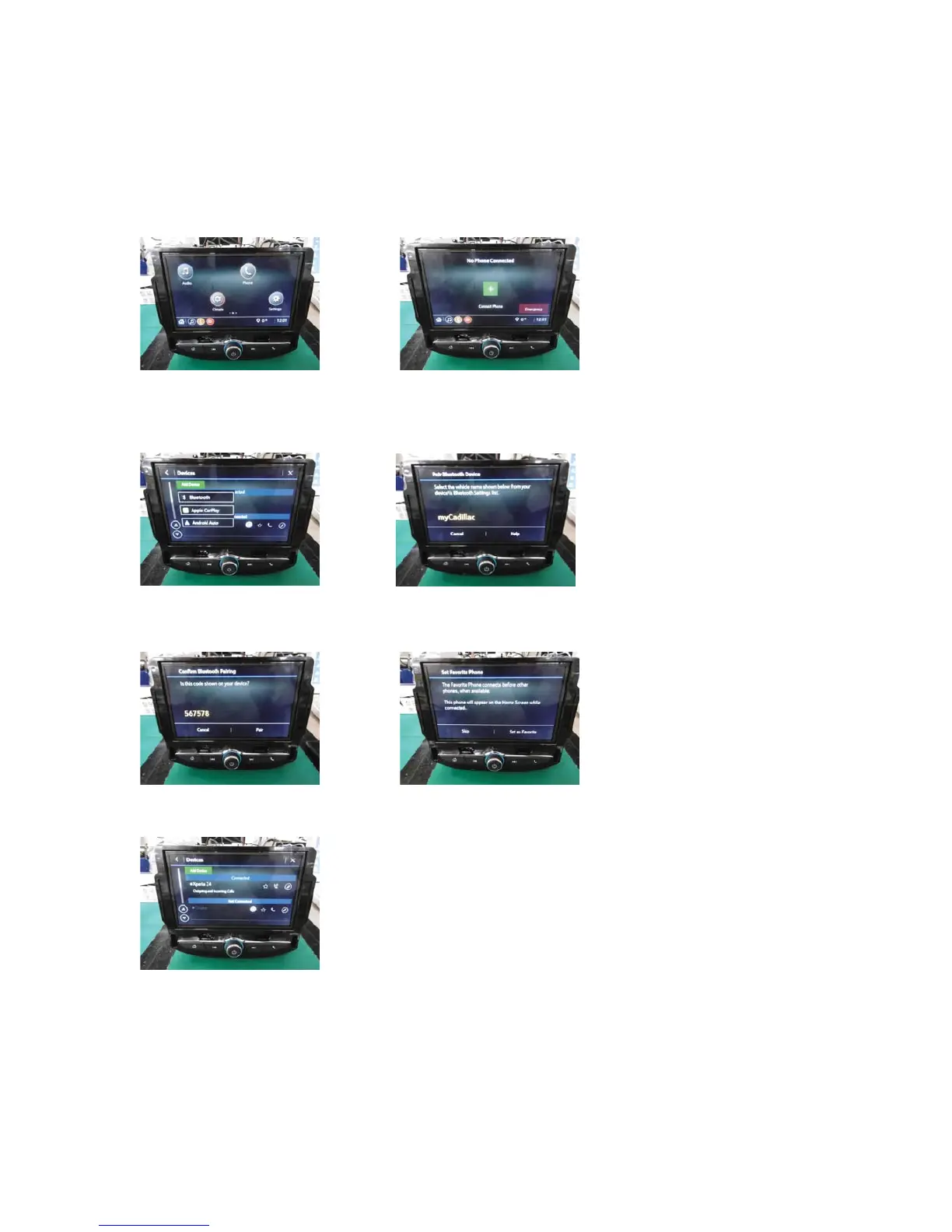
Connect Bluetooth phone (Pairing)
Una el teléfono del Bluetooth (Dispositivo)
1.Press the ෞ
ෞෞ
ෞ button 2.Touch "+".
1.empuje el botón de ෞ
ෞෞ
ෞ 2.Toque "+".
3.Press Add Device and then select Bluetooth 4.Search the name on the display from your cell phone.
empuje "conector telefono" y luego selecciona 4.Busque su teléfono celular en la pantalla.
selecciona el bluetooth
5. Select Pair both radio and your cellphone 6. Select Set as favorite or skip
5.Seleccione dispositivo su teléfono celular 6. Seleccione favorito o cancelar
7.Completed connection
7.Conexión completada
Fujitsu Ten Confidencial



 To Next Page