
 Need help?
Do you have a question about the Denver BFH-15 and is the answer not in the manual?
Instructions for downloading the DENVER BFH-15 mobile application via QR code or app store.
Guide on how to activate and charge the smart band device before first use.
Steps to pair the smart band with your mobile device using Bluetooth via the app.
Describes normal mode functions including time, distance, steps, and calories tracking.
How to activate and view heart rate data, requiring the band to touch the skin.
Details on receiving alerts for calls, messages, alarms, and sedentary reminders.
How the device records daily activities like steps, distance, and calorie consumption in the app.
Details on how the smart band automatically recognizes and monitors sleep progress.
Alerts the user via vibration when the smart phone is out of Bluetooth range.
Instructions on using the device screen to control remote photograph shooting on the phone.
Information on data clearing cycles and the suggestion to sync data with the app regularly.
Solutions for issues finding the device when attempting to pair it with a smartphone.
Steps to resolve problems connecting the smart band to the mobile application.
Procedure to reset the smart band to its original factory settings via the app.
Instructions on how to update the smart band's firmware through the mobile app.
Identifies the smart band model as DENVER BFH-15.
Details the Central Processing Unit used in the smart band.
Specifies the sensor used for motion detection.
Indicates the weight of the smart band's host unit.
Details the battery type and capacity for the device.
Specifies the Bluetooth version used for data synchronization.
Defines the acceptable temperature range for device operation.
Indicates the device's rating for protection against dust and water.
Specifies the typical standby duration of the device.
Lists the operating frequency range for the device's wireless communication.
States the maximum radio frequency output power of the device.
Information regarding the device's compliance with EU directives and available online.
 General
| Easy to use | Yes |
|---|---|
| Connectivity technology | Wireless |
| Wi-Fi | No |
| Bluetooth version | 4.0 |
| Stairs climbed | - |
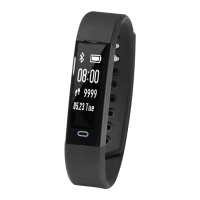
| Device type | Wristband activity tracker |
| Control type | Buttons |
| Product color | Black |
| International Protection (IP) code | IP65 |
| Battery life | 10 day(s) |
| Charging time | 1 h |
| Charging source | USB |
| Battery capacity | 50 mAh |
| Mobile operating systems supported | Android, iOS |
| Display type | OLED |
| Display diagonal | 0.87 \ |
| Quantity per master (outer) case | 20 pc(s) |
| Quantity per intermodal container (20ft) | 48000 pc(s) |
| Quantity per intermodal container (40ft, HC) | 126000 pc(s) |
 Weight and Dimensions
| Depth | 12 mm |
|---|---|
| Width | 55 mm |
| Height | 16 mm |
| Weight | 55 g |
| Package depth | 30 mm |
| Package width | 140 mm |
| Package height | 86 mm |

 To Next Page