1. Insert the “Power Supply Plug” into the car cigarette power port (Input:12-24V)
2. Switch on the unit using the “ON/OFF” switch
3. You can adjust the direction of the unit with goose neck
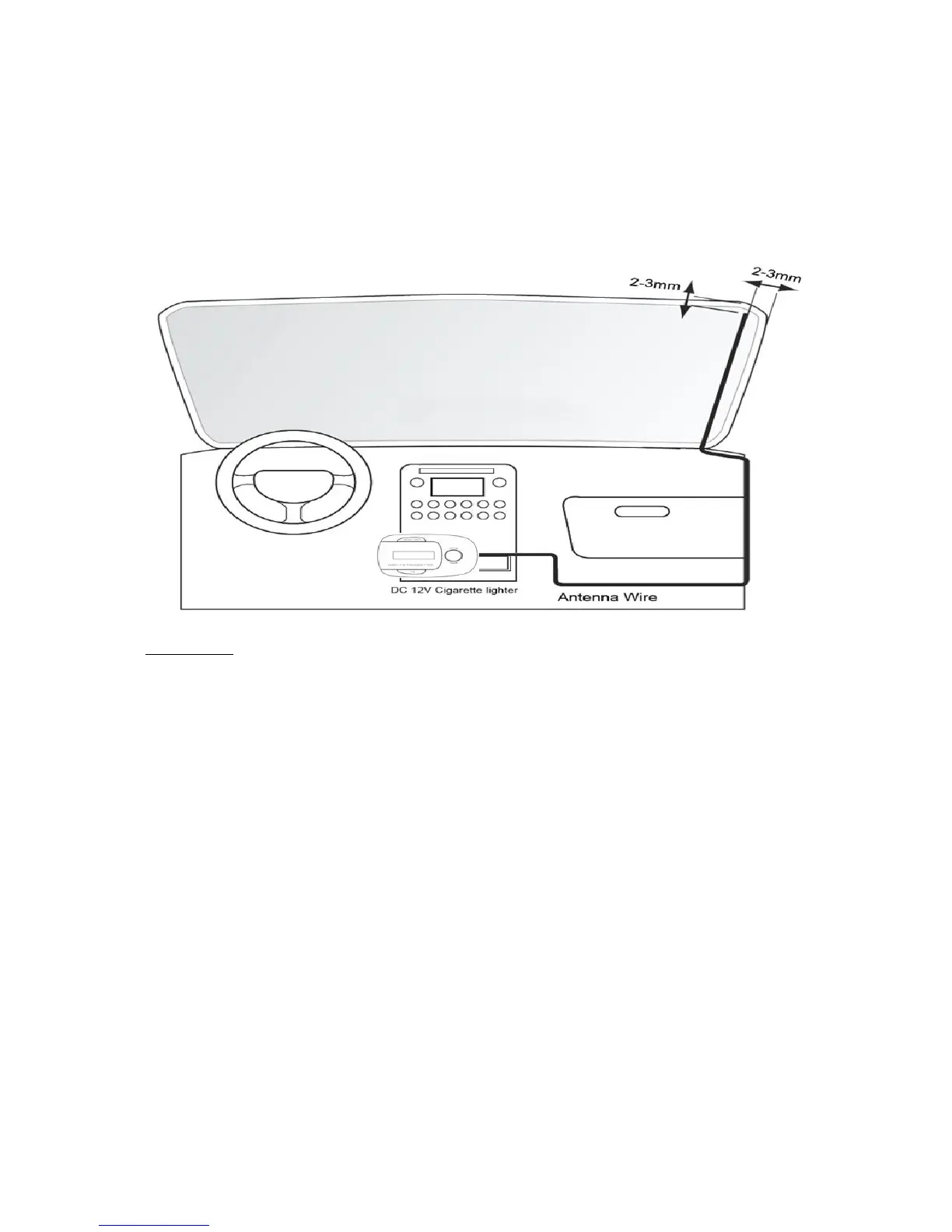
4. Install the external antenna as per the below diagram:
How to use:
1. Insert the Power Supply Plug into the car cigarette power port (Input:12-24V)
2. Switch on the unit using “ON/OFF” switch
3. It will perform a Full Scan of DAB stations automatically within 5 seconds after “Full
scan” shows on the display
4. Press TX button on the DAB-11 will get to the “FM Transmit Mode” and the screen will
show the current FM transmitting frequency, make a note of that number. You can
change to other frequencies manually to suit better to the district you are driving in. You
are recommended to tune your car FM radio to an unoccupied FM frequency, so that the
car radio is not interfered and to get a better audio quality.
5. Turn on your in-car audio system
6. Switch the car radio’s FM frequency to match the DAB-11 FM transmitting frequency
setting
Press and hold "MENU/INFO" button for 2 second, and spin “Spin Button Control” button
clockwise, and to see some options, below are listed in sequence:
1) Full scan: press the “Spin Button Control” and spin to start a full automatic scanning



 To Next Page