InstallationofTVchannels
ThisTVcomeswithtripletuner.
FordigitalterrestrialTV:(DVB-T2 – H.265HEVC)
FordigitalcableTV:(DVB-C)
FordigitalsatelliteTV:(DVB-S2)
+ithasananaloguetuneraswell.
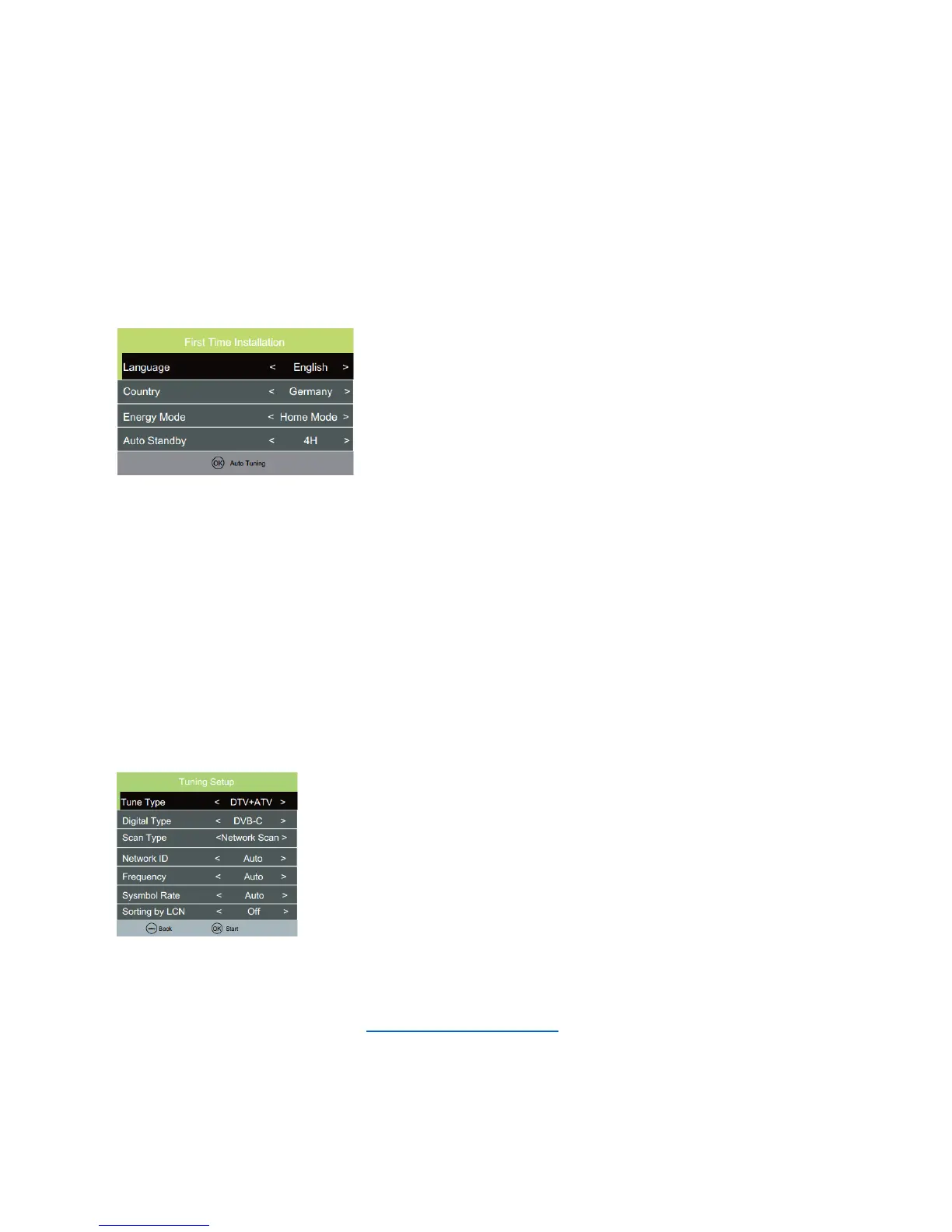
WhenyoustarttheTVforthefirsttime,youwillenterafirsttimeinstallationmode,Hereyoushallchoose
language,countryyouarein,Energymode(homeorstore)andAutostandby.Youdothisbypushingthe
arrowleft/rightkeys.
Whenyouarefinishedmakingthesesettings,pushOKbuttontogettoautotuningmenu.
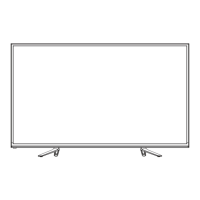
ChooseTunetype.(eitherDTV,ATV(analogue,orboth)
Thenchoosedigitaltype:DVB-Tforterrestrial(ifyouhaveownantennaontheroof),DVB-Cifyouhavedigital
cableTV(pleasenotice,youneedtoknowtheDVB-Cinfofromyourcableprovider)orDVB-Sifyouhavea
satellitedish.
IfusingDVB-T,youcanjustmakeanautoscan,anditwillscaninallavailablechannel.
IfusingDVB-C,youcanuseeitherfullscanorNetworkscan(somecountriesdemandthis).Andinsert
NetworkID,Frequency,SymbolrateandLCNon/off.
IfusingDVB-S,youhavetoknowwhatsatelliteyourdisharepointingtowards,andchoosethisinthesetup
menu.
Example:
Pleasenotice.TheTVhasacommoninterface+input.ThisallowsyoutoinsertCAmodule+smartcardfrom
yourTV/cableprovidertowatchpayperviewchannelsandselectablechannelsoutsideofyourpackage.Pay
attentiononthedescriptionshownonthebackoftheTVonhowtoinsertCAmodule. Youcan
downloadfullmanualonourwebsite: www.denver-electronics.com -entersearchfieldandwriteyourTV
modelnumberthere.
ENG-4





 To Next Page