LOCATION OF CONTROLS (cont. .)
Left channel speaker terminal
Connect the left speaker cable here.
Right channel speaker terminal
Connect the right speaker cable here.
Slot for Wall-Mounting Bracket
Used to connect the mounting (included) to
mount the unit on the wall.
-5-
41.
42.
43.
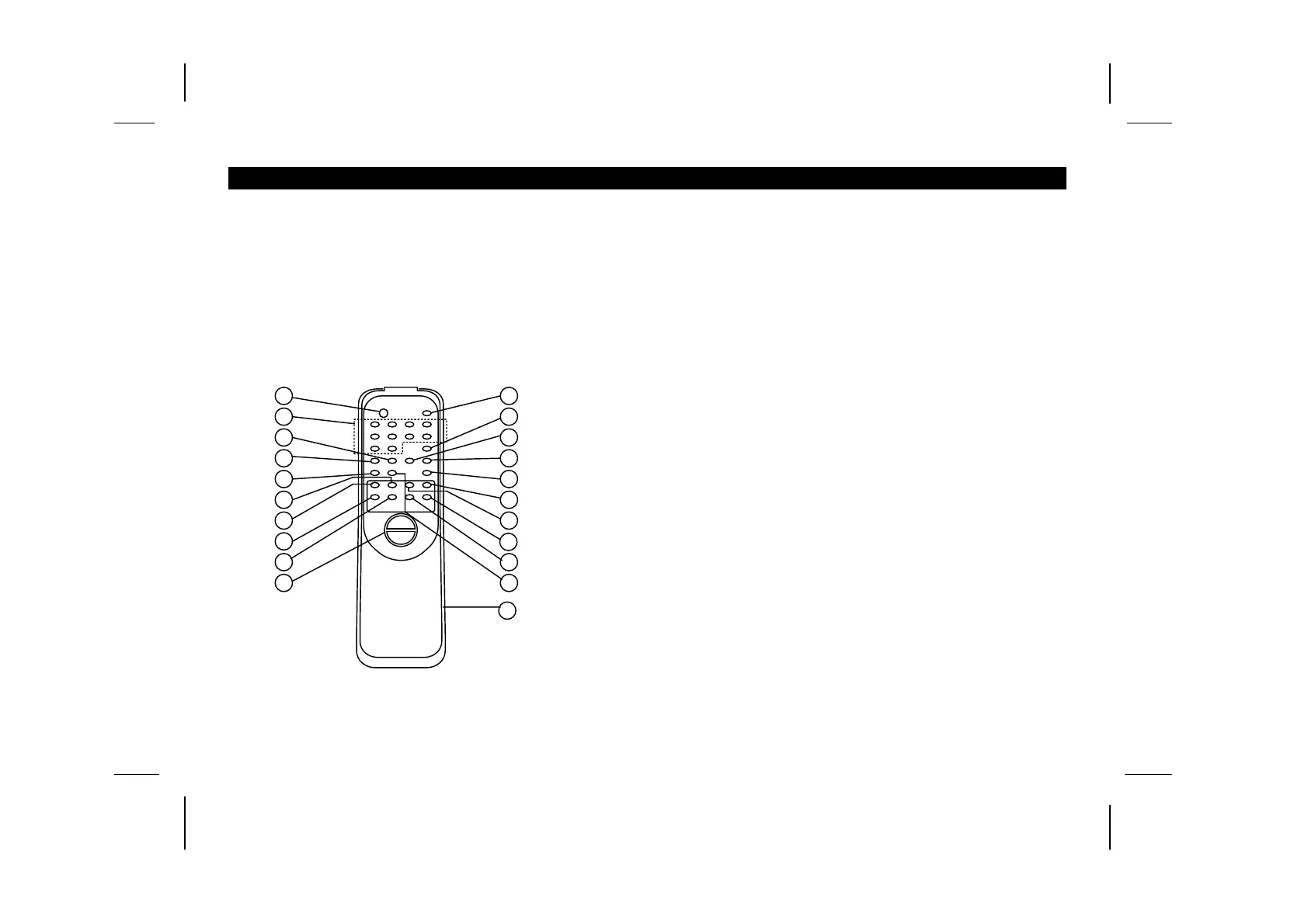
REMOTE CONTROL
1. Power ON/OFF - Standby button
2. Program select buttons
Tuner - To recall preset stations
CD - To recall tracks.
For 1-9, press 0 and 1-9 buttons.
For 10, press 1 and then “0”
For 11 - 19, press 1 and then 1 - 9.
For 20, press 2 and then “0”
For 21 - 29, press 2 and then 1 - 9.
For 30, press 3 and then “0”
3. MEM/CLK-ADJ: CD - Use to program CD tracks for
programmed play / TUNER - Use to programmed preset
memory / CLK-ADJ - Press to set hours and minutes
4. RANDOM/PRESET DN: CD Random play / Tuner - To select
Preset down station
5. MP3 MODE: Press to select TITLE or ALBUM at MP3 mode
6. AUX: Press to activate operating mode AUX
7. SLEEP/HOUR: Press to select the sleep/hour
8. CD - Skip/Search backward / TUNER - Tuning down
9. CD - Skip/Search forward / TUNER - Tuning up
10. VOLUME: Volume up or down
11. MUTE: Muting ON/OFF
12. INTRO/MONO-ST.: CD Intro play / Press to select Stereo or
Mono at TUNER FM mode
13. REPEAT/PRESET UP: CD - Repeat play / This button does
not function in MP3 mode - To select
Preset up station
14. REMAIN/MODE: CD - Check the remaining and clock
time / TUNER - Check clock and frequency
/ This button does not function in MP3 mode
15. FOLDER UP: Press to retrieve MP3 folder up
16. FOLDER DN: Press to retrieve MP3 folder down
17. BAND/TUNER: Press to select the AM/FM band in Tuner
mode / Press to select the Tuner mode
18. PLAY/PAUSE: CD Play/Pause
19. STOP: CD Stop
20. D-BASS (DYNAMIC BASS) button
21. Battery Compartment
1
1
2
1
3
1
4
1
5
1
6
1
7
1
8
1
9
11
10
12
13
14
15
16
17
21
19
20
18


 To Next Page