ENG 4
Battery Level Indicator
Batteryisfull.
Lowbattery;theplayershouldbechargedassoon
as possible.
Important:Chargetheplayerforatleast8hoursbefore
usingitforthefirsttime.
Basic Operation
To turn the player off, press and hold the button
until the display shuts off.
Note:"Pressandhold"meanslongpressforapprox.2
seconds.
Music
Music Playback Controls
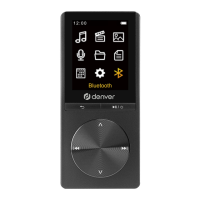
ButtonDefinition
1.button:Returntopreviousmenu
2.button:Selectandenterdifferent
modes/Play/Pause/PowerOn/Off(pressandhold)
3.NEXTbutton:Presstoskiptothenextfile;pressand
holdtofastforward,moverightinmenuoptions
4.
PREVIOUSbutton:Presstoskiptopreviousfile;
pressandholdtofastrewind,moveleftinmenu
options
5.
VOL+button:Increasevolume
6.
VOL-button:Decreasevolume



 To Next Page