When the AC outlet is not in use, turn it off to save
power.
NOTE: AC outlets, AC output voltage and frequency will vary in different countries or
regions. Please refer to the actual product specifications before use.
Protection mode:
Short-circuit/overload protection. If the AC outlet is short-circuited or overloaded (load
exceeds 150 W), the unit will shut down the AC output for protection. Please eliminate the
problem and press the AC button to switch the AC outlet on again.
Some electrical appliances such as refrigerators, ice makers or laser printers may require a surge
power to start or operate for a certain time. The surge power could exceed 150 W, thus triggering
the overload protection of this unit. Please disconnect the appliances and consult with the respective
manufacturers for further guidance. Please eliminate the problem and press the AC button to switch
the AC outlet again.
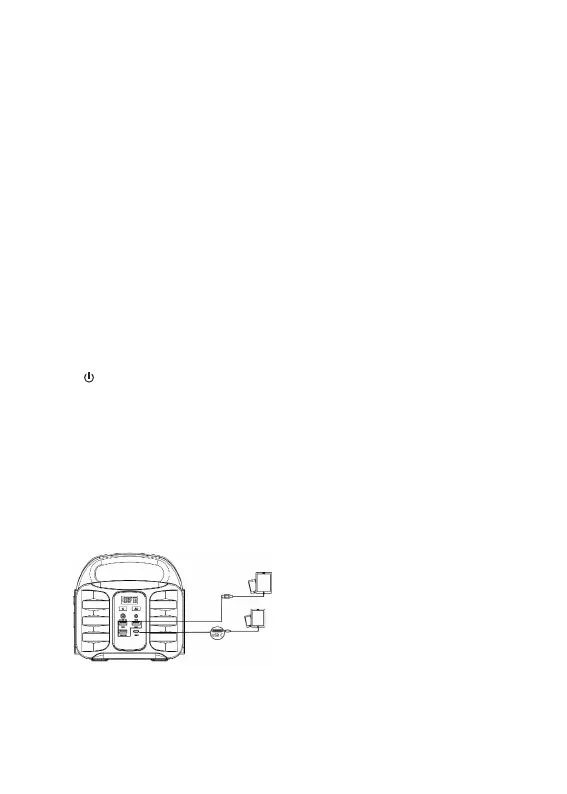
2) How to supply power to USB(C) digital appliances with this product?
Connect the standard USB cable of a digital appliance to the USB port of the unit, and press the
“ ” to turn on the USB port.
Qualcomm Quick Charge 3.0 technology. This product supports Qualcomm Quick Charge 3.0
technology and the 5 V, 9 V, 12 V/2A maximum output and is therefore suitable for smart USB
devices such as mobile phones or tablets that also support the Qualcomm Quick Charge 3.0
technology for fast charging. The actual charging voltage and current depend on the actual USB
smart device. Consult the device manufacturer for more information.
PD Type-C. The PD Type-C port 5 V/2.4 A 9 V/3 A 12 V/3 A 15 V/3 A 20 V/3 A is suitable for
smart devices such as mobile phones or tablets that also support the PD fast charging protocol for a
quick charge. When in use, you must press the “Power On Key” screen to light up for normal
output charging.
When using the Type-C port, you must press the “Power On Key”
for normal charging when the screen is on.
ENG
4


 To Next Page