EasyManua.ls Logo

Denver TR-54C - User Manual

Denver TR-54C
3 pages
Print Icon
To Next Page IconTo Next Page
Loading...
11. AC Socket
Headphone jack
When using (FM) frequency band, pull out the telescopic antenna
10.
COMPONENTS
INSERTING THE BATTERIES
1. Before inserting the batteries, the unit must be turned off and unplugged.
The power cable must be disconnected from the
connector jack AC 230V, otherwise battery
operation is not possible.
2. Open the battery compartment (9) on the unit’s bottom side.
3. Insert 4 batteries, type 1.5V AA.
Heed the correct polarity of all batteries as indicated in the battery compartment.
4. Close the battery compartment. The unit is ready for use.
OPERATING THE RADIO
1. Set the frequency band with the frequency band switch AM FM (3) .
(8) completely.
Reception can be improved by turning the radio and adjusting the antenna.
ENG 1
1.
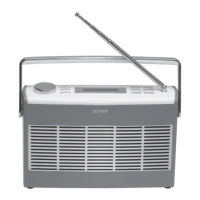
Telescopic antenna
2. Carrying handle
3. Frequency turning
4. Frequency display
5. VOLUME ON/OFF
6.
8.
Speaker
9. Battery compartment
AM /FM BAND SWITCH
7. Aux in jack
Question and Answer IconNeed help?

Do you have a question about the Denver TR-54C and is the answer not in the manual?

Overview

This document describes a portable radio, model TR-54C, manufactured by Denver Electronics A/S.

Function Description

The device is a portable radio capable of receiving both FM and AM (MW) frequency bands. It features a built-in speaker for audio output and a headphone jack for private listening. An AUX-in jack allows for connection of external audio devices like MP3 players, enabling music playback through the radio's speakers. The radio can be powered by either an AC connection or batteries, making it suitable for both home and portable use.

Important Technical Specifications

  • Frequency Bands:
    • FM: 87.5 – 108 MHz
    • MW (AM): 540 – 1600 KHz
  • Operating Voltage:
    • AC: 230V~50Hz
    • Battery: 4x 1.5V AA batteries
  • Max Output Power: 0.7W
  • Antenna:
    • FM: Telescopic antenna
    • AM (MW): Internal ferrite antenna
  • Connectivity:
    • AUX in jack (3.5 mm)
    • Headphone jack (3.5 mm)
    • AC Socket

Usage Features

General Operation:

  1. Power On/Off and Volume Control: The VOLUME ON/OFF dial (5) controls both the power and the volume level. Turn it in the VOLUME direction to power on and increase volume, and in the OFF direction to power off.
  2. Frequency Tuning: The Frequency turning dial (3) is used to select the desired radio station. The selected frequency is displayed on the Frequency display (4).
  3. Band Selection: The AM/FM BAND SWITCH (6) allows selection between the AM and FM frequency bands.

Radio Reception:

  • FM Reception: For FM stations, the telescopic antenna (8) should be pulled out completely for optimal reception. Adjusting the antenna and turning the radio can further improve reception.
  • AM (MW) Reception: The radio utilizes an internal ferrite antenna for AM (MW) stations. To improve AM reception, turn the radio appropriately.

External Audio Playback (AUX in):

  • An external playing device (e.g., MP3 player) can be connected to the AUX in jack (7).
  • Always observe the safety information and instructions of the external device before connecting.
  • Ensure both the radio and the external device are switched off before making the connection.

Private Listening (Headphone Jack):

  • Headphones with a 3.5 mm jack plug can be connected to the headphone jack (10).
  • Connecting headphones automatically mutes the built-in speaker (1).
  • The headphone volume is controlled by the VOLUME ON/OFF dial (5).

Portability:

  • The radio features a carrying handle (2) for easy transport.
  • It can operate on 4x 1.5V AA batteries, providing portability when an AC power source is not available.

Battery Installation:

  1. Ensure the unit is turned off and unplugged from AC power.
  2. Open the battery compartment (9) located on the bottom of the unit.
  3. Insert 4x 1.5V AA batteries, observing the correct polarity indicated inside the compartment.
  4. Close the battery compartment securely.

Maintenance Features

Cleaning:

  • General Cleaning: Wipe the unit regularly with a dry rag.
  • Prohibited Cleaning Agents: Do not use alcohol, acetone, benzene, scouring cleaning agents, or similar synthetic part cleaners.
  • Prohibited Cleaning Tools: Avoid using hard brushes or metallic objects, as these can damage the device.
  • Safety Precaution: Always turn off and unplug the radio before any cleaning procedure.

Battery Care:

  • Storage: Remove batteries from the battery compartment if the unit will not be used for extended periods.
  • Leakage Prevention: Leaking batteries can damage the unit. Removing them during disuse helps prevent this.

Storage:

  • Store the unit in a dry, cool place.
  • Protect the unit from moisture and direct sunlight to ensure its longevity.

Environmental Considerations:

  • The device contains materials and components that can be hazardous to health and the environment if not disposed of correctly.
  • It is marked with a crossed-out trash can symbol, indicating that it should not be disposed of with general household waste.
  • Electric and electronic equipment should be disposed of separately at designated collection points or recycling stations, or through household collection services, as per local regulations. Further information can be obtained from the technical department of your city.

Denver TR-54C Specifications

General IconGeneral
BrandDenver
ModelTR-54C
CategoryPortable Radio
LanguageEnglish

Related product manuals