6
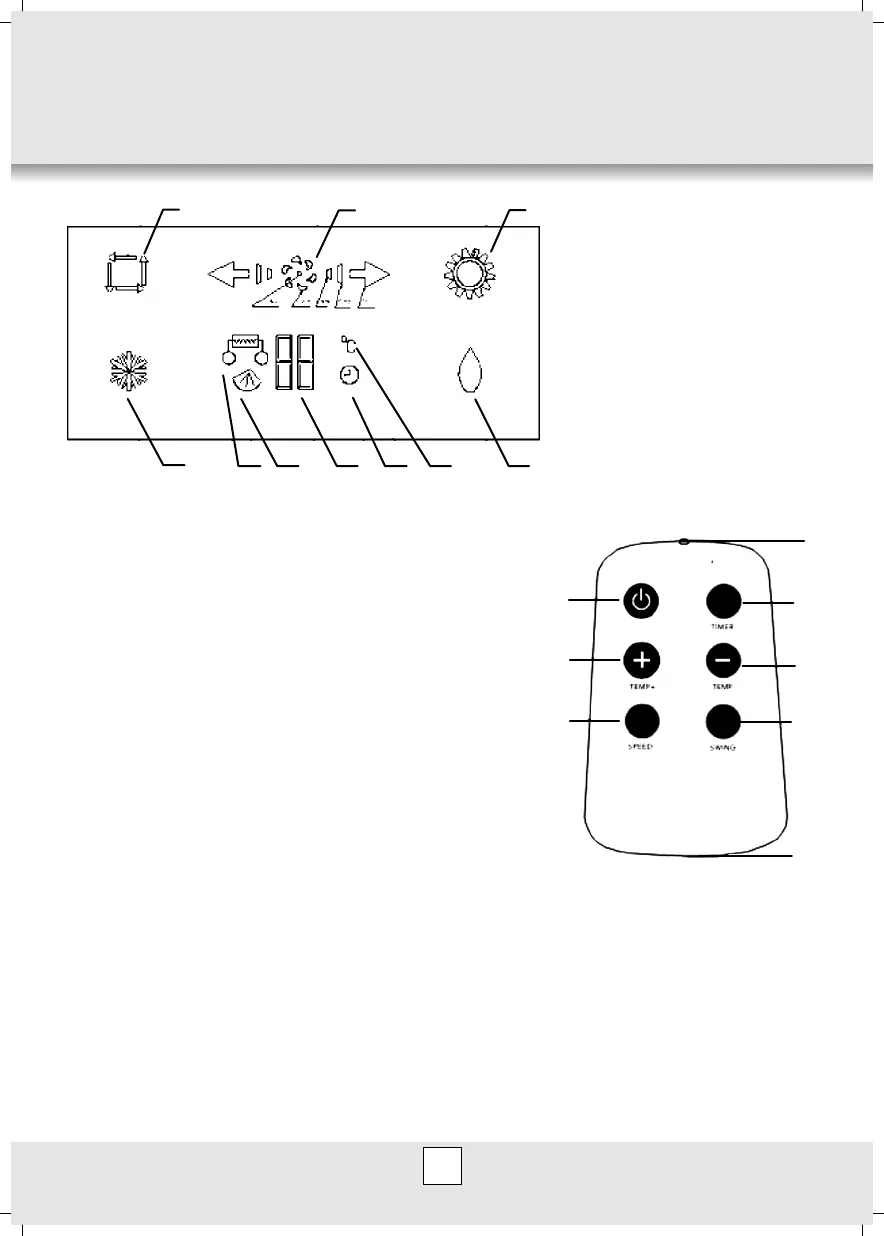
DISPLAY DESCRIPTION
1 2
3
4
5
6
7
8 910
1 auto mode icon
2 air volume selection icon
3 heating mode icon (model
EHP)
4 cooling mode icon
5 swing icon
6 temperature and timing
figure icon
7 timer icon
8 temperature icon
9 drying icon
10 heating icon (models EH)
REMOTE CONTROL
1
2
3
4
5
6
7
8
Note: Mode conversion shall be carried out on the
operation panel of air-conditioner.
Control button Operation:
When remote signals are emitted, the air-conditioner buzzer
gives off a sound, and corresponding operating symbols
appear on the display, indicating that signals have been
emitted and received.
1) ON/OFF Button: by pressing this button, you can
transmit such information stored in the Remote
Controller memory as operation mode, temperature,
wind speed and wind direction to the mainframe, which
will carry out corresponding operations and stop running when this button is pressed
again.
2) “TEMP+” button: Each time the “TEMP+” button is pressed, setting temp (time)
increases by 10 C (or one hour). The range of setting temperature is 16~31℃ (range of
time is 1-24 hours).
3) “TEMP -” button: Each time the “TEMP-” button is pressed, setting temp (time)
decreases by 10 C (or one hour). The range of setting temperature is 16~31℃ (range of
time is 1-24 hours).
4) Air Volume Shifting button: there are four modes for choice, AUTO, HIGH, MEDIUM and
LOW. In dehumidifying mode, the wind speed is locked to LOW.



 To Next Page