USE BLUETOOTH
TO ENJOY MUSIC EVERYWHERE
DISCOVER
DEVIALET MANIA
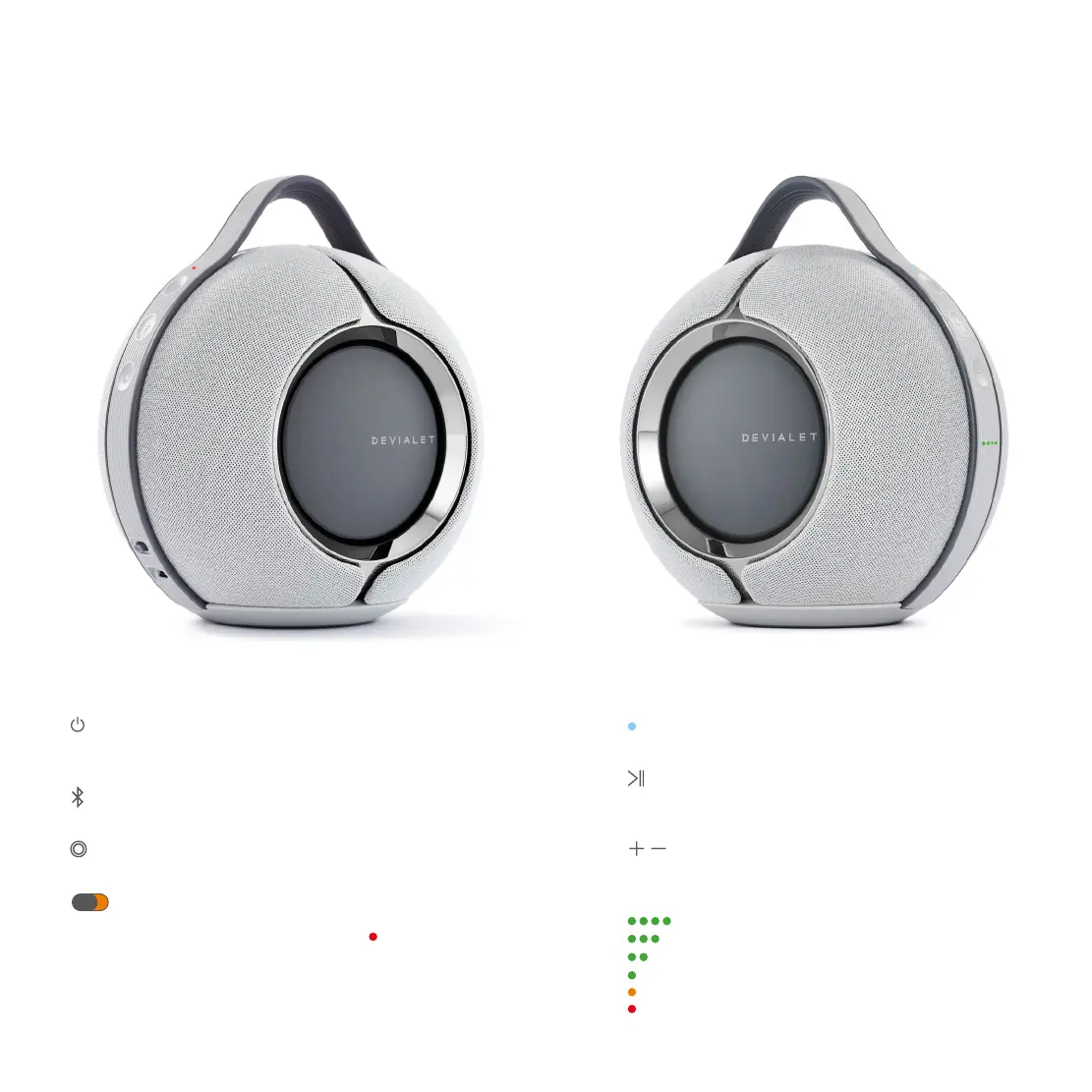
Indicator light
Product status
Play / Pause
Press to pause or resume playback
Press and hold for 6 seconds to enter setup mode
Volume
Press to increase/decrease volume
Battery status indicator lights
>80%
>60%
>40%
>20%
>10%
Very low battery
VOLUME SIDE
On / Off button
Press and hold for 2 seconds to enter standby mode
To exit standby mode, press any button
Bluetooth
Press and hold for 2 seconds to enable Bluetooth pairing
Devialet button
Press to access battery status
Disable microphone
Toggle left to switch off mics
When the mics are off, a red light appears on the On / Off side
Important: it will disable voice assistant but also real-time
room calibration. If you want to switch off voice assistant only,
please go directly to the settings of your Devialet app.
ON / OFF SIDE


 To Next Page