EasyManua.ls Logo

Dewenwils UHIMT02A - User Manual

Dewenwils UHIMT02A
4 pages
Print Icon
To Next Page IconTo Next Page
Loading...
Indoor Mechanical Pin
Timer Switch
Instruction Manual
Thank you for your purchase.
Please contact us if you have any problem.
Email: eusupport@dewenwils.com
Please attach your User Name or Order ID so that
We can assist you better.
Question and Answer IconNeed help?

Do you have a question about the Dewenwils UHIMT02A and is the answer not in the manual?

Overview

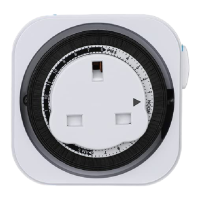
The Dewenwils Indoor Mechanical Pin Timer Switch is a device designed to control the power supply to electrical appliances, allowing users to automate their operation. It features a mechanical dial with pins that can be set to turn connected devices ON or OFF at specific times.

Function Description:

The primary function of this device is to provide timed control over electrical appliances. Users can program the timer to switch devices ON and OFF throughout a 24-hour cycle. It also includes a side switch for manual override, allowing the device to be continuously ON, bypassing the timer function.
Important Technical Specifications:

  • Input Voltage: 240VAC 50Hz
  • Max. Current: 13A
  • Max. Power: 3120W
  • Timer Dial Resolution: Each pin represents 15 minutes.
    • 4 pins = 1 hour
  • Pin Positions:
    • Pin in down position: ON
    • Pin in up position: OFF

Usage Features:

  1. Setting Current Time: The user needs to turn the timer dial clockwise until the arrow indicates the current time.
  2. Programming ON/OFF Periods: All pins on the dial should initially be pulled up. To set a period for the device to be ON, the corresponding pins on the dial must be pushed down. Pins in the down position signify an ON state, while pins in the up position signify an OFF state.
  3. Timer Control vs. Always ON: A side switch allows the user to select between "TIMER" mode for programmed operation or "ON" mode for continuous power supply, bypassing the timer function. For proper timer operation, the switch must be set to "TIMER."
  4. Connecting Devices: Electrical devices are plugged directly into the timer's outlet. It is crucial to ensure that the connected device itself is in an "ON" state for the timer to effectively control its power supply.
  5. Blackout Reset: In the event of a power outage, the timer needs to be reset according to the initial setup instructions.

Maintenance Features:

  • Safety Precautions:
    • Do not connect devices exceeding the maximum ratings of the timer.
    • Avoid connecting appliances with heating elements (e.g., cooking appliances, heaters, irons) to prevent overheating and potential fire hazards if the timer fails to shut off.
    • Do not immerse the timer in water.
    • Children should not use the timer without supervision.
    • The product should not be disassembled or repaired by unauthorized personnel.
    • Always unplug and store the timer indoors when not in use.
  • Warranty: The product comes with a one-year limited warranty, covering defects in material and workmanship from the date of purchase. The warranty is void if damage results from misuse or improper installation.
  • Customer Support: For any issues, customers can contact eusupport@dewenwils.com, providing their User Name or Order ID for assistance. The customer service team aims to respond within 24 hours.

Dewenwils UHIMT02A Specifications

General IconGeneral
BrandDewenwils
ModelUHIMT02A
CategorySwitch
LanguageEnglish

Related product manuals